
Claim Tax Fees on Solana: Step-by-Step Guide
Introduction
The DEXArea Claim Tax Fees tool lets you harvest and claim Token-2022 transfer fees (“tax”) that have accumulated on your token.
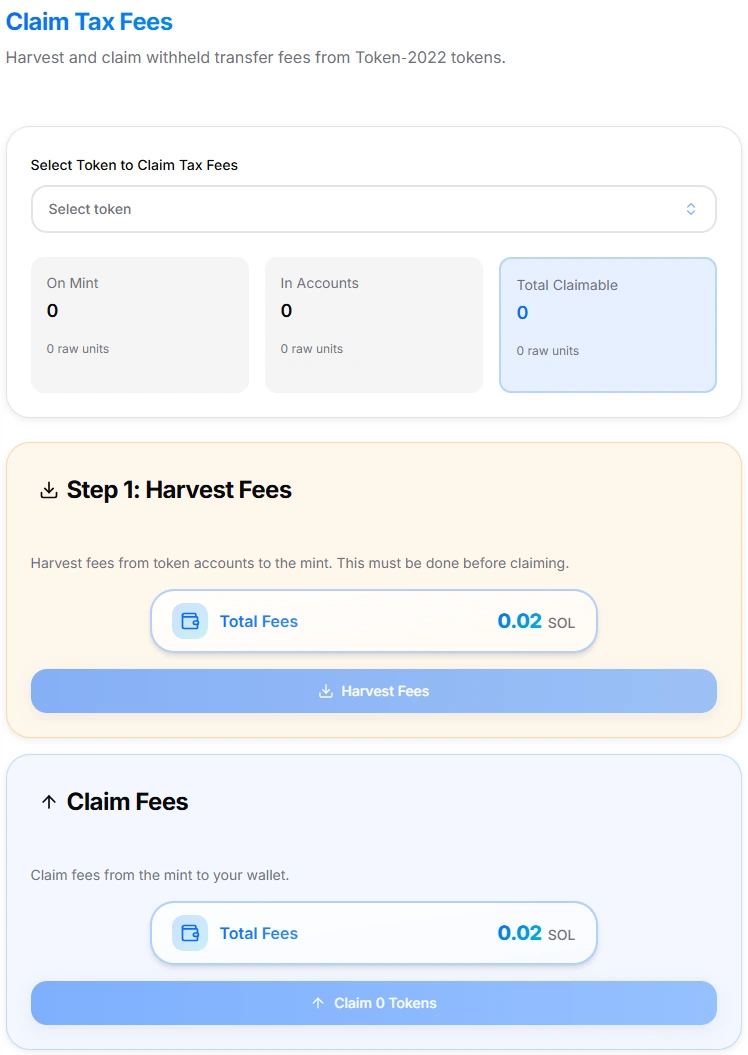
Claim Tax Fees interface
Token-2022 transfer fees are collected automatically on each transfer and stored as withheld amounts in token accounts and on the mint. These fees are not sent to a central address by default. They must be claimed manually by the fee withdraw authority.
This guide explains:
- How transfer fees & withheld balances work
- What “On Mint” vs “In Accounts” vs “Total Claimable” means
- How to use Harvest and Claim safely
- What authority you need, and common risks
This is technical documentation only. It does not provide financial or investment advice.
1. What the Claim Tax Fees Tool Does
The Claim Tax Fees tool:
- Works with Token-2022 tokens that use the TransferFeeConfig extension (transfer fees).
- Reads your token’s current state and shows:
- On Mint – fees already harvested to the mint
- In Accounts – fees still withheld in individual token accounts
- Total Claimable – sum of both, after harvesting
- Provides a two-step flow:
- Harvest Fees – move withheld fees from token accounts to the mint
- Claim Fees – withdraw fees from the mint to your wallet
- Lets you:
- Select specific accounts to harvest from
- Or harvest fees from all accounts at once
- Requires you to be the tax withdraw (claim) authority for that token
On the tool page you will see:
- “On Mint”, “In Accounts”, and “Total Claimable” amounts
- A Step 1: Harvest Fees section
- A Claim Fees section for sending tokens to your wallet
2. Background: Token-2022 Transfer Fees & Withheld Amounts
Token-2022 adds a TransferFeeExtension to the token program. When enabled:
- Each transfer charges a fee in the same token (percentage, capped by a max fee).
- Collected fees are stored as withheld amounts:
- In recipient token accounts, and/or
- On the mint, after they are harvested
- These withheld amounts:
- Are visible on-chain
- Cannot be used by normal token holders
- Can be withdrawn only by the withdraw authority (tax withdraw authority)
Important roles:
- Transfer fee config authority – can change fee %, max fee
- Withdraw-withheld authority (tax withdraw authority) – can withdraw/claim fees
This tool is focused on the withdraw-withheld authority, not on editing fee parameters.
3. Why Use Claim Tax Fees?
Typical reasons:
-
Project revenue / treasury — Collect transfer fees earned by your token and move them into a treasury, multisig, or operational wallet.
-
Buyback, burn, or incentives — Use claimed fees to buy back tokens, fund reward programs, or support liquidity or marketing.
-
Before revoking withdraw authority — If you plan to revoke tax withdraw authority, you usually want to harvest and claim all fees first, then revoke so no further withdrawals are possible.
-
Accounting & transparency — Regular claims simplify accounting; on-chain transactions show clearly how much was collected and when.
This tool doesn’t decide how you use the fees. It just gives you a clean, non-custodial way to move them from withheld balances to your wallet.
4. What You Need Before Using This Tool
To use Claim Tax Fees, you must have:
-
A Token-2022 token with transfer fees enabled — Standard SPL tokens without Token-2022 transfer fees cannot use this tool.
-
Withdraw-withheld (tax withdraw) authority — Your connected wallet must be the claim authority for this token. The tool refers to this as “claim authority” on the page.
-
Existing transfer fee activity — There must be fees withheld In Accounts, and/or fees already On Mint. If there have been no transfers under a non-zero fee, there is nothing to claim.
-
SOL for fees — Network and priority fees for harvest transaction(s) and claim transaction(s).
5. Quick Start
-
Open the tool — Go to Claim Tax Fees.
-
Connect your wallet — Use the wallet that holds the tax withdraw (claim) authority for your Token-2022 token (e.g., Phantom, Solflare).
-
Select your token
- Choose the Token-2022 mint you want to claim fees for
- The UI will load On Mint fees, In Accounts fees, and Total Claimable
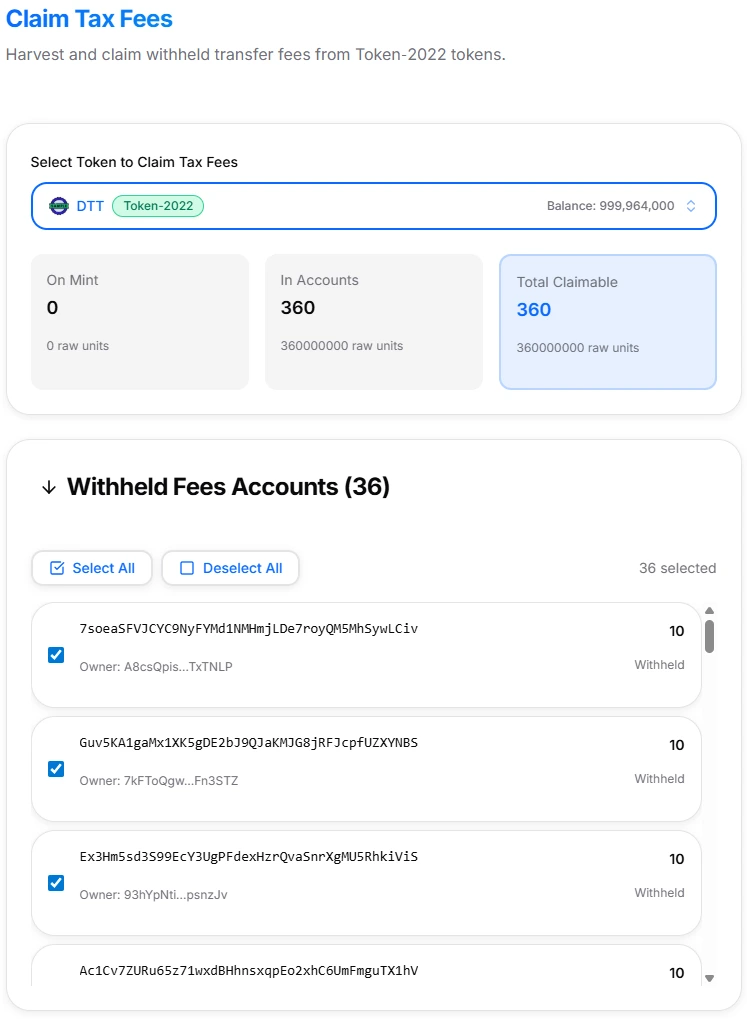
Claim Tax Fees interface with token selected
-
Review amounts — Check whether fees are mostly on the mint, in accounts, or both.
-
Step 1: Harvest Fees (if needed) — If there are fees In Accounts, run Harvest Fees. You can select specific token accounts or harvest all at once.
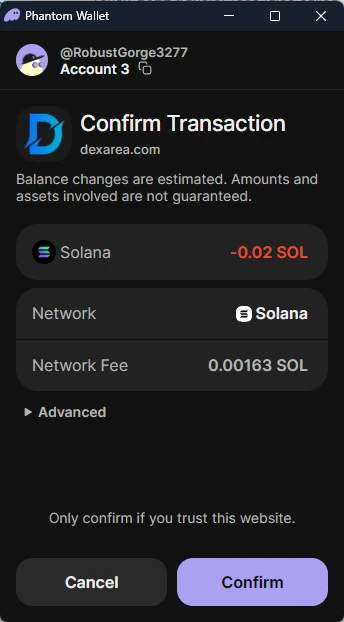
Phantom wallet confirmation popup for harvesting fees
- Claim Fees — Once fees are on the mint, click Claim. Confirm the amount and fees in your wallet. After confirmation, the fees arrive in your wallet as normal tokens.
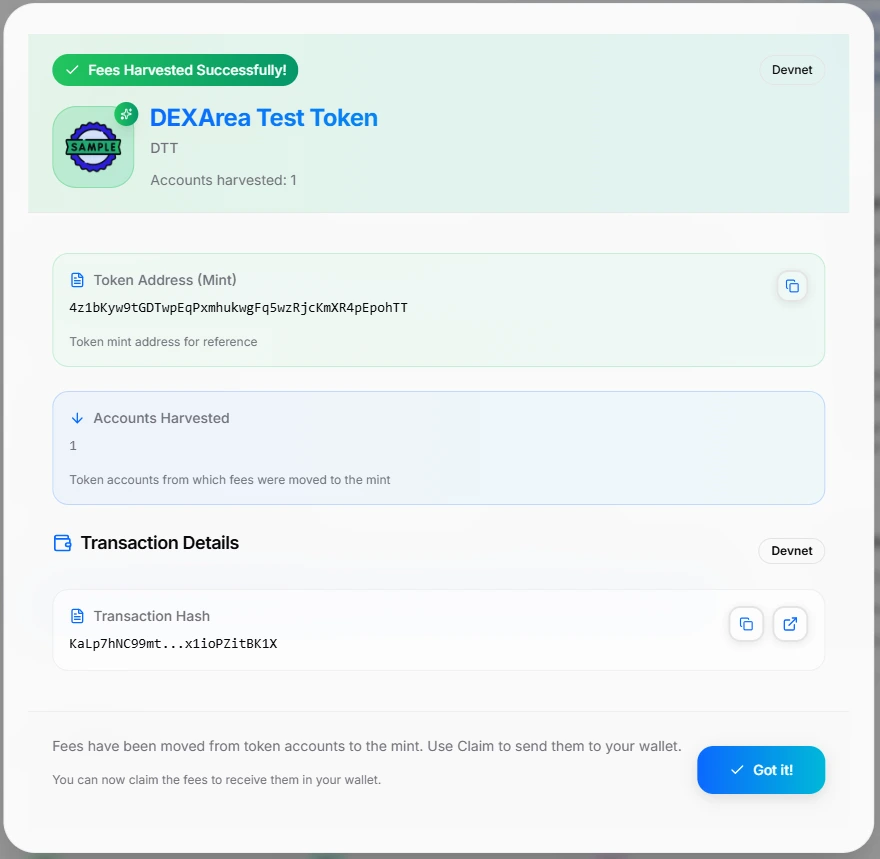
Claim Tax Fees success modal
6. Interface Overview
The tool is divided into:
- Fee summary section
- Harvest Fees section
- Claim Fees section
- FAQ & explanation
A. Fee Summary
At the top of the main panel you’ll see:
-
On Mint — Amount of fees already harvested to the mint. Shown both in UI units and “raw units”.
-
In Accounts — Amount still withheld in individual token accounts. Needs harvesting before it can be claimed.
-
Total Claimable — On Mint + In Accounts (after harvesting).
If fees exist in accounts, the UI will list those accounts and their withheld amounts.
B. Step 1: Harvest Fees
Section labeled “Step 1: Harvest Fees”:
- Explains: “Harvest fees from token accounts to the mint. This must be done before claiming.”
- Shows Total Fees (estimated cost)
- Has a Harvest Fees button
Harvesting:
- Moves withheld balances from token accounts to the mint
- Does not send tokens to your wallet yet
- Prepares fees so they can be claimed
You can often choose which accounts to harvest from, or harvest all at once.
C. Claim Fees
Section labeled “Claim Fees”:
- Explains that this step sends fees from the mint to your wallet
- Shows Total Fees (transaction cost estimate)
- Provides a Claim button such as
Claim X Tokens
Claiming:
- Transfers fees from the mint’s withheld pool to your connected wallet
- After this, the tokens behave like any normal tokens in your wallet
D. Documentation & FAQ
The tool page includes:
- About Transfer Fees
- Important Notes (claim authority, non-custodial, harvest vs claim)
- Resources and Related Tools section
- Detailed FAQ about withheld tax fees, why harvesting is required, Devnet testing, and reversibility of actions.
7. How Claiming Actually Works (Step by Step)
Step 0: Make Sure You’re the Claim Authority
- Only the claim authority (withdraw-withheld authority) can harvest from accounts to the mint and claim fees from the mint to their wallet.
If you’re not the authority, the tool will not allow harvest/claim. You may need to transfer authority to your wallet using an authority tool, or connect with the correct authority wallet.
Step 1: Scan & Review
After selecting your token:
- The tool scans token accounts and the mint using your RPC setup
- It calculates withheld fees In Accounts, already-harvested fees On Mint, and Total Claimable
Review these numbers before proceeding.
Step 2: Harvest Fees
If In Accounts > 0:
- Select which token accounts to harvest from
- Click Harvest Fees
- Your wallet shows a transaction using Token-2022 transfer fee instructions and requests confirmation with network fees
After confirmation:
- Withheld fees in those accounts are moved to the mint
- Token accounts may now be eligible for closing later, if all fees have been harvested
Step 3: Claim Fees
Once fees are on the mint:
- Confirm the mint-level fee amount in the UI
- Click Claim
- Your wallet shows a transaction to withdraw withheld fees from the mint and send the claimed amount to your connected wallet
Result:
- Tokens arrive in your wallet
- They’re now regular, spendable tokens (same mint as your fee token)
8. Devnet Testing
The tool strongly recommends “Test on Devnet first” before using real funds on Mainnet.
Best practice:
- Create a Devnet version of your Token-2022 token
- Configure the same transfer fees
- Perform test transfers to generate fees
- Use Claim Tax Fees on Devnet
- Verify harvest & claim behavior, display of “On Mint / In Accounts / Total Claimable”, and authority detection
Only after this should you switch to Mainnet and repeat the process on your production token.
9. Risks & Irreversibility
A. Harvest Is One-Way
- After you harvest, fees move from token accounts to the mint. You cannot send them “back” to individual accounts as withheld fees.
- From there, your only real options are Claim them to the withdraw authority wallet or leave them on the mint.
B. Claim Moves Fees to Your Wallet
- Claiming is final: fees leave the mint and enter your wallet. They become normal balances you can transfer or burn. You cannot “un-claim” them back into a withheld state.
C. Authority & Security
- If your withdraw authority is compromised, an attacker could harvest and claim fees.
- Protect the wallet that holds withdraw-withheld authority and config authority (if still present). Consider multisig or a governance contract for production tokens.
D. Interaction With Revocations
- If you later revoke tax withdraw authority, you will no longer be able to harvest or claim fees. Any future fees will be locked as withheld balances forever.
- Best practice: use Claim Tax Fees to harvest & claim everything you need, then if desired use Revoke Tax Withdraw Authority to lock withdrawals.
10. Troubleshooting
”On Mint / In Accounts / Total Claimable all show 0”
Possible reasons:
- No transfers have occurred under a non-zero fee
- You’re on the wrong network (Devnet vs Mainnet)
- You selected a token that doesn’t actually use Token-2022 transfer fees
”I see withheld fees in explorers, but the tool says 0”
- RPC or indexer differences may affect visibility. The fees might be locked in accounts not yet scanned or under a different authority than your connected wallet.
- Try reconnecting your wallet and confirming that your wallet is truly the withdraw-withheld authority.
”Transactions fail when I try to harvest or claim”
Common causes:
- Insufficient SOL for network fees
- Network congestion; try again with higher priority fees
- Token state changed between scan and transaction (someone else interacted with the token)
“I am the token creator but still can’t claim”
Token creator and withdraw authority are not always the same:
- The withdraw-withheld authority may have been transferred to another wallet, set to a multisig or governance account, or revoked in the past.
- You must connect with the current withdraw authority to use this tool successfully.
11. FAQ
What are withheld tax fees?
Withheld tax fees are token amounts collected as transfer fees under the Token-2022 TransferFee extension. They are stored as withheld amounts in token accounts and can be harvested to the mint, then claimed by the withdraw authority.
Who is the claim authority?
The claim authority is the withdraw-withheld authority on your Token-2022 mint. Only this wallet (or program/multisig controlling it) can harvest withheld fees from token accounts to the mint and claim fees from the mint to a wallet.
Why do I need to harvest before claiming?
Because fees live in two places: In Accounts (withheld in individual token accounts) and On Mint (already harvested and ready to claim). You can only claim what is on the mint. Harvesting moves fees In Accounts to the mint, so they become part of the claimable amount.
Can I select which accounts to harvest from?
Yes. The tool shows accounts with withheld fees and lets you select specific accounts, select all, or in some cases harvest everything by default.
Is claiming tax fees reversible?
No: Harvest moves withheld fees from accounts to the mint (one-way). Claim moves fees from the mint to your wallet (also one-way). You can send tokens back to another wallet, but you cannot restore them to “withheld fee” state.
What happens if I harvest but don’t claim?
Fees stay On Mint. They continue to be visible as a mint-level balance, can be claimed later by the withdraw authority, and do not disappear or lose value just because they stay on the mint.
12. Related Tools & Wiki Articles
Related DEXArea Tools
-
Change Tax Settings — Update transfer fee % and max fee for Token-2022 tokens.
-
Revoke Tax Withdraw Authority — Permanently disable fee withdrawals.
-
Revoke Tax Config Authority — Permanently lock fee settings.
-
Burn Tokens — Destroy tokens you’ve claimed if you want to implement a burn mechanism.
-
Snapshot Holders — Capture current holders, often used for reporting around fee usage.
-
Token Creator (Token-2022) — Create Token-2022 tokens with transfer fees enabled.
Recommended Wiki Articles
-
Token Authorities Explained — Full overview of mint, freeze, update, tax config, and withdraw authorities.
-
Token 2022 — How Token-2022 extensions (transfer fees, interest, hooks, etc.) work.
Use Claim Tax Fees as your primary operational tool for turning Token-2022 transfer fees from on-chain withheld balances into usable project funds in your wallet, while keeping the process transparent and fully non-custodial.