
Claim Your SOL on Solana: Rent Recovery Guide
Introduction
The DEXArea Claim Your SOL tool helps you recover rent SOL that is locked inside unused Solana accounts. Every token account and many mint accounts hold a rent-exempt deposit in SOL so they can stay on-chain. When those accounts are no longer needed, you can close them and get that SOL back.
This guide explains what the tool does, when to use it, how each tab works, and the risks of burning tokens or closing mint accounts. It is purely technical documentation and not financial or investment advice.
1. What It Does
The Claim Your SOL tool:
- Scans your connected wallet for recoverable rent SOL
- Groups accounts into three categories:
- Close Accounts – empty token accounts (zero balance) that can be safely closed
- Burn and Close – token accounts that still hold a small balance (“dust”) and can be burned then closed in one step
- Close Mint Accounts – closeable mint accounts where you are the close authority
- Shows the total recoverable SOL based on the selected accounts
- Lets you batch-close multiple accounts in a single transaction where possible
- Returns the rent deposit from those accounts back to your wallet
Platform pricing:
- Platform fee: 1% of recoverable SOL
- Network fee: standard Solana transaction fee (typically a tiny fraction of a cent)
2. Why Use DEXArea’s Claim Your SOL Tool
- Wallet cleanup: Remove dozens or hundreds of useless token accounts that accumulate from airdrops, test tokens, and degen experiments.
- Recover locked SOL: Each token account holds a rent deposit. Closing unused accounts returns that SOL back to you.
- Non-custodial: All operations are executed via your wallet. DEXArea never has access to your private keys or seed phrase.
- Safe defaults:
- The Close Accounts tab only shows accounts with zero balance.
- The UI separates “burn and close” operations so you don’t accidentally burn tokens when you just want to close empty accounts.
- Token-2022 support: Handles both SPL and Token-2022 token accounts, including Token-2022 mint accounts that have the close authority extension enabled.
Use this tool as periodic maintenance to reclaim SOL and keep your wallet tidy.
3. Quick Start
- Open the tool
Go to the Claim Your SOL page on DEXArea.
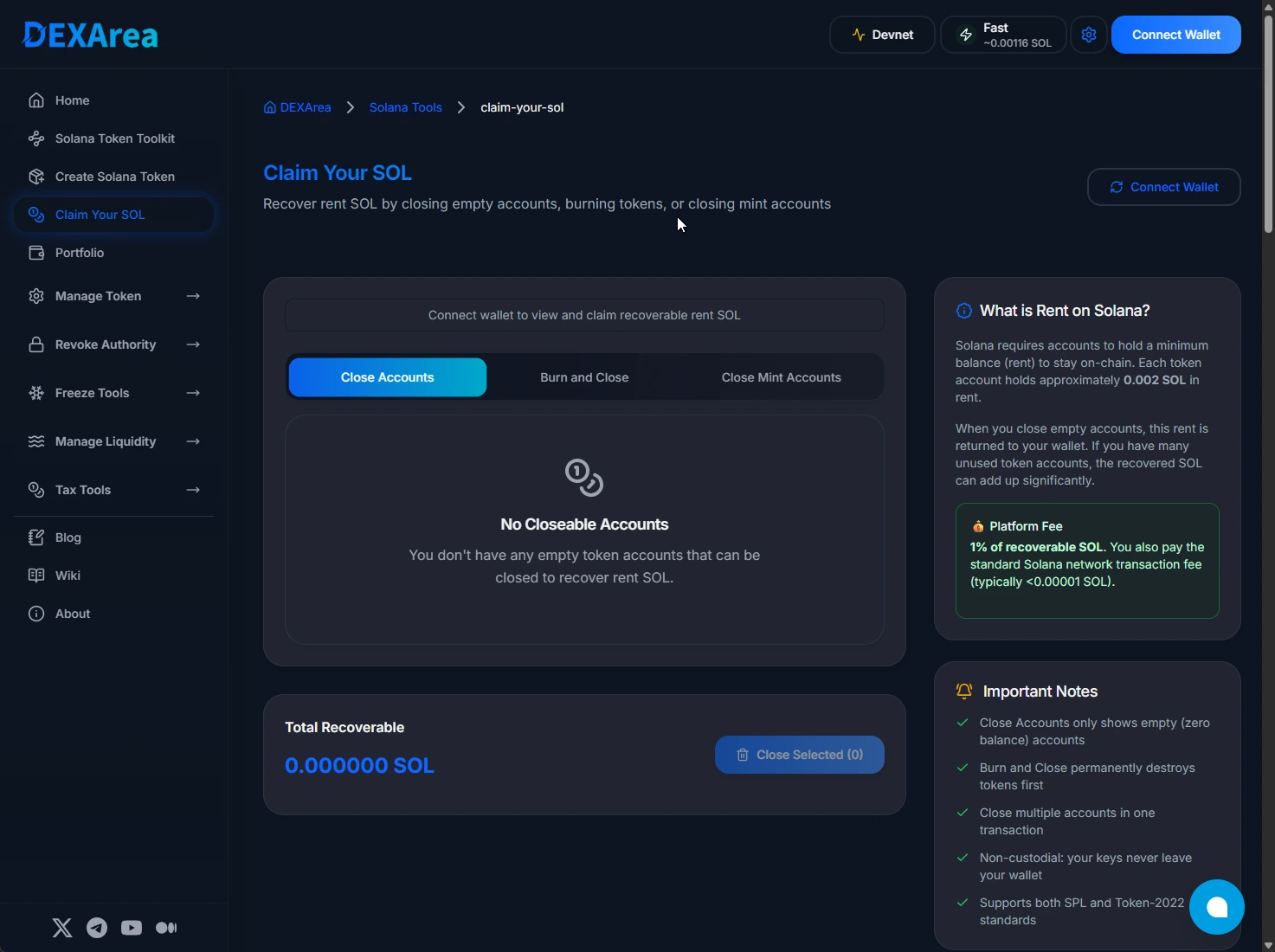
Claim Your SOL tool interface
- Connect your wallet
Use Phantom, Solflare, Backpack, or any wallet supported by the Solana wallet adapter.
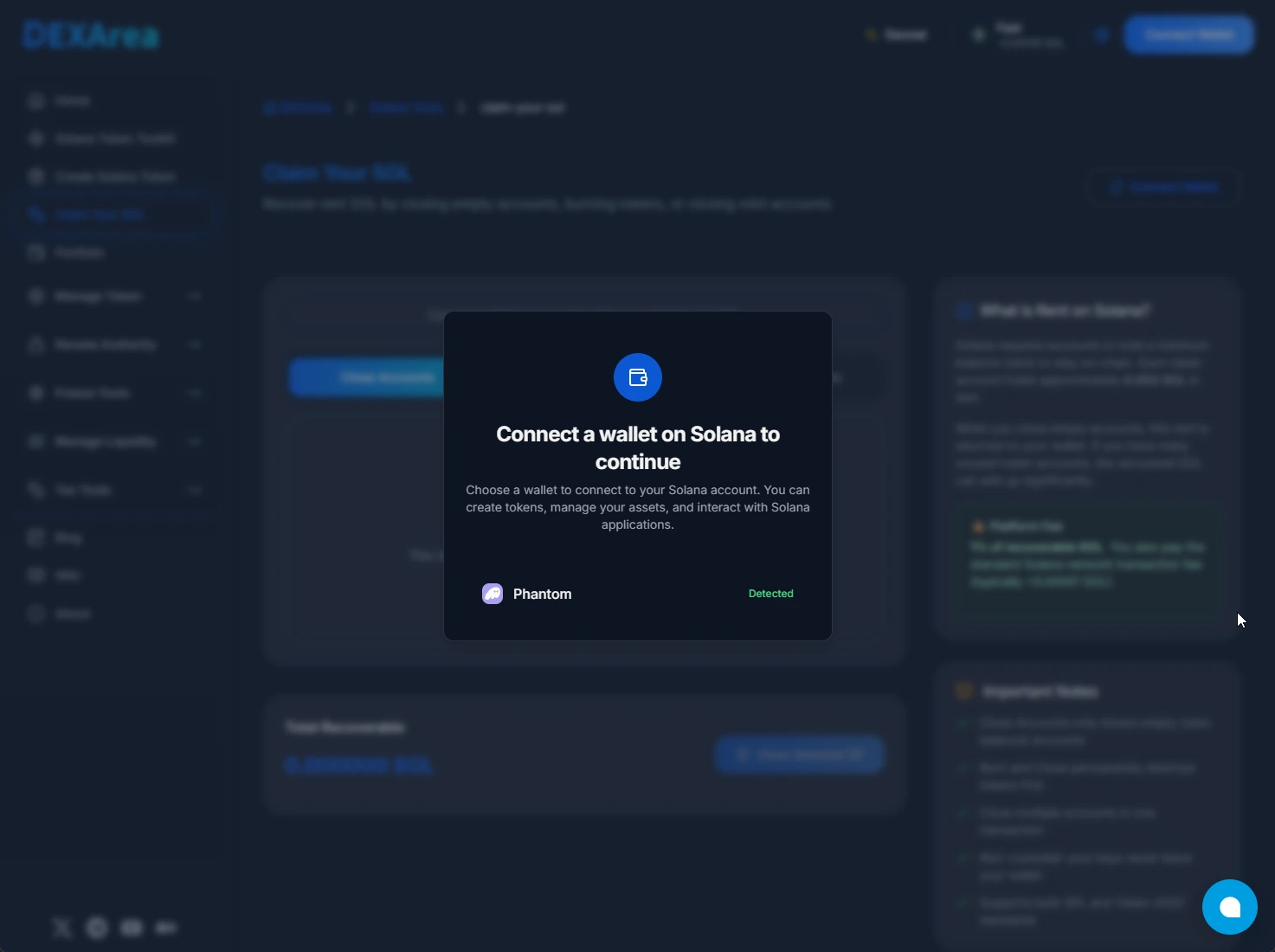
Connect wallet to use Claim Your SOL
-
Let the tool scan your accounts
The tool analyzes your wallet and populates the three tabs:- Close Accounts
- Burn and Close
- Close Mint Accounts
-
Choose a tab based on your goal
- Close empty accounts only → Close Accounts
- Get rid of dust tokens and close the account → Burn and Close
- Close closeable mint accounts → Close Mint Accounts
-
Select the accounts to process
Use the checkboxes or a “Select All” option (when available) to pick the accounts you want to close.
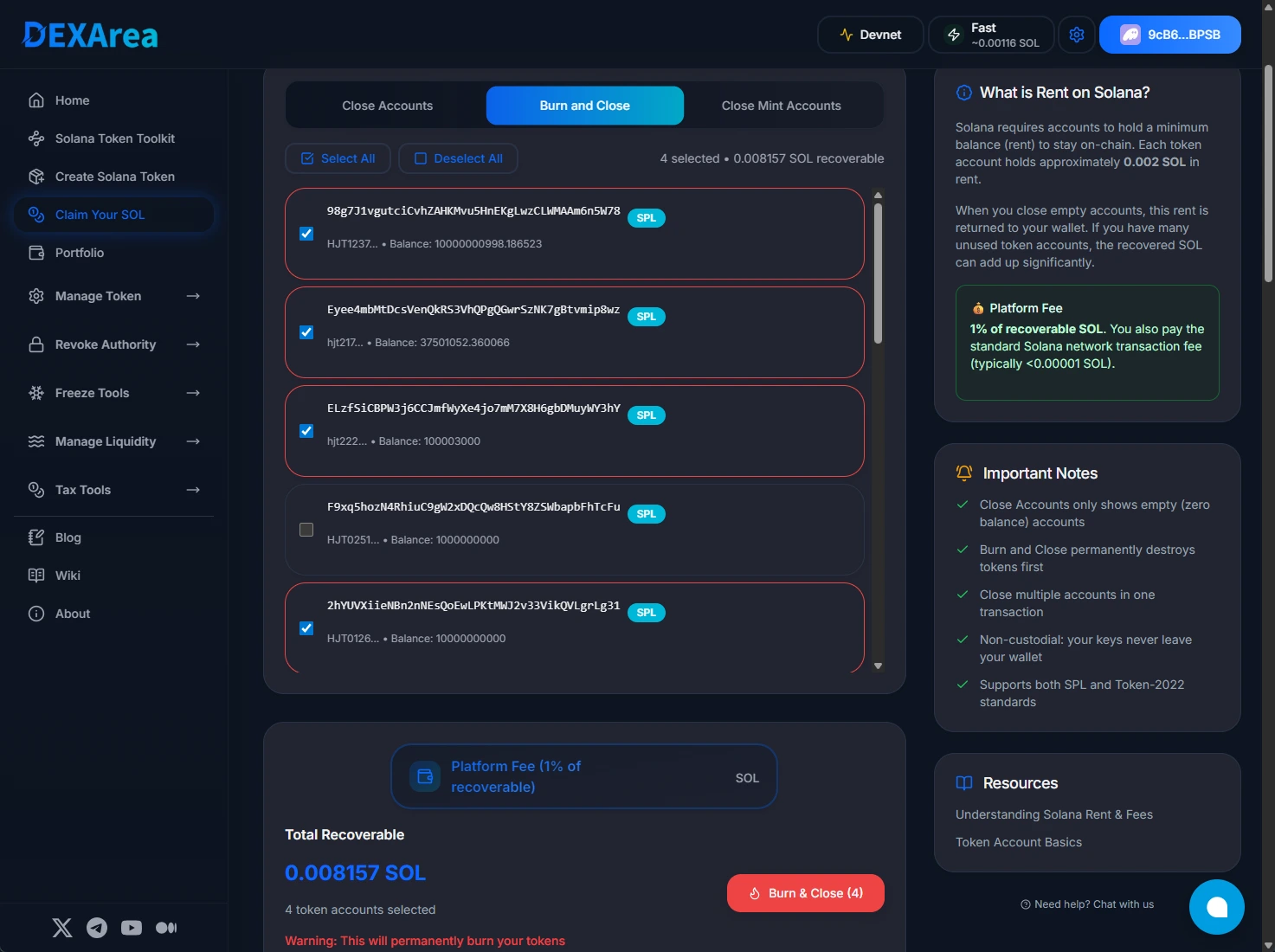
Select accounts in the Burn and Close tab
-
Review total recoverable SOL & fees
Check:- Estimated SOL you will recover
- Platform fee (1% of recoverable SOL)
- Network fee estimate from your wallet
-
Confirm & sign in your wallet
The transaction closes the selected accounts (and burns tokens if applicable). Recovered SOL is sent back to your wallet balance.
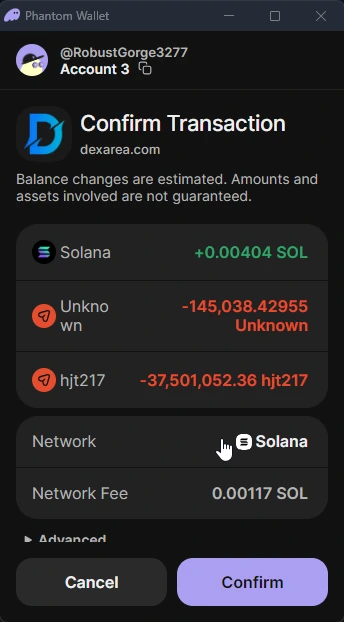
Wallet confirmation prompt for Claim Your SOL
4. What You Need
To use the Claim Your SOL tool, you’ll need:
-
A Solana wallet
Phantom, Solflare, Backpack, or any compatible wallet. -
SOL for fees
Even though you are reclaiming SOL, you still need a small amount of SOL to pay the transaction/network fee up front. -
Account ownership / authority
- You must own the token accounts you are closing.
- For Burn and Close, you must own the tokens being burned.
- For Close Mint Accounts, you must be the close authority on that mint (typically Token-2022 with the close authority extension).
-
Basic understanding of rent deposits
If you are not familiar with rent and token accounts, read the Solana rent & fees and token account basics pages before using the tool.
5. When to Use
Common scenarios where Claim Your SOL is useful:
-
After heavy trading or farming
You’ve interacted with many tokens and DEXes, leaving behind dozens of empty token accounts. -
After airdrop seasons / memecoin waves
Your wallet is full of tiny dust balances and random token accounts. -
Regular wallet maintenance
You want to periodically reclaim SOL locked in unused token accounts. -
Token-2022 mint cleanup
You have Token-2022 mints with zero supply and the close authority extension enabled and want to close those mints to recover rent.
Best practice: Treat this as a maintenance tool, not a trading strategy. You’re reclaiming rent deposits, not generating profit.
6. Inputs & Interface Overview
The UI is structured around three tabs and a summary section.
A. Tabs
-
Close Accounts
- Shows token accounts with zero token balance.
- Each row typically includes:
- Token name / symbol
- Mint address (or shortened)
- Token account address (shortened)
- Amount of rent SOL recoverable if closed
- Closing these accounts has no token risk because their balance is already zero.
-
Burn and Close
- Shows token accounts where:
- There is a remaining token balance (often dust / spam).
- You can burn the tokens and then close the account in one combined operation.
- Each row typically includes:
- Token details
- Token balance in that account
- Estimated SOL rent to recover
- Use this tab only for tokens you genuinely don’t want anymore.
- Shows token accounts where:
-
Close Mint Accounts
- Shows mint accounts that can be closed (usually:
- Token-2022 mints with zero supply, and
- You are the close authority).
- Closing a mint account removes that mint account from the chain and returns its rent deposit, but does not retroactively affect already-circulating tokens.
- Shows mint accounts that can be closed (usually:
B. Selection Controls
- Checkbox per row – choose individual accounts.
- Select All – quickly select all accounts in the current tab (if available).
- Tab-level counts – see how many accounts are available/selected.
C. Summary & Actions
- Total Recoverable – estimated SOL you will receive back if you close all selected accounts.
- Platform Fee – 1% of recoverable SOL.
- Primary action button
- Example:
Close Selected (X) - Disabled until at least one account is selected.
- Example:
7. Confirmation Step (What Happens When You Click “Close Selected”)
After you choose accounts and click the main button:
-
Validation
- The tool verifies:
- Accounts are still in the expected state (empty or dust).
- You have enough SOL to pay the network fee.
- For mint accounts, that supply is zero and you hold the close authority.
- The tool verifies:
-
Transaction construction
- For Close Accounts:
- Builds SPL Token Close Account instructions for each selected token account.
- For Burn and Close:
- Adds SPL Token Burn instructions to destroy the remaining balance.
- Adds Close Account instructions after burning completes.
- For Close Mint Accounts:
- Builds instructions for closing the mint account (Token-2022 with close authority extension).
- For Close Accounts:
-
Wallet prompt
- Your wallet shows:
- The list of accounts affected (aggregated in one or more transactions).
- Estimated network fee.
- Any additional compute/priority fees if applied.
- Your wallet shows:
-
On-chain execution
- Once you confirm and sign:
- Token accounts are closed; rent SOL is returned to your wallet.
- For Burn and Close, tokens are burned first, then the account is closed.
- For mint accounts, the mint account is closed and its rent deposit is returned.
- Once you confirm and sign:
8. Results & How to Verify
After a successful transaction:
-
Your SOL balance increases
You should see the net recovered SOL (minus platform fee and network fee) in your wallet. -
Closed accounts disappear from your wallet UI
Those token accounts will no longer appear in your wallet’s token list. -
Tokens burned (Burn and Close)
Any tokens in those accounts are permanently destroyed. -
Mint accounts removed
Closed mint accounts no longer appear in explorer views or on-chain account lists.
To verify:
- Copy the transaction signature from your wallet.
- Paste it into a Solana explorer (Solscan, SolanaFM, etc.).
- Check:
- Account close instructions
- Rent refunds going back to your wallet
- Burn instructions (for Burn and Close)
- Closed mint accounts (for Close Mint Accounts)
9. Important Notices / Risks
A. Burn and Close Is Permanent
- Burning tokens cannot be undone.
- Use Burn and Close only for:
- Spam tokens
- Test tokens
- Dust positions you are sure you will never need.
Once burned, those tokens are gone forever.
B. Mint Account Closing Rules
- You can only close a mint account if:
- The total supply is zero, and
- You are the close authority, and
- The mint supports closing (typically Token-2022 with the close authority extension).
- Standard SPL Token mints cannot be closed and remain on-chain permanently.
- Closing a mint account does not automatically delete tokens already in circulation, but it can be part of final cleanup for test or experimental tokens.
C. Account Selection Risk
- Always confirm you’re closing the correct accounts:
- Double-check token names and mint addresses.
- If you’re unsure what a token is, look it up on an explorer before closing.
- Closing a zero-balance token account is safe.
- Burning tokens on Burn and Close is where you can make an irreversible mistake if you pick the wrong token.
D. Fees & Net Benefit
- Claim Your SOL is meant to be net positive:
- You pay a small network fee and a 1% platform fee on recovered SOL.
- In return, you recover much more SOL locked as rent deposits.
- If you only have a few token accounts, the recovered amount may be tiny. The tool is most useful when you have many empty or dust accounts.
E. No Financial or Investment Advice
This tool and guide focus on technical operations only (closing accounts, burning tokens, reclaiming rent). They do not:
- Recommend specific tokens
- Predict prices or profits
- Provide investment advice
Always make your own decisions based on your risk tolerance and independent research.
10. Troubleshooting & Advanced Tips
Common Issues
-
“No closeable accounts” but you expect some
- The accounts you’re thinking of may still have a non-zero token balance.
- Check the Burn and Close tab as well.
- Some wallets hide certain system or program accounts that cannot be closed.
-
“Insufficient SOL for fees”
- You still need a tiny amount of SOL to pay the network fee even if you’re reclaiming SOL.
- Add a bit of SOL to your wallet and try again.
-
Transaction fails or is dropped
- Solana could be congested. Try again with a slightly higher priority fee if your wallet allows it.
- Ensure no other transactions are simultaneously modifying the same accounts.
-
Mint account won’t close
- Confirm:
- Mint supply is zero.
- You are correctly connected as the close authority.
- The mint type supports closing (Token-2022 with close authority extension).
- Confirm:
Advanced Tips
-
Do a dry run with a few accounts first
Start by closing a small subset of accounts to confirm everything behaves as expected. -
Use Devnet for testing
If you’re nervous about the workflow, reproduce a similar situation on Devnet with test tokens and accounts before touching Mainnet. -
Periodically clean up
Active wallets accumulate junk. Running Claim Your SOL every few weeks or months keeps things under control and reclaims rent regularly.
11. FAQ
How much SOL can I realistically recover?
Each standard SPL token account holds roughly 0.002 SOL in rent. If you have 50 empty accounts, that’s around 0.1 SOL back to your wallet. Heavy users with hundreds of accounts can reclaim more.
Is it safe to close token accounts?
Closing empty accounts is safe because they hold no tokens. The tool only shows zero-balance accounts under Close Accounts. For Burn and Close, make sure you truly don’t want those tokens before you proceed.
What’s the difference between the three tabs?
- Close Accounts: Close empty token accounts only. No burning.
- Burn and Close: Burn remaining tokens in the account and then close it to reclaim rent.
- Close Mint Accounts: Close eligible mint accounts (typically Token-2022 with the right extension and zero supply) where you are the close authority.
Why can I close some mint accounts but not others?
Mint accounts are only closeable when:
- The program supports closing (e.g., Token-2022 with close authority extension).
- The supply is zero.
- You are set as the close authority.
Standard SPL mints do not support closing and will remain on-chain.
What happens if I receive the same token again after closing an account?
Your wallet will create a new token account for that mint when you receive tokens again. This new account will require a fresh rent deposit.
Is this tool safe to use?
Yes, when used as intended:
- All transactions are signed in your wallet.
- DEXArea never sees your private keys or seed phrase.
- The tool uses standard Solana program instructions (Close Account, Burn, etc.).
Still, you are responsible for checking which accounts and tokens you are closing or burning before you approve a transaction.
12. Related Tools & Further Reading
Related DEXArea Tools
- Burn Tokens – Permanently destroy unwanted tokens from your wallet.
- Revoke Mint Authority – Lock supply by revoking mint authority.
- Make Immutable – Revoke update authority / make token metadata immutable.
- Portfolio Tool – View all SPL and Token-2022 balances and Raydium positions in one place.
Recommended Wiki Articles
- Solana Transactions & Fees Explained – Deep dive into base fees, priority fees, and rent deposits.
- Token Basics – How token accounts and rent work on Solana.
- Supply Management – Concepts for managing your token’s supply over time.
Use Claim Your SOL as part of a wider wallet and token hygiene strategy: keep accounts tidy, reclaim rent, and understand the on-chain impact of burning and closing operations before you confirm anything.