Solana Mint Authority & Freeze Authority Explained
Learn what Solana mint authority and freeze authority control, how to check active vs revoked status, and what revoking each authority changes before launch.
Solana Mint Authority and Freeze Authority Explained
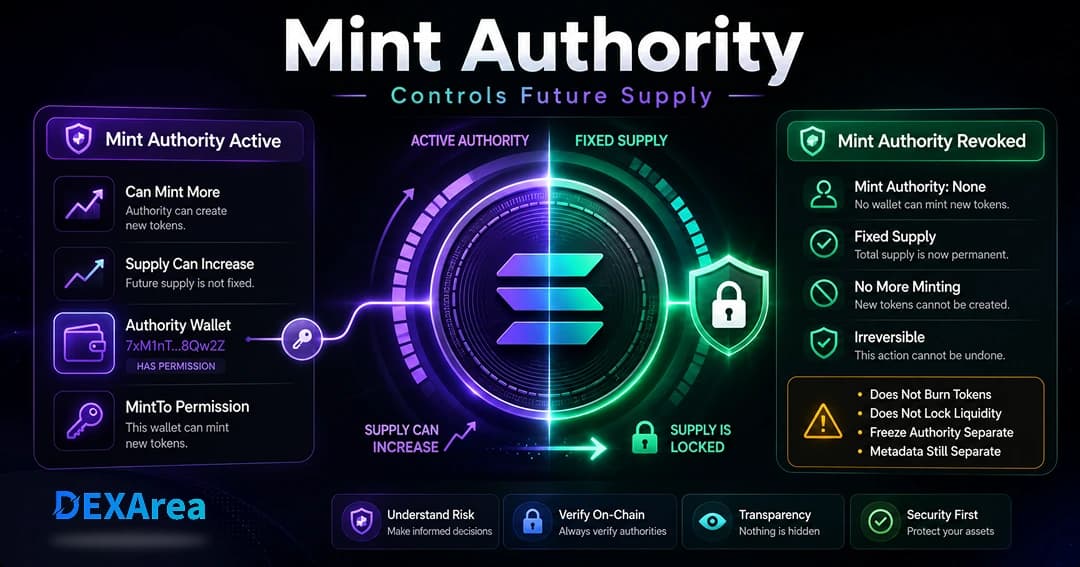
Mint authority and freeze authority are two separate permissions on Solana SPL tokens. Mint authority controls whether new tokens can be minted and total supply can increase. Freeze authority controls whether token accounts can be frozen or thawed by the authorized wallet.
This guide explains what each authority controls, how active and revoked authority states differ, how to check mint and freeze authority status, and what changes when a creator revokes one of them. It also links to official Solana documentation where command syntax or low-level token behavior should be verified.
DEXArea is non-custodial: your wallet signs transactions, and your private keys stay in your wallet.
TL;DR
- Mint authority controls whether additional tokens can be minted through standard mint instructions.
- Freeze authority controls whether token accounts can be frozen or thawed by the authorized wallet.
- Revoking mint authority does not revoke freeze authority, update authority, or metadata authority.
- Revoking freeze authority does not change token supply or mint authority.
- Revoked mint authority usually makes future minting unavailable in most standard cases.
- Revoked freeze authority usually removes the ability to freeze token accounts in most standard cases.
- Revoking either authority is usually irreversible and does not guarantee trust, price stability, liquidity, or project quality.
- Always verify the mint address, network, current authorities, and wallet transaction details before signing.
Mint Authority vs Freeze Authority on Solana
| Authority | Controls | If active | If revoked |
|---|---|---|---|
| Mint authority | Token supply | Authorized wallet may mint additional tokens through standard mint instructions | Future minting is unavailable in most standard cases |
| Freeze authority | Token accounts | Authorized wallet may freeze or thaw token accounts | Freezing token accounts is unavailable in most standard cases |
| Update authority | Token metadata | Authorized wallet may update metadata fields where supported | Metadata updates are unavailable in most standard cases |
These authorities are separate. Revoking mint authority does not revoke freeze authority. Revoking freeze authority does not change token supply. Review each authority independently before launch.
Metadata and update authority behavior can differ between classic SPL setups and Token-2022 or Metaplex configurations—confirm what applies to your mint before signing.
How Solana Mint Authority Works
mint_authority field is an optional public key. If it contains an address, that address can sign transactions that mint new units. If no mint authority is present, future minting is unavailable in most standard SPL token cases, and the current supply should be treated as final for normal mint operations.Minting uses the Token Program’s MintTo or MintToChecked instructions, which increase the mint’s total supply. Only the designated mint authority can call them. Leaving mint authority active means more tokens may be minted later; setting authority to None usually makes future minting unavailable for normal mint operations.
Why it matters
- Supply and tokenomics — Active mint authority allows emissions, rewards, or treasury minting. Revoking limits future minting through standard mint instructions in most standard cases.
- Transparency — Holders often check whether mint authority is revoked. Public supply claims should match on-chain authority status.
- Promises vs design — Some launches revoke after distribution; dynamic-supply projects may keep authority with clear communication.
Active vs Revoked: Mint and Freeze Authority
| Status | Mint authority | Freeze authority |
|---|---|---|
| Active | The authorized wallet may mint additional tokens through standard mint instructions. | The authorized wallet may freeze or thaw token accounts where supported. |
| Revoked | Future minting is unavailable in most standard cases; existing balances stay unchanged. | Freezing token accounts is unavailable in most standard cases; supply is unchanged. |
Revoked authority usually cannot be restored in standard SPL setups. Treat revocation as usually irreversible and review mint address, network, and wallet transaction details before signing.
Active mint authority supports flexible emissions; revoking can align supply with a finalized plan when no further minting is intended. Active freeze authority supports account-level controls; revoking removes freeze/thaw capability in most standard cases when that control is no longer needed.
What Happens When Mint Authority Is Revoked?
When you set mint authority to None:
- Future minting is unavailable in most standard cases — MintTo can no longer create new tokens through normal mint authority flows.
- Existing supply unchanged — Revocation does not burn or transfer tokens already minted.
- Freeze and update authority unchanged — Manage those permissions separately.
- Liquidity unchanged — Revoking mint authority does not lock liquidity pools or LP positions.
- Usually irreversible — There is usually no way to restore mint authority after revocation in most standard SPL setups.
Revoking mint authority does not guarantee trust, price stability, liquidity, or project quality.
What Happens When Freeze Authority Is Revoked?
When freeze authority is revoked:
- Token accounts can no longer be frozen in most standard cases — The authorized wallet cannot freeze or thaw accounts through standard freeze authority flows.
- Token supply does not change — Revocation does not mint, burn, or alter total supply.
- Mint authority does not change — Supply controls remain as they were before the freeze revoke transaction.
- Metadata/update authority does not change — Review update authority separately for metadata edits.
- Usually irreversible — Restoring freeze authority is usually unavailable in most standard SPL setups.
Revoking freeze authority does not guarantee trust, liquidity, price stability, or project quality.
How Solana Freeze Authority Works
Freeze authority is separate from mint authority. It controls whether the authorized wallet can freeze or thaw token accounts tied to the mint. Freeze authority controls account-level freeze and thaw behavior. It does not mint tokens, burn tokens, update metadata, or change token supply.
When freeze authority is active, the authorized wallet may freeze holder accounts (blocking transfers until thawed) where the token program supports those instructions. When freeze authority is revoked, freezing token accounts is unavailable in most standard cases.
Revoking freeze authority does not revoke mint authority or update authority. A token can have revoked mint authority while freeze authority remains active, or the reverse pattern depending on which transactions were signed.
Mint Authority vs Update Authority (Metadata Authority)
Under Metaplex token metadata, update authority controls changes to name, symbol, URI, and related fields. Only the update authority can modify metadata or set authority to null to make metadata immutable.
| Role | Controls |
|---|---|
| Mint authority | Token supply |
| Update authority | Metadata changes |
| Freeze authority | Account freezing |
Should Creators Keep or Revoke Mint and Freeze Authority?
There is no one-size-fits-all answer. Review mint authority, freeze authority, and update authority separately.
Keeping authority can be useful when:
- Planned emissions, vesting, treasury minting, or migration still require minting
- Account freeze/thaw controls are still part of your operational plan
- Pre-launch testing or supply changes are not finalized
If you keep any authority active, communicate what may still change and who controls each permission.
Revoking authority can be appropriate when:
- Final supply is minted and no further standard minting is planned (mint authority)
- Freeze/thaw controls are no longer needed (freeze authority)
- Metadata immutability is handled through update authority separately
Revocation is usually irreversible. Revoking authority does not guarantee trust, liquidity, price stability, or project quality. Creators should state authority status clearly and avoid vague claims.
Do not revoke mint authority before completing planned minting. Do not revoke freeze authority until you understand how it affects account-level controls.
Should Token Creators Revoke Mint Authority?
Revoke mint authority only after planned minting is complete and the final supply plan is ready.
Common triggers when teams choose to revoke mint authority:
- Final supply minted and distributed
- Public communication that no further minting is planned
- No planned emissions from the mint authority wallet
Revoking mint authority is not required for Raydium, liquidity pools, or public launch. It does not guarantee trust or price stability.
Fixed Supply: What It Does and Does Not Mean
A token may be treated as fixed-supply when mint authority is revoked and no further minting is available in most standard cases.
Fixed supply means (for normal mint operations):
- No more minting via MintTo while mint authority is none
- Total supply unchanged by revocation itself
Fixed supply does not mean:
- Liquidity is locked
- Metadata is immutable (update authority may still be active)
- Freeze authority is revoked
- Price is stable or predictable
- The project is trustworthy or low-risk
- Distribution is fair
How to Check Mint Authority and Freeze Authority
- Verify the mint address — names and symbols are not unique; use the exact mint public key.
- Confirm the network — mainnet and devnet mints are separate.
- Inspect the mint account — use View token metadata, a block explorer, or another trusted tool.
- Check mint authority status — active wallet address vs none/revoked.
- Check freeze authority status — active wallet address vs none/revoked.
- Compare on-chain status with public claims — supply, fixed-supply statements, and freeze risk should match what the mint account shows.
- CLI verification — if you use terminal commands, verify syntax with Solana Set Authority documentation or your installed CLI help before running authority changes.
CLI vs No-Code: Checking and Revoking Token Authority
spl-token authorize mint --disable to disable mint authority. CLI syntax can vary by tool version and token program (classic SPL vs Token-2022). Verify command syntax with Solana documentation or CLI help before running authority commands.CLI workflows require the correct mint address, the authority wallet, the correct network, and enough SOL for fees. Review transaction previews carefully before signing.
| Method | Often used for | What to verify |
|---|---|---|
| Solana CLI | Developers comfortable with terminal workflows | Mint address, authority keypair, cluster/network, command syntax |
| DEXArea revoke tools | Wallet-based review and signing | Token mint, authority wallet, network, fee summary, wallet transaction |
Step-by-Step: How to Revoke Mint Authority with DEXArea
Step 1: Open DEXArea Revoke Mint
Step 2: Connect the authority wallet
Connect the wallet that currently holds mint authority. DEXArea never accesses your private keys.
Step 3: Enter the token mint
Use the exact mint address—not name or symbol alone.
Step 4: Review token details
Confirm name, symbol, authority status, supply, and decimals.
Step 5: Confirm you no longer need future minting
Step 6: Review and sign
DEXArea prepares a transaction to set mint authority to None. Review in your wallet and sign when correct. Save the transaction signature.
Step 7: Verify revocation
Re-check mint authority status and keep proof for community announcements.
Common Mistakes to Avoid
- Confusing mint authority with freeze authority
- Assuming revoking mint authority also revokes freeze authority
- Assuming revoked mint authority locks liquidity
- Assuming revoked mint authority makes metadata immutable
- Revoking mint or freeze authority before the operational plan is ready
- Signing on the wrong network or wrong mint address
- Not checking wallet transaction details before signing
- Revoking too early before all planned mints
- Claiming fixed supply while mint authority is still active
- Keeping active authority without explaining what may still change
- Treating fixed supply or revoked authority as proof of price performance or project quality
Revoking an authority is usually irreversible, so verify the mint address, network, and authority status before signing.
Pre-Revoke Authority Checklist
- Confirm the token mint address
- Confirm the network
- Check current mint authority
- Check current freeze authority
- Decide whether future minting is still needed
- Decide whether freeze/thaw controls are still needed
- Review update authority separately
- Confirm whether liquidity, metadata, or distribution steps are already complete
- Review wallet transaction details before signing
- Understand revocation is usually irreversible
Troubleshooting: Why Can’t I Revoke Mint Authority?
| Problem | Possible cause | What to check |
|---|---|---|
| Transaction fails | Wrong authority wallet | Connected wallet must control mint authority |
| Token details wrong | Wrong mint address | Verify mint, not symbol |
| Authority already revoked | None set on mint | Check status in a viewer first |
| Freeze risk remains | Separate permission | Revoke freeze authority |
| Metadata still editable | Update authority separate | Make token immutable |
| Not enough SOL | Low balance for fees | Keep SOL for transaction fees |
| RPC/network issue | Temporary failure | Retry or switch RPC |
What to Do After Revoking Mint Authority
- Save the transaction signature.
- Verify mint authority is None.
- Review freeze authority — revoke freeze if appropriate.
- Review metadata — make immutable if appropriate.
- Review liquidity — create pool or add liquidity.
- Update launch docs and communicate clearly.
- Avoid overstating what revocation proves (fixed supply does not guarantee trust or price).
FAQ
1. What is mint authority on Solana?
Mint authority is the optional permission on a Solana SPL token mint that allows the designated wallet to mint additional tokens and increase circulating supply through standard mint instructions.
2. What is freeze authority on Solana?
Freeze authority is the optional permission that controls whether the authorized wallet can freeze or thaw token accounts for that mint. It does not control token supply or metadata updates.
3. Are mint authority and freeze authority the same?
No. Mint authority controls whether more tokens can be minted. Freeze authority controls whether token accounts can be frozen or thawed. They are separate authorities and should be reviewed independently.
4. Can a token have revoked mint authority but active freeze authority?
Yes. A token can have revoked mint authority while freeze authority remains active. Revoking mint authority does not automatically revoke freeze authority.
5. What does revoked mint authority mean?
Revoked mint authority usually means the mint authority field is set to none. Future minting is unavailable in most standard cases, and existing token balances remain unchanged.
6. What does revoked freeze authority mean?
Revoked freeze authority usually means the authorized wallet can no longer freeze or thaw token accounts in most standard cases. Token supply and mint authority are unchanged.
7. Is revoking mint authority reversible?
Usually no. Once mint authority is revoked in most standard SPL setups, it is generally not possible to assign a new mint authority. Treat revocation as usually irreversible.
8. Is revoking freeze authority reversible?
Usually no. Revoking freeze authority is usually irreversible in most standard SPL setups. Review the mint address, network, and authority status before signing.
9. Does revoking mint authority burn existing tokens?
No. Revoking mint authority does not burn tokens or reduce existing holder balances. It removes the permission to mint more tokens going forward in most standard cases.
10. Does revoking freeze authority change token supply?
No. Revoking freeze authority does not mint, burn, or change total token supply. It affects account-level freeze and thaw behavior only.
11. Does revoking mint authority make metadata immutable?
No. Mint authority and metadata/update authority are separate. If update authority remains active, metadata may still be changeable where supported.
Verify the mint address and network, then inspect the mint account in a trusted explorer or View token metadata. Compare on-chain mint and freeze authority fields with public claims. For CLI workflows, verify command syntax with Solana documentation or CLI help.
13. What is spl-token authorize mint --disable?
It is a common CLI-style command pattern used to disable mint authority. Command syntax can vary by CLI version and token program, so verify the exact command with official Solana documentation or CLI help before using it.
Yes. DEXArea provides a no-code Revoke Mint Authority tool. DEXArea is non-custodial: your wallet signs the transaction, and your private keys stay in your wallet.
Yes. DEXArea provides a no-code Revoke Freeze Authority tool. Review the mint address, network, and wallet transaction details before signing.
16. Is this financial advice?
No. This article is educational content only and is not financial advice.
Conclusion
Mint authority and freeze authority are separate SPL token permissions. Mint authority controls whether supply can grow through standard mint instructions; freeze authority controls account-level freeze and thaw behavior. Active and revoked states should be checked on-chain and compared with public claims before launch.
Revoking either authority is usually irreversible and does not guarantee trust, liquidity, price stability, or project quality. Review update authority separately for metadata.
Disclaimer
This guide is for educational purposes only and is not financial advice. Revoking mint authority is usually irreversible and affects your supply plan. Verify mint address, authority wallet, and transaction details before signing.
DEXArea is non-custodial. Your wallet signs transactions, and your private keys stay in your wallet.