How to Revoke Freeze Authority on Solana
Revoke freeze authority on Solana safely: what it controls, when to revoke, how it differs from mint and metadata authority, and a step-by-step DEXArea workflow.
How to Revoke Freeze Authority on Solana
Introduction
None using the SetAuthority instruction). Once revoked, token accounts for that mint can no longer be frozen.Many projects revoke freeze authority as part of their security checklist before going public or adding liquidity. DEXArea offers a non-custodial Revoke Freeze Authority tool that lets you connect your wallet, select the token mint and revoke freeze authority with a single transaction. In this guide you'll learn what freeze authority is, why and when you might revoke it, what changes and what does not change after revocation, and how to execute the transaction safely. By the end you'll understand how revoking freeze authority affects token trust and how it differs from mint authority, metadata authority and making tokens immutable.
TL;DR
- Freeze authority controls whether token accounts can be frozen. A frozen account keeps the same owner, mint and balance but cannot receive, transfer or burn tokens.
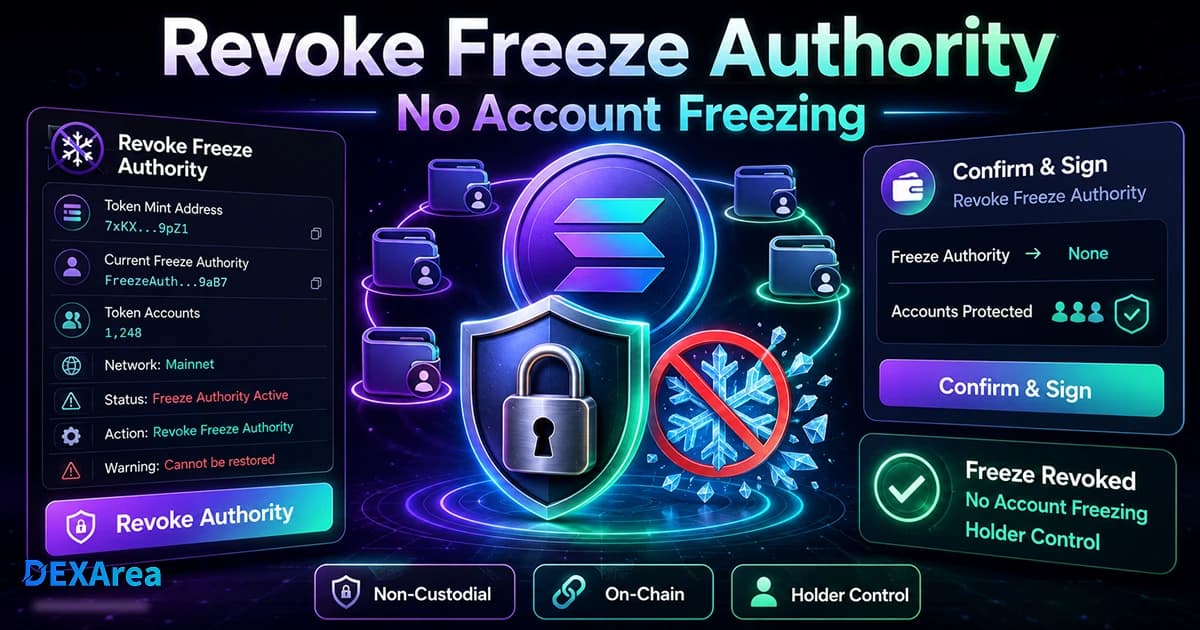
- Revoking freeze authority usually sets the freeze authority on the mint to
None. After revocation, token accounts for that mint can no longer be frozen. - The action is permanent on standard SPL tokens. Once removed, freeze authority cannot be restored without a fork or new mint.
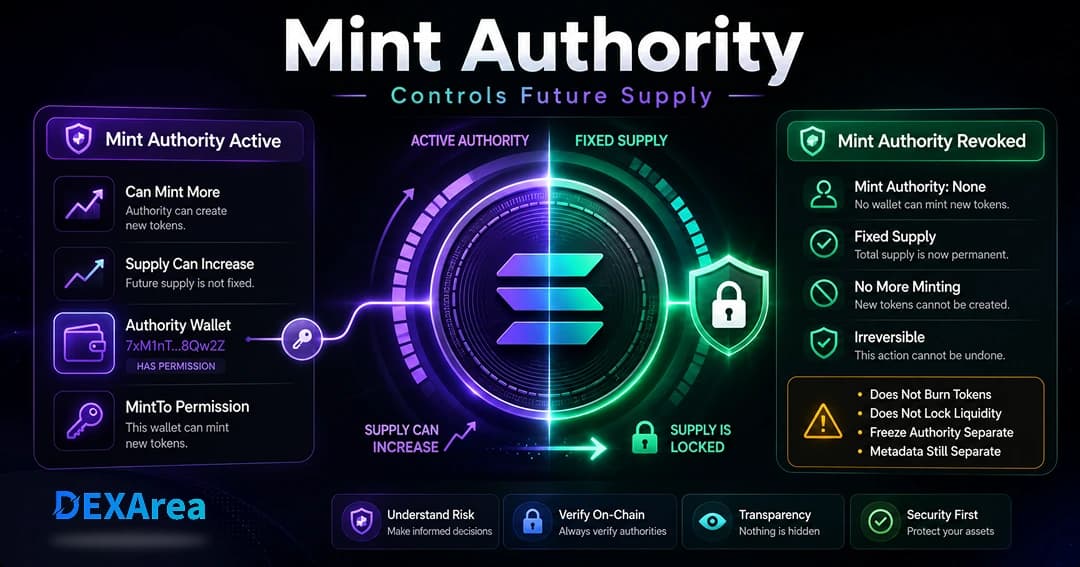
- Freeze authority is different from mint authority. Mint authority controls the ability to mint new tokens; revoking freeze authority does not fix supply.
- Revoking freeze authority does not lock token metadata or liquidity. Metadata is controlled by the update authority; liquidity remains in the pool and can be modified by liquidity providers.
- DEXArea is non-custodial. You sign transactions directly from your wallet. Always verify the mint address and ensure the connected wallet currently holds freeze authority before signing.
What Is Freeze Authority on Solana?
On Solana, a mint account stores global data about the token, including two optional authorities: mint authority and freeze authority. The mint authority is the account authorised to create new units of the token, and the freeze authority is the account authorised to freeze token accounts for that mint. Token accounts hold balances for individual owners. When a token account is frozen, it retains the same owner, mint and balance, but it cannot receive, transfer or burn tokens until it is thawed. Only a mint that still has a freeze authority can freeze accounts; if the freeze authority has been revoked, accounts for that mint can no longer be frozen.
Freeze authority is completely separate from other authorities:
- Mint authority – allows the minting of new tokens. Revoking mint authority fixes the token supply, but it does not remove freeze authority.
- Metadata/update authority – controls changes to token metadata such as name, symbol, image or royalty fields.
- Close authority (token account) – controls the ability to close a token account and reclaim SOL rent.
Projects can choose to assign different addresses to these authorities during mint creation. Sometimes the creator retains freeze authority during early testing and revokes it before launch to reduce account-control risk. Other times freeze authority is never set, resulting in a token with no freeze capabilities from the start.
Why Token Creators Revoke Freeze Authority
Revoking freeze authority is a trust-building measure. Here are key reasons projects do it:
- Reduce account-control risk – When freeze authority remains active, the authority holder can freeze any token account. Revoking freeze authority removes that control in most SPL token cases.
- Show holders the token is decentralized – Revocation reassures the community that token accounts cannot be frozen by the project owner.
- Improve launch transparency – Revoking before or during launch signals that testing is complete and emergency account-control features are no longer needed.
- Strengthen trust before adding liquidity – Liquidity providers may worry that tokens in the pool could be frozen. Revoking removes this fear.
- Simplify authority setup – Fewer active authorities means fewer keys to secure and less misconfiguration risk.
Revoking freeze authority does not guarantee project quality, price stability or liquidity safety. It simply removes one type of control.
What Happens When You Revoke Freeze Authority?
None via the Token Program's SetAuthority instruction. This leads to several outcomes:- Token accounts can no longer be frozen – The previous authority loses the ability to freeze or thaw accounts. If any were frozen before revocation, they stay frozen unless thawed before revocation.
- Holders can transfer tokens normally – Revoking freeze authority does not block transfers for unfrozen accounts.
- Supply remains unchanged – Only mint authority can mint new supply.
- Mint authority remains unaffected – Unless you revoke mint authority separately, minting is still possible.
- Metadata remains changeable – Update authority can still change metadata.
Warning
None, you cannot restore it without modifying the program or issuing a new token. Do not revoke if your project requires freezing or thawing accounts later (compliance, custodial flows, or protocol-specific mechanics).Revoke Freeze Authority vs Revoke Mint Authority
Understanding the difference between freeze authority and mint authority is crucial when designing tokenomics.
| Freeze authority | Mint authority | |
|---|---|---|
| Controls | Ability to freeze or thaw token accounts | Ability to mint new tokens |
| Revocation effect | Accounts for that mint can no longer be frozen | Supply becomes fixed |
| Independence | Does not fix supply | Does not remove freeze authority |
Revoke Freeze Authority vs Make Token Immutable
Immutability usually means revoking the update authority so token metadata cannot be changed. This is separate from freeze authority:
- Revoking freeze authority: Removes the ability to freeze token accounts. Metadata can still be updated if update authority remains.
- Making a token immutable: Removes or changes update authority so metadata cannot be modified. This does not affect freeze or mint authority by itself.
Projects focused on trust often review all authorities—mint, freeze and metadata.
When Should You Revoke Freeze Authority?
The timing of revocation depends on your project's needs and risk tolerance:
Before Public Launch
Revoking before launch shows potential holders that accounts cannot be frozen after launch.
Before Creating Liquidity
Some teams revoke freeze authority before creating or adding liquidity so providers are not worried about arbitrary freezes.
After Testing Token Operations
If you tested freeze and thaw on devnet, revoke on mainnet once you no longer need that control.
Never, If Freezing Is Required
Regulated stablecoins, compliance flows, or vesting designs may require retaining freeze authority. Communicate that clearly to holders.
Warning: Do not revoke if your project legitimately requires freezing or thawing token accounts later.
What You Need Before Revoking Freeze Authority
Before starting the revoke process, gather the following:
-
Correct token mint address – Use the exact 32-byte address; do not rely on symbol or name alone.
-
Wallet controlling the freeze authority – Only the current freeze authority can revoke itself.
-
Correct network selected – Mainnet, testnet or devnet as appropriate.
-
Token metadata reviewed – Confirm name, symbol and supply.
-
Holder/account control policy reviewed – Decide whether you need future freezing or thawing.
-
Mint authority reviewed separately – Consider revoke mint authority for fixed supply.
-
Metadata/update authority reviewed separately – Decide when to make token immutable.
-
SOL for transaction fees – Keep enough SOL for network fees.
-
Understanding of permanence – Revocation is usually irreversible.
Step-by-Step: How to Revoke Freeze Authority on Solana
Here is a detailed walkthrough using the DEXArea Revoke Freeze Authority tool:
Step 1: Open the DEXArea Revoke Freeze Authority Tool
Step 2: Connect the Authority Wallet
Connect the wallet that currently holds the freeze authority for the token. If the connected wallet is not the current freeze authority, the transaction will fail. DEXArea is non-custodial; your private keys never leave your wallet.
Step 3: Select or Paste the Token Mint Address
Enter or paste the exact token mint address. Do not rely solely on the token's symbol or name.
Step 4: Review Current Token Information
Step 5: Confirm You No Longer Need Freeze Control
Ensure your project does not require freezing or thawing token accounts in the future. Thaw any accounts that must remain active before revoking.
Step 6: Sign the Revoke Transaction
None. Double-check the mint address and network, then sign.Step 7: Verify Freeze Authority Was Revoked
None via metadata viewer or a block explorer. Save the transaction signature.What to Do After Revoking Freeze Authority
Once freeze authority is removed, consider these next steps:
- Verify authority status – Confirm freeze authority is
Noneand other authorities match your design. - Revoke mint authority – Use Revoke Mint Authority if you want fixed supply.
- Make metadata immutable – Use Make Token Immutable when metadata is final.
- Create or manage liquidity – Create a pool and add liquidity.
- Distribute tokens – Token multisender.
- Snapshot holders – Snapshot token holders.
- Communicate to the community – Share the transaction ID and explain that freeze authority has been revoked.
Common Mistakes to Avoid
- Revoking before thawing – Thaw frozen accounts first; you cannot thaw after revocation.
- Using the wrong wallet – Only the current freeze authority can revoke.
- Entering the wrong mint address – Copy and paste the correct mint address.
- Confusing freeze and mint authority – Revoke mint authority separately to fix supply.
- Assuming metadata is locked – Revoke update authority separately.
- Assuming liquidity is locked – Liquidity is not locked by revoking freeze authority.
- Forgetting transaction fees – Keep enough SOL.
- Not checking the correct network – Devnet does not affect mainnet.
- Not saving the transaction signature – Keep a record for audits and communication.
- Ignoring permanence – Align the decision with your long-term plan.
Security and Trust Checklist
Use this checklist when revoking freeze authority:
| Checkpoint | Description |
|---|---|
| Correct mint address verified | Confirm the 32-byte mint address matches your token. |
| Correct freeze authority wallet connected | Use the wallet that currently holds freeze authority. |
| Correct network selected | Mainnet, testnet or devnet as appropriate. |
| Token metadata reviewed | Verify name, symbol, decimals and supply. |
| Frozen account status reviewed | Thaw accounts that need to be active before revoking. |
| Future freeze/thaw requirements reviewed | Decide whether you need freeze functionality later. |
| Mint authority reviewed separately | Determine if you need to revoke mint authority to fix supply. |
| Metadata/update authority reviewed separately | Decide if and when to make metadata immutable. |
| Liquidity plan reviewed | Plan how and when to add liquidity. |
| Permanence understood | Recognize revocation is usually irreversible. |
| Transaction reviewed before signing | Check mint address and network in the wallet prompt. |
| Confirmation and signature saved | Keep a record of the transaction. |
Troubleshooting: Why Can't I Revoke Freeze Authority?
If your transaction fails, consider these common issues:
- Wrong wallet connected – Use the wallet that holds freeze authority.
- Wallet is not the current freeze authority – Confirm on a block explorer or metadata viewer.
- Wrong token mint address – Verify the mint address character by character.
- Wrong network selected – Wallet and DEXArea must be on the same network.
- Freeze authority already revoked – If freeze authority is already
None, there is nothing to revoke. - Insufficient SOL for fees – Keep a small SOL balance.
- Wallet rejected the transaction – Review details and try again.
- RPC or network issues – Wait and retry during congestion.
- Token program mismatch – Ensure you use the correct tool for your token program version.
Practical advice
Always verify the mint address, the current freeze authority and network. Keep SOL for fees and save the transaction signature. If the issue persists, consult Solana's official documentation or reach out to DEXArea support.
FAQ
What is freeze authority on Solana?
Freeze authority is an optional authority stored in a mint account that allows the holder to freeze token accounts. A frozen account keeps the same owner and balance but cannot transfer or burn tokens until thawed.
Revoking freeze authority sets the freeze authority on the mint to
None using the SetAuthority instruction. After that, token accounts for that mint cannot be frozen.Can freeze authority be restored after revoking it?
In standard SPL token programs, revoking freeze authority is permanent. To regain freeze control, you would need to create a new mint or fork the program.
Is freeze authority the same as mint authority?
No. Mint authority controls minting; freeze authority controls freezing or thawing token accounts. They can be set or revoked independently.
Does revoking freeze authority make supply fixed?
No. Supply is governed by mint authority. Revoke mint authority separately if you want fixed supply.
Should I revoke freeze authority before launching a token?
Often yes, if you do not need compliance or protocol freeze features. Some projects retain freeze authority by design.
Should I revoke freeze authority before creating liquidity?
Many teams do so liquidity providers are not worried about arbitrary freezes.
Does revoking freeze authority lock liquidity?
No. Liquidity can still be added or removed by liquidity providers.
Does revoking freeze authority lock token metadata?
No. Revoke or reassign update authority to lock metadata.
Can I revoke freeze authority without coding?
Yes. DEXArea's Revoke Freeze Authority tool lets you revoke from your wallet without code.
Why can't I revoke freeze authority?
Common reasons include wrong wallet, wrong mint, wrong network, insufficient SOL, or freeze authority already revoked.
Is revoking freeze authority financial advice?
No. This guide is technical information only. Consult professionals when needed.
Disclaimer
This guide is for educational purposes only and is not financial advice. Revoking freeze authority is usually permanent and can affect your token control model. Always review every transaction in your wallet before signing, and test important flows on devnet when possible.
Trust statement: DEXArea is non-custodial. Your wallet signs transactions, and your private keys stay in your wallet.
Conclusion
None using the Token Program's SetAuthority instruction. Once revoked, token accounts can no longer be frozen, but supply and metadata remain governed by separate authorities. This guide explained freeze authority, when to revoke it, how it compares to mint and metadata authority, a step-by-step process, and common mistakes and troubleshooting tips.