How to Remove Liquidity from Raydium on Solana
Withdraw your share of a Raydium pool safely on Solana: LP tokens vs CLMM positions, remove vs burn liquidity, impermanent loss, prerequisites, and a step-by-step walkthrough with DEXArea Remove Liquidity.
How to Remove Liquidity from Raydium on Solana
Introduction
When you provide liquidity on a decentralized exchange such as Raydium, you lock two tokens into a smart-contract pool so other traders can swap between them. At some point you may want those tokens back. This guide walks you through safely withdrawing your share of a Raydium pool on Solana: what removing liquidity actually does, how it differs from burning liquidity, what you need before you start, and how to use the non-custodial DEXArea Remove Liquidity tool. It also covers pool types (AMM, CPMM, and CLMM), impermanent loss, and common troubleshooting.
Need to withdraw now? Open DEXArea Remove Liquidity, connect the wallet that holds your LP tokens or CLMM position, and review the transaction before you sign.
TL;DR
- Removing liquidity returns your proportional share of the pool’s two assets to your wallet. Amounts usually differ from what you originally deposited because the pool ratio changes as people trade; that gap versus simply holding the two tokens is often discussed as impermanent loss, which becomes realized when you exit.
- Proof of position: Classic AMM/CPMM pools use fungible LP tokens. CLMM (concentrated liquidity) positions are usually tied to a position NFT and a chosen price range—not the same workflow as a single LP mint balance.
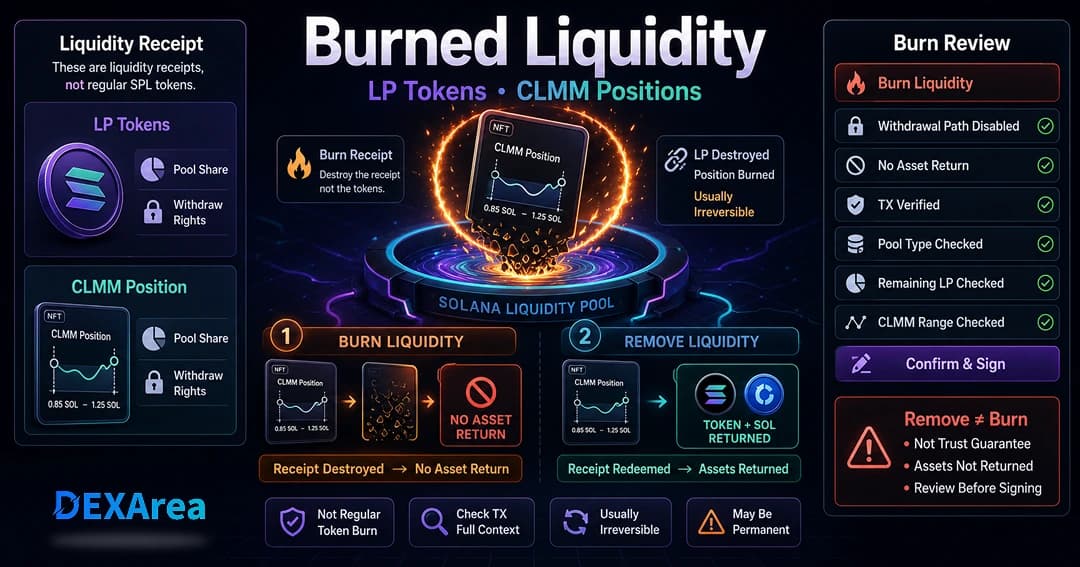
- Remove ≠ burn: Remove liquidity redeems your claim and sends underlying tokens back. Burn liquidity destroys LP receipts (or locks them irrecoverably) so that liquidity cannot be withdrawn later. Do not confuse the two.
- Check pool type before you act so you pick the right flow in the app (AMM/CPMM vs CLMM).
- DEXArea is non-custodial: your wallet signs everything. Keep SOL for fees, and verify pool address, mints, and estimated outputs on every transaction.
What Does Removing Liquidity Mean?
Liquidity providers (LPs) supply two tokens—often called base and quote—to a pool. Traders swap the pair and pay fees that accrue to the pool. Over time the ratio of the two reserves changes. When you remove liquidity, you redeem your LP tokens or close / shrink your CLMM position so the program releases your proportional share of the pool’s assets at that moment.
Constant-product AMM math keeps a relationship between reserves (commonly written as (x \times y = k)); as one side of the pool is bought or sold, reserves and implied price move along that curve. So the token amounts you receive on exit reflect current reserves, not your historical deposit snapshot.
Impermanent loss (IL) describes a situation where the value of what you withdraw is lower than if you had held the same two tokens outside the pool over the same period—often because price moved and arbitrage rebalanced the pool. Trading fees you earned may or may not offset that. Removing liquidity turns IL from a mark-to-pool concept into a realized outcome in your wallet.
For CLMM, liquidity sits in a band of prices. If the market trades outside your range, your position can behave differently (for example more one-sided exposure) until you adjust or exit. Always read the estimated token outputs in the UI before confirming.
Remove Liquidity vs Burn Liquidity
| Remove liquidity | Burn liquidity | |
|---|---|---|
| Outcome | Underlying tokens return to your wallet (minus fees / slippage as applicable). | LP receipts are destroyed or sent somewhere they cannot be used to withdraw; that liquidity stays in the pool from a “can the LP walk it out?” perspective. |
| Requires | The same wallet (or custody) that holds the LP tokens or CLMM position you are closing. | A deliberate decision—often for launches that want to signal locked liquidity. |
| Reversible? | You can add liquidity again later with add liquidity. | No—do not burn unless you intend permanence. Use burn liquidity only by choice. |
What You Need Before Removing Raydium Liquidity
- The wallet that owns the position – Same wallet that received the LP tokens or holds the CLMM position NFT (or whichever wallet actually holds the receipts).
- Correct network – Mainnet vs Devnet must match where the pool was created.
- Pool identity – Prefer mint addresses over symbols alone; many tokens share similar names.
- LP tokens or CLMM position – Without the correct on-chain proof of your share, the program cannot pay you out.
- SOL for fees – Every Solana transaction costs SOL; keep a buffer so the transaction does not fail mid-spike.
- Expectations – Read estimated outputs in the tool; small differences at execution time are normal when the pool is moving.
- No accidental lock – If LP tokens were already burned or sent to a lock you do not control, withdrawal is not available for that share.
Which Raydium Pool Type Are You Removing From?
AMM pools
Classic constant-product pools issue fungible LP tokens. Removing liquidity redeems those tokens and returns the underlying pair—usually the simplest mental model for beginners.
CPMM pools
Still constant-product style, with Raydium’s CPMM path and features relevant to Token-2022 mints (for example transfer fees). You still typically track share with fungible LP tokens, but token-specific rules can change what you see in your wallet after withdrawal.
CLMM pools
Concentrated liquidity: you chose a price range. Capital is more efficient inside that band, but range and price matter: if price leaves your band, your position can sit idle or become one-sided until you manage or exit. Positions are usually represented by a position NFT; partial removal may keep the NFT with a smaller position, while a full exit closes the position—confirm in the UI.
CLMM suits teams comfortable managing ranges; if you want a hands-off full-curve position, classic AMM/CPMM-style pools are often easier operationally.
Protocol details change; confirm behavior in Raydium’s official documentation and in your wallet simulation at send time.
Step-by-Step: How to Remove Liquidity from Raydium
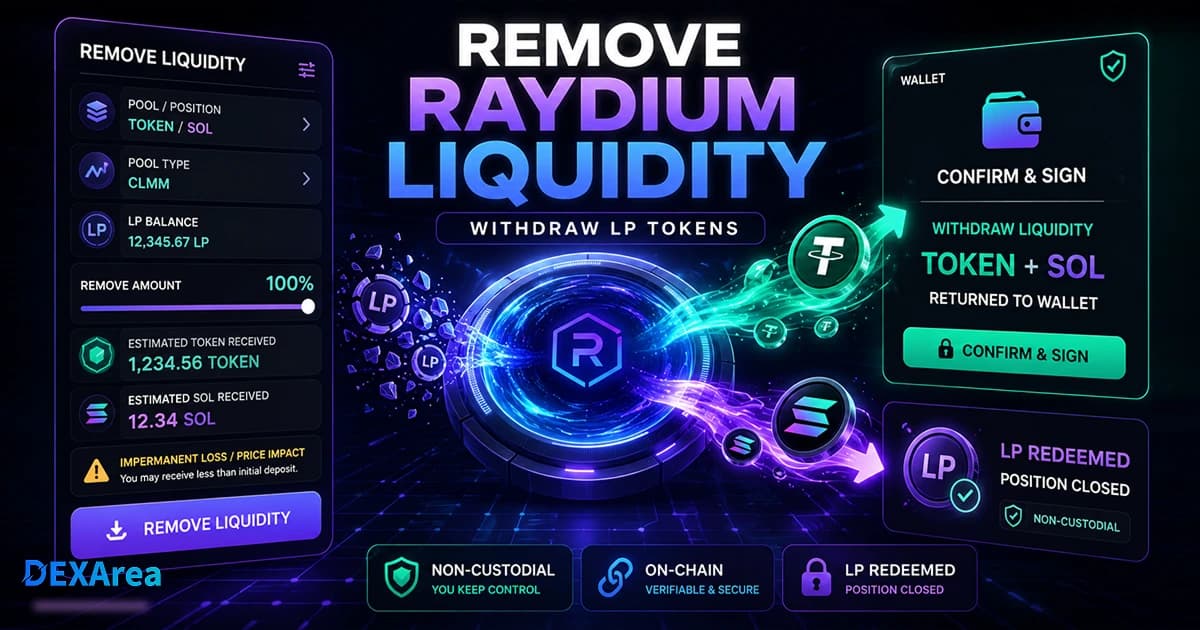
Use DEXArea Remove Liquidity for a non-custodial, wallet-signed flow.
Step 1: Open DEXArea Remove Liquidity
Step 2: Connect your wallet
Choose your Solana wallet (Phantom, Solflare, Backpack, and so on). Connect the wallet that holds the LP tokens or CLMM position. Confirm Mainnet or Devnet matches your pool.
Step 3: Select the pool or position
Find your pool by pair, pool address, or listed positions. Verify mints. For CLMM, select the correct position NFT if you have several ranges.
Step 4: Review LP balance or position details
Confirm the LP amount or position matches what you expect. If nothing appears: wrong wallet, wrong network, tokens moved, or liquidity was burned / locked and is no longer withdrawable by you.
Step 5: Choose how much to remove
Withdraw 100% or a partial percentage. Partial withdrawal leaves the remainder in the pool (and may leave a CLMM NFT open with reduced size—check the UI).
Step 6: Review estimated output
Check base amount, quote amount, and fees. Estimates can drift slightly between quote and confirmation if the pool moves.
Step 7: Confirm in your wallet
Click through to submit, then read the transaction in your wallet: program accounts, pool, LP burn or position change, and expected credits. Save the signature after success.
Withdraw now: DEXArea Remove Liquidity
What Happens After You Remove Liquidity?
After confirmation, your wallet receives the underlying tokens (subject to pool state and any token rules). The LP tokens used for that withdrawal are consumed by the protocol logic, or your CLMM position is reduced or closed as you chose. Total pool depth drops slightly, which can affect slippage for other traders on large swaps.
You might then:
- Hold or swap the returned tokens normally.
- Add liquidity again later (new LP tokens or a new CLMM position).
- Use burn tokens if you need to reduce supply from treasury inventory (separate from pool mechanics).
- Run snapshot token holders for distributions or reporting.
Why You Might Not Be Able to Remove Liquidity
- Wrong wallet or network – Most common.
- Missing LP tokens or NFT – Transferred away, wrong account, or never received.
- Burned or permanently locked liquidity – No withdrawal path for that share.
- Wrong pool / fake mint – Always verify mints with view token metadata.
- Insufficient SOL – Fund the fee payer wallet.
- RPC congestion or timeouts – Retry later or switch RPC in your wallet if supported.
- User rejected or wallet blocked the transaction – Re-read details and try again.
If the UI shows no position: refresh, reconnect, and re-check network and mints. Keep enough SOL for fees so the transaction can land.
Risks Before Removing Liquidity
- Impermanent loss realization – Exiting fixes the PnL versus your deposit in pool terms.
- Market depth – Large removals can increase slippage for others and sometimes move perception on thin pools.
- CLMM range risk – Out-of-range behavior can yield unexpected token mixes on exit.
- Token-2022 fees – Transfer or extension logic can change net received amounts.
- Smart-contract risk – Same as any DeFi interaction; prefer well-reviewed flows and test on Devnet when learning.
This guide is not financial advice.
Common Mistakes to Avoid
- Confusing remove liquidity with burn liquidity.
- Wrong wallet, wrong network, or wrong pool row in the UI.
- Trusting symbol only—verify mint addresses.
- No SOL for fees.
- Expecting identical deposit amounts back—pools are dynamic.
- Ignoring IL and community context on large exits right after launch.
- Accidentally choosing burn when you only meant to withdraw.
Raydium Remove Liquidity Checklist
- Correct wallet connected
- Correct network
- Pool pair and mints verified
- LP tokens or CLMM position available
- SOL for fees
- Estimated outputs reviewed
- Pool type understood (AMM/CPMM vs CLMM)
- Remove vs burn understood
- Wallet transaction read end-to-end before signing
- Transaction signature saved
FAQ
Use DEXArea Remove Liquidity: connect your wallet, select pool or position, choose percentage, review estimates, sign.
2. Do I need LP tokens?
For typical AMM/CPMM Raydium pools you need the fungible LP tokens tied to that pool. For CLMM you need the position NFT (and the correct range) for that liquidity.
3. What happens when I remove liquidity?
Your claim on the pool is settled: you receive the current mix of underlying tokens. Amounts differ from your original deposit when the pool has rebalanced.
No. Remove returns assets to you; burn destroys the ability to withdraw that locked share—see burn liquidity.
5. Can I remove if my LP tokens were burned?
No. That share is not yours to redeem anymore.
6. Can I remove only part of my liquidity?
Yes—partial withdrawal is supported; the remainder keeps earning fees until you exit again.
7. Why do returned amounts differ from my deposit?
Reserves moved with trading and time; you exit at the current ratio plus any fee mechanics on your tokens.
8. Can I remove from a CLMM position?
Yes—select the position in the tool and choose how much to withdraw; mind range and one-sided outcomes.
9. Why can’t I see my position?
Wrong wallet/network, LP tokens moved, position closed, or liquidity was burned/locked.
10. Do I need SOL?
Yes—for Solana transaction fees.
11. Is removing risky?
It realizes IL, can affect depth, and has normal DeFi risks—size and communicate appropriately.
Yes—use add liquidity whenever you want a new position.
Conclusion
Disclaimer: This guide is for educational purposes only and is not financial advice. Liquidity removal can affect market depth, your token balances, and how holders perceive the project. Always review every transaction in your wallet before signing, and test important flows on Devnet when possible. DEXArea is non-custodial: your wallet signs transactions, and your private keys stay in your wallet. Raydium pool behavior and fees can change—verify against Raydium’s official documentation and your wallet at execution time.