How to Create a Raydium Liquidity Pool on Solana
Learn how to create a Raydium liquidity pool on Solana, choose AMM/CPMM/CLMM, set initial liquidity, and review risks before signing.
How to Create a Raydium Liquidity Pool on Solana
A Raydium liquidity pool lets users swap between two Solana assets through Raydium’s pool programs. For token creators, creating a pool usually means pairing your token with SOL, USDC, or another quote asset and depositing initial liquidity to define the starting ratio.
DEXArea is non-custodial. Your wallet signs transactions, and your private keys stay in your wallet.
Ready to create a Raydium pool? Use the DEXArea Create Pool tool to review pool type, token pair, initial liquidity, and wallet transaction details before signing.
TL;DR
- A Raydium pool pairs two assets, such as your token and SOL or USDC.
- The initial amounts you deposit define the starting ratio and implied starting price.
- AMM and CPMM use full-range constant-product style liquidity, while CLMM uses a selected price range and requires more active management.
- Adding liquidity deposits assets into a pool; removing liquidity withdraws assets when you still hold the required LP receipt or position.
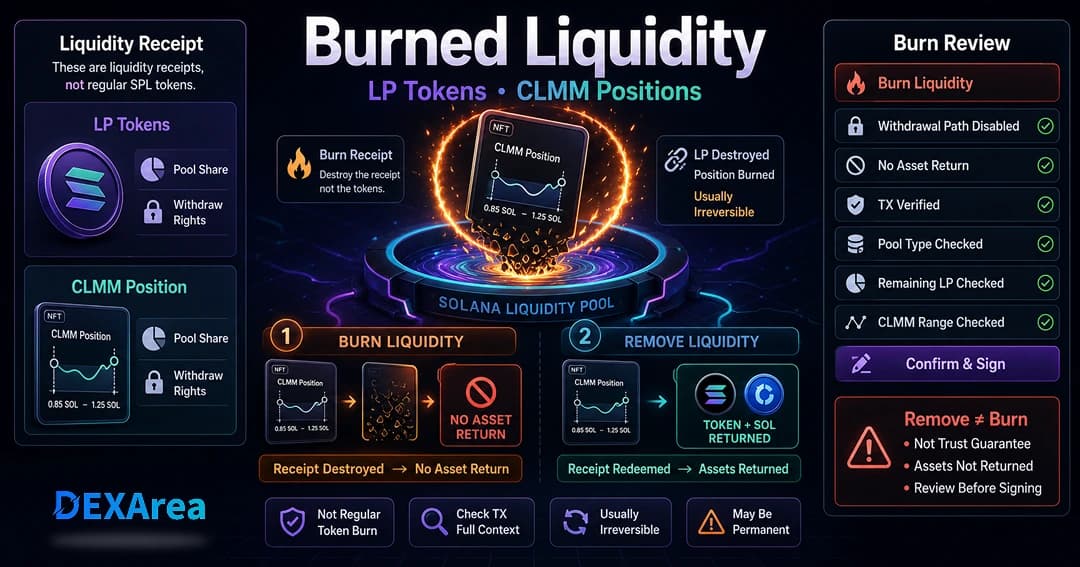
- Burning LP tokens or a CLMM position is different from removing liquidity and may affect the ability to withdraw later.
- Creating a pool does not guarantee demand, trading volume, price stability, or project trust.
- DEXArea provides a non-custodial Create Pool workflow. Your wallet signs the transaction.
What Is a Raydium Liquidity Pool?
A liquidity pool is a smart contract that holds at least two tokens and uses an automated formula to facilitate trades. Capital sits in one place so traders do not need a matching counterparty for every order. In a typical AMM (automated market maker) model, liquidity providers deposit two assets in a balanced way and receive receipts (LP tokens) that represent their share. Traders swap one token for the other by interacting with the pool; the formula updates the price as the ratio of reserves changes.
Why Token Creators Use Raydium Pools
Raydium is a widely used Solana liquidity protocol with pool types that many token creators consider when preparing a token market. It supports integration paths with Jupiter and OpenBook, so a pool may participate in broader routing and aggregator flow depending on indexing, integrations, pool type, token setup, and market conditions. Raydium also offers AMM, CPMM, and CLMM designs, which gives teams flexibility across simple launches and more advanced liquidity strategies.
A Raydium pool may become discoverable through supported Solana trading interfaces depending on indexing, integrations, pool type, token setup, and market conditions.
Why Create a Raydium Pool for a Solana Token?
Creating a Raydium pool is a common step when you want on-chain swaps against a defined pair. Here is what teams usually plan for:
- Tradability and price discovery: A pool provides a venue where users may buy or sell along the curve when the pool is live and supported by relevant interfaces.
- Launch visibility: When you launch a token, potential holders often look for a defined swap venue. A Raydium pool can provide a defined venue for swaps once the pool is created and supported by relevant interfaces.
- Community distribution: Liquidity pools let users swap in and out; this can support community ownership, but it does not guarantee demand.
- Liquidity incentives: Pools accrue trading fees that flow back to LPs. Separately, teams sometimes run incentives; that is outside the scope of this guide.
- Integration with the Solana ecosystem: Raydium pools may appear in Jupiter-style routing and common DeFi dashboards when indexing and integrations support your pair.
For new projects, failing to plan liquidity can cause high slippage and a poor trading experience. Thoughtful pool creation helps users understand the token pair, starting ratio, liquidity depth, and trading conditions.
What You Need Before Creating a Raydium Pool
Practical prerequisites:
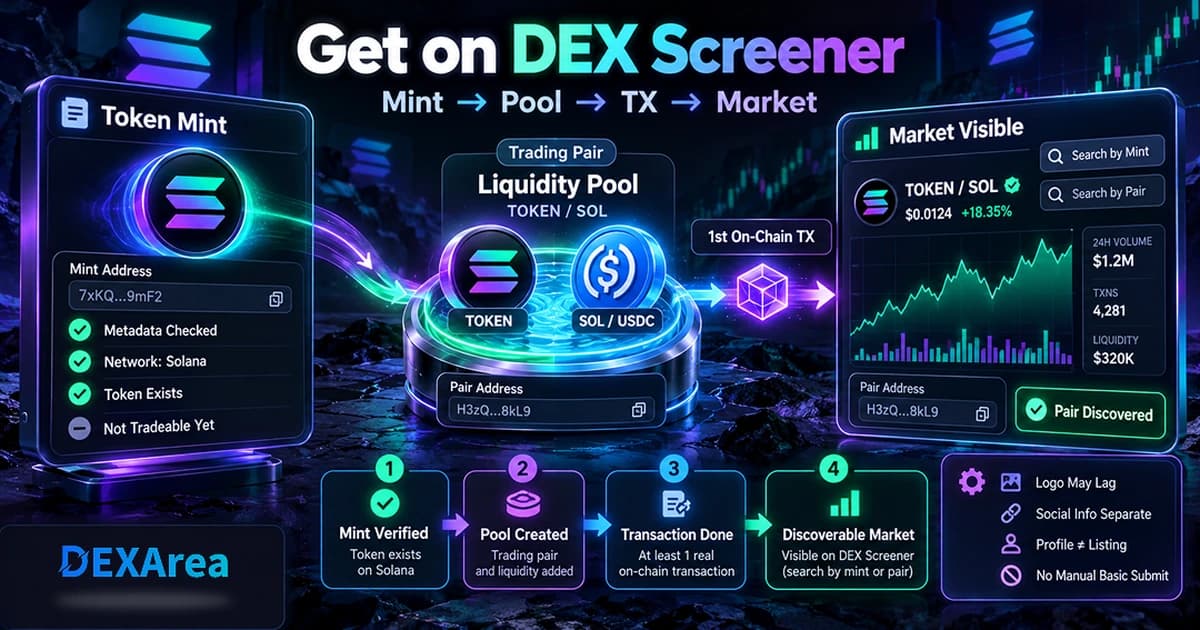
- A minted Solana token – Use DEXArea's token creator to deploy your token. Ensure the mint address, symbol, and decimals are correct.
- Wallet with your base token – You must hold enough of your token to seed the pool. Confirm the token account and balance.
- Quote asset (SOL or USDC) – Raydium pools pair two assets. Choose a quote token—often SOL for Solana-native price references or USDC for dollar-pegged pricing.
- SOL for network fees – You need SOL for Solana transaction fees and any protocol-side account creation your pool path requires. Exact costs depend on pool type, account rent, priority fees, and current network conditions—always review the amounts in your wallet preview on the day you transact, and use DEXArea Create Pool so you see what you are signing.
- Token metadata checked – Verify name, symbol, and decimals with view token metadata.
- Correct network – Mainnet for production, or Devnet for testing. Networks do not share pools.
- Pool type decision – AMM, CPMM, or CLMM (see below).
- Initial token amounts – The ratio defines the implied starting price.
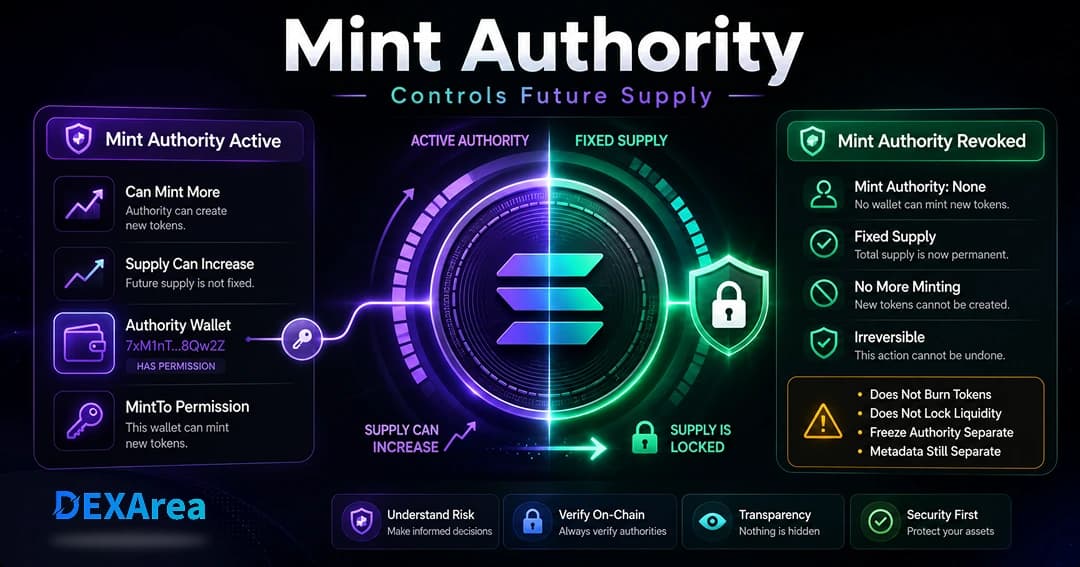
- Mint and freeze authority plan – Decide whether mint, freeze, or update authorities should remain active before launch. Revoking an authority is usually irreversible and changes what can be modified later. Revoking authority does not guarantee trust, price stability, liquidity, or trading volume. See revoke mint authority, revoke freeze authority, make the token immutable, and what is mint authority on Solana.
- Operational security – For team treasuries, consider multisig workflows; DEXArea's token multisender can help with distribution workflows (not a substitute for a proper multisig wallet).
Protocol-specific limits, fee tiers, and account layouts change over time. For authoritative, up-to-date Raydium behavior, rely on Raydium's official documentation (treat any third-party summary as unofficial and verify in the UI before signing).
Choosing the Right Raydium Pool Pair
The asset you pair with your token affects how users perceive price and how easily they can trade.
| Pair | Common fit | Notes |
|---|---|---|
| TOKEN/SOL | Meme tokens, community launches, simple launches | Familiar to Solana users; SOL is the native asset |
| TOKEN/USDC | Projects wanting a stable quote asset | Dollar-denominated reference; clearer for outsiders |
| TOKEN/Other | Ecosystem or partner-token pairs | Needs strong liquidity and user education |
Many Solana users think in SOL terms, so a TOKEN/SOL pair often feels natural. A USDC pair anchors value to the U.S. dollar and may appeal to traditional DeFi participants. Pairing with another volatile token can confuse users unless there is clear synergy (partner or ecosystem tokens).
Raydium Pool Types Explained: AMM, CPMM, and CLMM
Standard AMM pool
- Model: Classic constant-product AMM: the product of the two token reserves follows the familiar (x \times y = k) relationship, so price moves as users trade and reserves rebalance.
- Ease of use: Familiar to many users; broad wallet and aggregator support for standard Raydium AMM pools when indexing supports the pair.
- Setup: Older-style AMM flows on Solana often involve additional infrastructure (for example OpenBook market integration in legacy designs). That can mean more accounts and more SOL tied up in rent than simpler pool types, but the exact layout and cost are not fixed in this article—your wallet simulation is the source of truth.
- Common fit: Simple launches or teams that want full-range liquidity and understand that liquidity is spread across the full curve.
Constant product (CPMM) pool
- Model: Still a constant-product curve at the core, with Raydium's CPMM path aimed at newer pool features—commonly discussed together with Token-2022 extensions such as transfer fees on supported mints.
- Setup: Often presented as a lighter-weight alternative to legacy AMM market setup for new pairs, but fees and rent still depend on live protocol parameters—confirm at transaction time.
- Features: Fee behavior and extension support follow Raydium's current CPMM design; read the official docs rather than relying on static numbers here.
- Common fit: Teams that need a constant-product pool path and want to review Token-2022 compatibility where supported.
Concentrated liquidity (CLMM) pool
- Model: You supply liquidity inside a chosen price band instead of across the entire curve. Capital is more concentrated near prices where trading may happen, but if the market trades outside your band, your position may stop earning fees until you adjust or add range.
- Setup: Does not remove the need to read the transaction carefully—ranges, ticks, and position NFTs add complexity.
- Positions: Liquidity is usually represented as a position NFT (not a single simple fungible LP token like many classic AMMs). Keep access to the wallet or account that controls the position, and review how the live form displays the position before signing.
- Common fit: Teams that understand price ranges, active position management, and the risk of liquidity moving out of range.
There is no one-size-fits-all answer. AMM pools are familiar but spread liquidity across all prices. CPMM targets modern mint features on a constant-product curve. CLMM can use capital more efficiently in a band but demands ongoing attention.
Step-by-Step: How to Create a Raydium Liquidity Pool
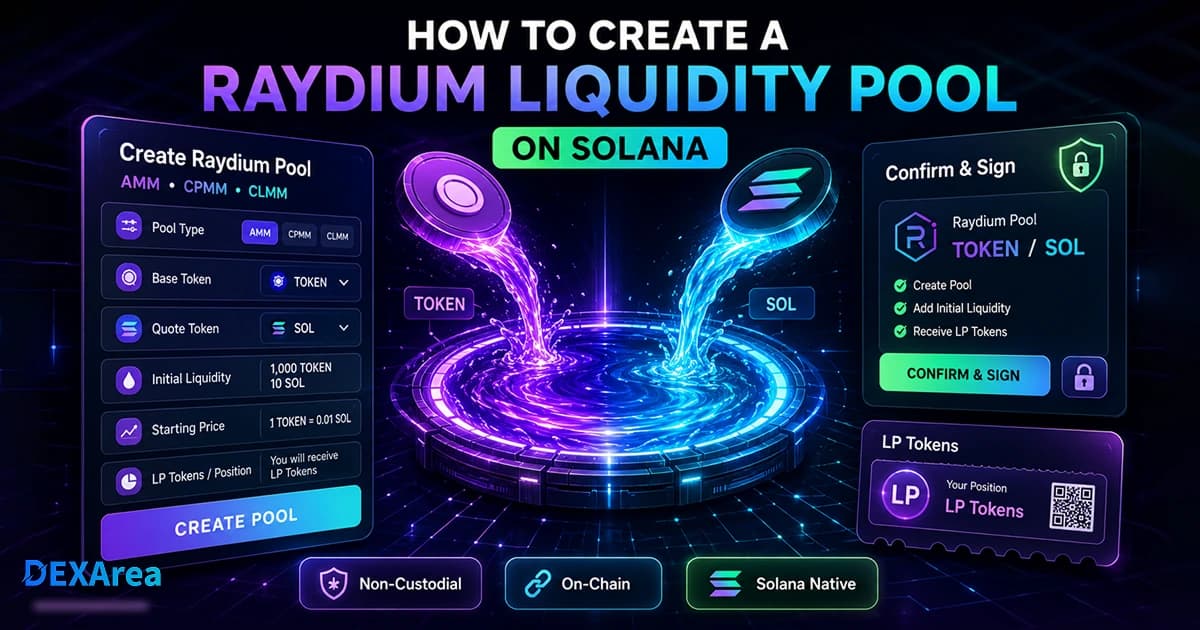
Once your token and quote asset are ready, use DEXArea's no-code flow:
Step 1: Open DEXArea Create Pool
Step 2: Connect your wallet
Connect the wallet that holds your base token. DEXArea never takes custody of your keys; you must sign each transaction. Confirm Mainnet or Devnet and verify the wallet address shown.
Step 3: Select the Raydium pool type
Choose AMM, CPMM, or CLMM. Beginners usually start with AMM or CPMM unless the team understands concentrated liquidity and range risk.
Step 4: Select your base token
Step 5: Select your quote token
Choose SOL, USDC, or another asset. The quote asset shapes how users read price and how aggregators may route flow when supported.
Step 6: Enter initial token amounts
Input how many base and quote tokens you will deposit. The ratio sets the initial implied price (see next section).
Step 7: Review price and settings
Double-check pool type, tokens, amounts, and network. For CLMM, review the price range. For CPMM, understand any transfer fee or extension behavior on your mint.
Step 8: Confirm in your wallet
Submit and sign only when everything matches your intent. Wait for confirmation, then save the transaction signature and pool address for support and analytics.
How Initial Liquidity Affects Starting Price
In AMM and CPMM pools, price follows the ratio of reserves along the constant-product curve: as one reserve decreases during a swap, the other changes so the curve invariant holds. Your seed amounts set the starting price: more quote token per unit of base token implies a higher base price in quote terms; less quote implies a lower price.
For example, seeding 1,000,000 base tokens with 10 SOL implies a different starting price than seeding the same supply with 1 SOL. The pool does not judge "fair value"; it implements the ratio you supply.
Low liquidity tends to mean high slippage on larger swaps. High liquidity reduces slippage but ties up more capital. This guide is educational, not financial advice—model scenarios and consider testing on Devnet first.
What Are Raydium LP Tokens?
In CLMM pools you often do not receive a single simple fungible LP token; positions are commonly NFT-based and tied to a range—review position details in your wallet and in the tool before signing.
Manage liquidity: Add liquidity, remove liquidity, and burn liquidity—each does something different; read the prompts before you sign.
What to Do After Creating a Raydium Pool
- Save the pool address – Store pool address and transaction IDs for your team and community.
- Verify token pair and pool type – Confirm base, quote, and AMM/CPMM/CLMM match what you intended.
- Review on supported explorers and interfaces – Confirm the pool and signature on a Solana explorer and Raydium-compatible UIs when available.
- Add liquidity if needed – Use add liquidity as the project grows.
- Remove liquidity only when you still hold withdrawal rights – Use remove liquidity when you still hold the required LP receipt or CLMM position.
- Burn liquidity only when intentional – Burn liquidity is usually irreversible; use it only when that matches your plan.
- Communicate authority status clearly – State whether mint, freeze, or update authority remains active without treating revocation as a trust guarantee. Use view token metadata and snapshot token holders when you need holder or metadata checks alongside liquidity events.
- Share only verified links – Scammers create look-alike pools; publish the canonical pool address.
Common Mistakes to Avoid
- Creating on the wrong network (use Devnet for practice).
- Using the wrong mint—always verify with view token metadata.
- Mismatched quote token versus audience expectations (SOL vs USDC).
- Unreviewed initial ratio—deposit amounts can imply a starting price that does not match your intended launch plan.
- Too little liquidity—high slippage and a poor first impression for larger swaps.
- Misunderstanding LP tokens or CLMM positions—removing liquidity and burning liquidity are different actions with different consequences. See remove liquidity versus burn liquidity.
- Unclear authority posture—communicate whether mint, freeze, or update authority remains active. Revoking authorities does not guarantee trust, but unclear authority status can confuse users.
- Confusing minting with pooling—tokens and pools are separate steps.
- Assuming pools stabilize price—they implement a curve for swaps, not eliminate market risk.
Raydium Pool Launch Checklist
- Token mint verified
- Token metadata checked (view metadata)
- Wallet holds enough base and quote tokens
- Wallet has SOL for fees (amount confirmed in wallet at send time)
- Correct Raydium pool type (AMM / CPMM / CLMM)
- Correct network (Mainnet or Devnet)
- Initial price ratio reviewed
- Mint authority plan (revoke or retain)
- Freeze authority plan (revoke or retain)
- LP token or position plan: hold, remove later if withdrawal rights remain, or burn only if that matches the project’s operational plan
- Transaction reviewed in the wallet before signing
- Pool address saved after creation
FAQ
1. What is a Raydium liquidity pool?
A Raydium pool is a Solana program that holds two assets and lets users swap between them using an AMM-style curve instead of a classic central-limit order book for that leg of execution.
Yes. DEXArea lets you connect a wallet, pick a pool type, enter amounts, and sign—no custom smart-contract code required. Start at Create Pool.
3. What do I need before creating a Raydium pool?
A minted token, wallet balances for base and quote assets, SOL for fees (see your wallet preview), a chosen pool type, planned seed amounts, and a clear authority strategy.
4. Should I pair my token with SOL or USDC?
SOL is intuitive for native Solana users; USDC gives a stable dollar reference. Match your audience and how you plan to communicate price.
In plain terms: AMM is the classic full-range constant-product experience many traders already know; CPMM is Raydium's constant-product path aligned with newer mint features where supported; CLMM concentrates liquidity in a band you choose, with more active management. Confirm current definitions in Raydium's official documentation and see Raydium pool types.
6. How does initial liquidity affect starting price?
The seed ratio defines the starting price along the curve; larger quote deposits relative to base imply a higher initial price for the base token in quote terms.
They usually represent your share of an AMM/CPMM pool; removing liquidity means returning those receipts through remove liquidity when the protocol still allows withdrawal.
8. What is a CLMM position?
In CLMM pools, liquidity is often tied to a position NFT or account record for a chosen price range. Keep access to the wallet or account that controls the position and review how the live form displays it before signing.
Yes, when you still hold the right LP receipts (or the CLMM position) and the program path allows withdrawal—use remove liquidity. If you have already burned or given up withdrawal rights, you may not withdraw the same way later.
10. Is burning liquidity the same as removing liquidity?
No. Removing liquidity withdraws underlying assets when you still hold the required LP receipt or CLMM position. Burning LP tokens or a position may remove the item used to withdraw liquidity later and is usually irreversible. It does not guarantee trust or price stability.
No. Revoking mint authority is not required to create a pool. If your planned supply is complete, revocation may be appropriate because future minting becomes unavailable in most standard cases. Revoking mint authority does not lock liquidity or guarantee trust. See revoke mint and what is mint authority.
12. Can I create a pool before a public launch?
You can test pool creation on Devnet or prepare a Mainnet pool before a public announcement. Review token pair, initial liquidity, authority settings, and wallet transaction details before sharing a pool publicly.
13. Does creating a Raydium pool guarantee trading volume?
No. A pool can create a venue for swaps when supported by relevant interfaces, but it does not guarantee demand, trading volume, price stability, liquidity depth, or project trust.
14. Is this financial advice?
No. Liquidity provision involves risks including impermanent loss and volatility. Consult qualified advisers when appropriate.
Conclusion
Creating a Raydium liquidity pool pairs your Solana token with SOL, USDC, or another asset and defines a venue where swaps may occur when supported by relevant interfaces. Choosing among AMM, CPMM, and CLMM means balancing setup complexity, how capital sits on the curve, and how much you will monitor the position. Plan seed liquidity carefully, understand LP receipts versus burns, and always verify details in your wallet before signing.
Create your Raydium pool: DEXArea Create Pool — then use add liquidity, remove liquidity, or burn liquidity as your roadmap requires.