How to Create a Solana Token Without Coding
Create an SPL token on Solana with no code: wallet setup, token settings, metadata, authorities, and post-launch steps using a non-custodial token creator.
How to Create a Solana Token Without Coding
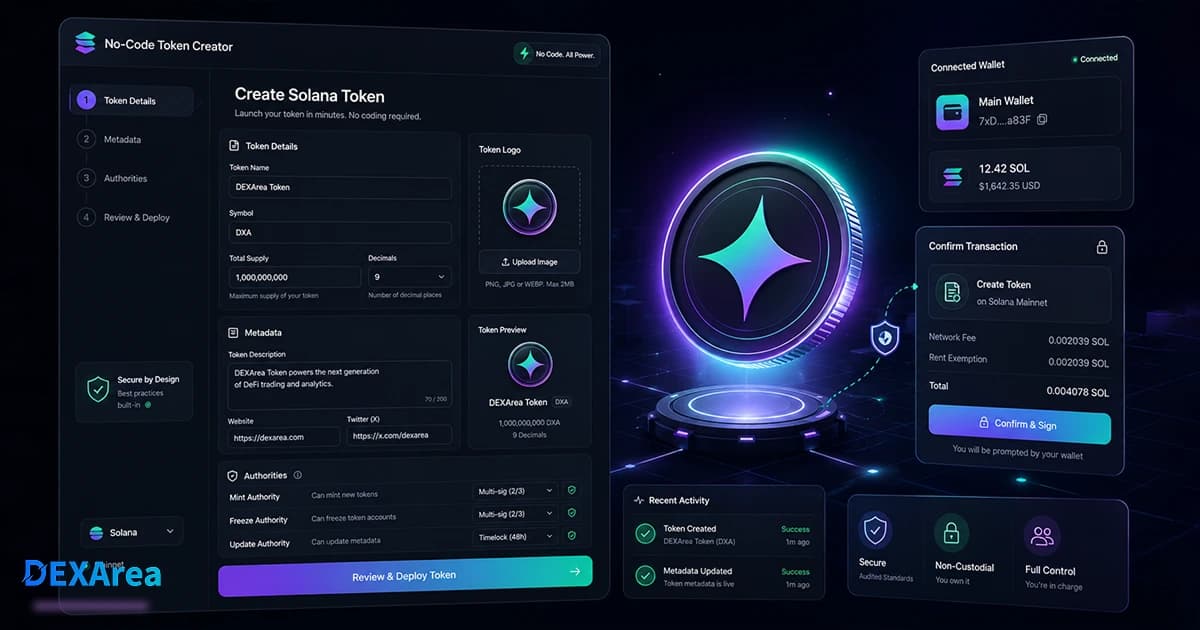
Creating a token on Solana used to mean learning Rust, setting up the Solana CLI, and writing a smart-contract program. Today you don't have to write a single line of code. A no-code Solana token creator lets you define your token's name, symbol, supply, decimals and metadata from a simple wallet-based interface. The transaction is prepared for you and you sign it from your own wallet – the tool never touches your private keys. This guide explains how to prepare for launch, what each setting means and why managing authorities matters.
TL;DR
| Topic | Summary |
|---|---|
| Can you create a Solana token without coding? | Yes. SPL tokens are based on Solana's existing token program, so you don't write a custom smart contract. A no-code tool prepares the mint transaction and you sign it from your wallet. |
| What do you need? | A Solana wallet (Phantom, Solflare, Backpack, etc.), a small amount of SOL for fees (~0.5 SOL for rent and gas), and token details such as name, symbol, decimals, supply, image and description. |
| Key settings | Name and symbol (shown in wallets), decimals (commonly 6 or 9), initial supply, off-chain metadata (logo and description), and authorities (mint, freeze and update). |
| After creation | Save the mint address; verify metadata; decide whether to revoke mint and freeze authority to build trust; plan liquidity and distribution. |
| Toolkit | DEXArea provides a non-custodial suite for creating tokens, revoking authorities, updating metadata, creating pools, adding liquidity, multisending tokens and taking snapshots. |
Can You Really Create a Solana Token Without Coding?
Absolutely. SPL tokens are digital assets built on top of Solana's existing token program. Unlike deploying a custom smart contract on other chains, creating a standard token on Solana typically involves two on-chain accounts: the mint (which defines supply, decimals and authorities) and the metadata account (which points to off-chain data such as logo and description). Because the token program already exists, you don't need to write code or deploy your own program.
createMint, initializeMetadata and related instructions with your chosen parameters. When you click Create Token, your wallet asks you to sign the transaction; your private keys stay in your wallet. The result is a standard SPL token that any wallet, DEX or protocol can recognize.Why wallet-based signing matters: Mint accounts can store a mint authority and freeze authority. If a platform holds your keys, it could mint additional tokens or freeze accounts later. DEXArea is non-custodial: the tool creates the transaction but cannot sign on your behalf. Only you control the authorities and can revoke them when ready.
What You Need Before Creating a Solana Token
Before clicking "Create," gather the following:
-
A Solana wallet – Phantom, Solflare, Backpack or any wallet that supports SPL tokens. Make sure you're connected to the correct network (Devnet for testing or Mainnet for real tokens).
-
Some SOL for fees and rent – Each token account requires a small deposit (~0.002 SOL), and creating a mint plus metadata typically costs around 0.5 SOL in total. This covers network rent and transaction fees. The deposit is returned if you later close unused accounts.
-
Token details – Decide on a name and symbol (up to 32 and 8 characters respectively). These will appear in wallets and explorers.
-
Decimals – Choose how many decimal places each token can have. Most SPL tokens use 9 decimals; stablecoins and DeFi tokens often use 6.
-
Initial supply – The total number of tokens to mint at launch. Common practice is to create between 1 million and 10 billion tokens, reserving some for liquidity, airdrops and rewards.
-
Logo and image file – A square PNG or SVG that will represent your token in wallets and on DEX screens. Off-chain metadata stores images.
-
Description and metadata – A brief description or purpose of your token. Metadata is stored off-chain via IPFS and referenced by a URI.
-
Authority plan – Decide who will hold the mint, freeze and update authorities and whether you intend to revoke them later.
-
Launch plan – Think about liquidity (will you create a pool?), distribution (airdrop, sale or reward program), and community engagement.
Step-by-Step: Create a Solana Token Without Coding
This section walks through the creation process using the DEXArea Token Creator. If you want to follow along, open the tool in a new tab:
Step 1 – Connect Your Wallet
Click Connect Wallet and choose your preferred wallet (Phantom, Solflare, Backpack, etc.). The site uses the standard Solana wallet adapter to request connection. It does not have access to your private key. You'll see your public address and network once connected. Ensure you're on Devnet if testing or Mainnet for production.
Step 2 – Enter Token Details
Fill in the token form:
- Name – Up to 32 characters; this appears on DEX listings and in wallets.
- Symbol – Up to 8 uppercase letters or numbers.
- Decimals – Choose 6 or 9 decimals (6 is common for stablecoins and simpler maths; 9 allows finer granularity).
- Supply – The total number of tokens you want to mint initially.
- Image – Upload your logo; it will be hosted on IPFS.
- Description – A short sentence explaining the token's purpose. This is stored in the metadata and shown by explorers.
Optional fields allow you to add social links (website, X/Twitter, Telegram, Discord) to your metadata.
Step 3 – Upload Metadata
When you submit the form, DEXArea uploads your image and description to IPFS and creates a metadata JSON file with your token name, symbol, decimals and URI. The metadata structure follows Metaplex's token metadata standard: on-chain fields store the name, symbol and decimals, while off-chain fields store images and detailed descriptions.
Step 4 – Review Token Authorities
Before finalizing, review the authority settings:
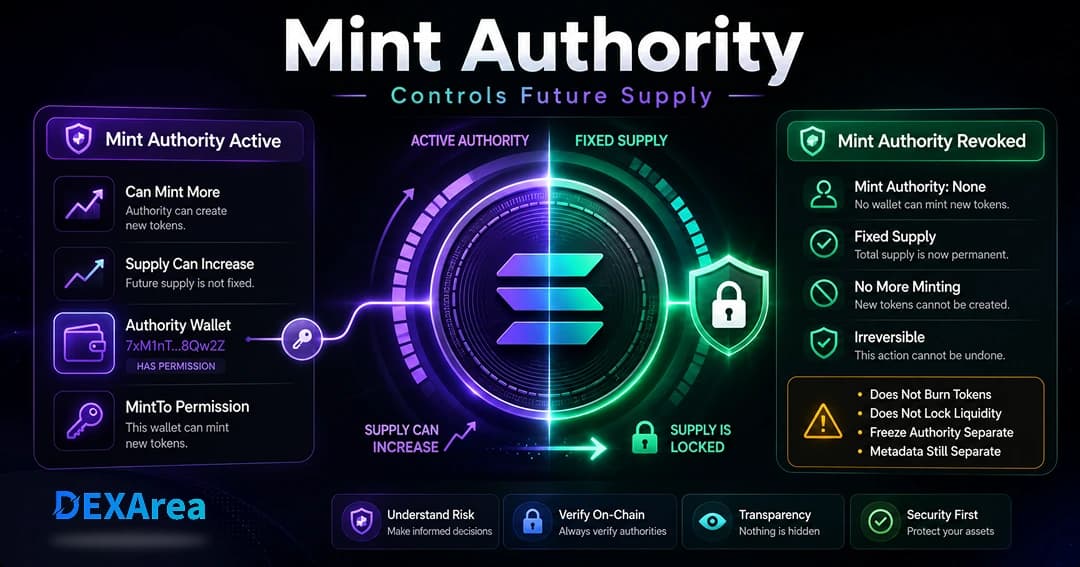
- Mint authority – Controls whether additional tokens can be minted. Initially set to your wallet. If you plan a fixed supply, consider revoking it after launch.
- Freeze authority – Allows freezing/unfreezing token accounts. Used by regulated tokens to stop transfers but can be abused. For trustless tokens, revoke this authority.
- Update authority – Allows changing metadata (name, symbol, logo) via the metadata program. If you want to adjust branding later, keep it; if not, you can revoke it to make metadata immutable.
None permanently removes that role. You can also decide to revoke authorities later using the Revoke Mint Authority, Revoke Freeze Authority and Make Token Immutable tools.Step 5 – Confirm in Your Wallet
Click Create Token. Your wallet will open a transaction summary showing the instructions (create mint, allocate supply, create metadata). Verify that the network (Devnet or Mainnet) matches your intention, that the token details are correct and that the fee looks reasonable. If everything looks good, approve the transaction. Within a few seconds, you should see a confirmation, and your wallet will display the new token.
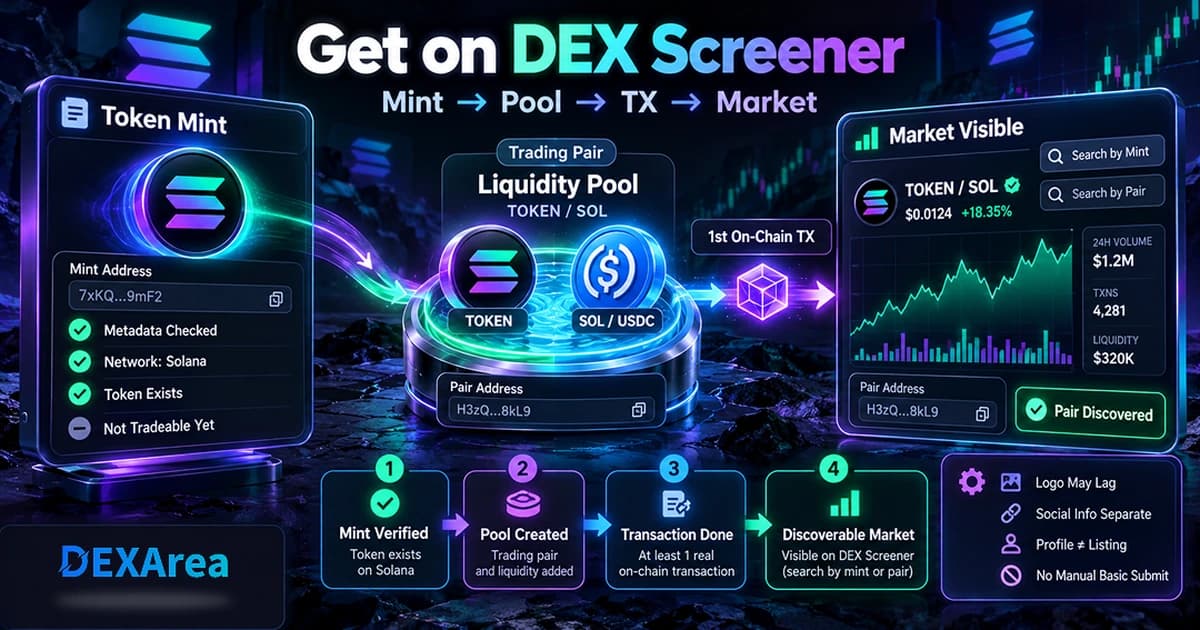
Step 6 – Save Your Mint Address
CTA: Once your token is live, consider exploring additional DEXArea tools to manage it. Create a pool, add liquidity, mint or burn tokens, freeze/unfreeze accounts, or snapshot holders directly from the platform.
No-Code vs CLI vs Custom Program
There are three ways to create a token on Solana. Which is right for you?
| Method | Best for | Pros | Cons |
|---|---|---|---|
| No-code token creator | Entrepreneurs, creators and projects launching standard tokens | Fast, user-friendly interface; wallet-based signing; no development required | Limited to standard SPL features; cannot implement custom logic |
| Solana CLI | Developers comfortable with the command line | Fine-grained control over token parameters; free aside from network fees | Requires installing Rust and Solana CLI; manual key management; no UI |
| Custom program | Protocols needing custom behaviour (e.g. transfer fees, dynamic supply) | Unlimited flexibility via Rust smart contracts | Complex and expensive development; security risks; requires audits |
For most fungible token launches, a no-code tool is sufficient. Use the CLI if you need deeper control, and only commission a custom program when your project demands bespoke on-chain logic.
Important Token Settings Explained
Token Name & Symbol
The name is your token's full display label (e.g., "Example Token"), and the symbol is its ticker (e.g., EXMP). These fields are stored on-chain and appear in wallets and explorers. Symbols are limited to 8 characters; names to 32.
Decimals
Decimals define how divisible your token is. SPL tokens often use 9 decimals (1 token = 1 billion base units) or 6 decimals for stablecoins and DeFi tokens. Choose 6 decimals if you want simple amounts (1.00, 2.50); choose 9 if you need finer granularity. Once set, decimals cannot be changed.
Initial Supply
This is the total number of tokens minted at creation. Consider how many tokens you'll allocate to liquidity pools, airdrops, team allocations and reserves. Minting too few may hinder liquidity; minting too many without a plan may look unserious.
Metadata
Metadata provides human-readable information about your token: the name, symbol and decimals (stored on-chain) and the image, description and external links (stored off-chain via a metadata URI). Good metadata helps wallets and explorers display your token correctly. You can update metadata later if you hold the update authority.
Mint Authority
None, permanently disabling further minting.Freeze Authority
The freeze authority can freeze or thaw individual token accounts, preventing transfers. Stablecoins and regulated assets may keep this authority; for community tokens it's often revoked to ensure holders can always transfer. A freeze authority held by a malicious actor could create a "honeypot" where buyers cannot sell.
Update Authority
The update authority (part of the Metaplex Token Metadata program) allows updating your token's name, symbol or image. Keep it if you foresee branding changes; revoke it to make your token immutable. This only applies when your token uses the metadata standard.
What to Do After Creating Your Solana Token
Launching a token is just the first step. Consider the following next actions:
-
Verify Metadata – Use the View Metadata tool to confirm your name, symbol, image and description appear as expected.
-
Revoke Authorities – If you intend to lock your supply or build community trust, use Revoke Mint Authority and Revoke Freeze Authority. Once you're confident the metadata is final, use Make Token Immutable to revoke the update authority.
-
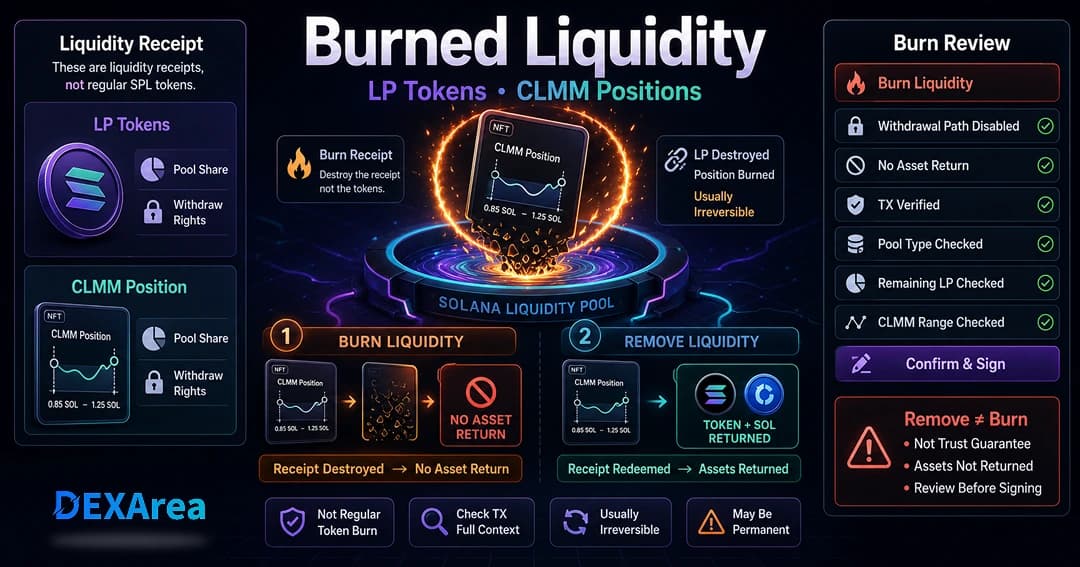
Create a Liquidity Pool – To make your token tradable, create a pool on Raydium or another DEX. DEXArea offers a Create Pool tool that sets up the pair and issues LP tokens.
-
Add Liquidity – Supply your token and SOL (or another token) to the pool using the Add Liquidity tool. A healthy pool improves price stability and attracts traders.
-
Distribute Tokens – Use the Token Multisender to airdrop tokens to early supporters or participants.
-
Take Holder Snapshots – Later, use Snapshot Token to record current holders for governance, airdrops or rewards.
-
Manage Supply – If you need to mint or burn tokens post-launch, DEXArea provides mint and burn tools.
-
Communicate – Announce your launch on social channels. Provide your mint address and relevant links so users can verify authenticity and liquidity.
Common Mistakes to Avoid
-
Choosing inappropriate decimals – Six decimals are easiest to work with. Nine decimals are common but can be confusing for non-technical users.
-
Minting an enormous supply without a plan – Huge numbers look unprofessional. Align supply with tokenomics and distribution strategy.
-
Failing to save the mint address – Without the mint address you can't update metadata, create pools or revoke authorities. Record it securely.
-
Leaving mint or freeze authority active unintentionally – If you intend a fixed supply or a trustless token, revoke these authorities. Otherwise you risk accusations of rug-pulling.
-
Using a low-quality image – A poor logo harms credibility. Use a clear, square image and ensure your metadata URI is permanent.
-
Launching without liquidity – Users cannot trade your token until a liquidity pool exists. Plan to allocate tokens and SOL for liquidity.
-
Not testing on Devnet – Run your entire flow on Devnet first to ensure your wallet, metadata and authority revocations work correctly.
-
Sending tokens to wrong addresses – Transactions are irreversible. Double-check recipient addresses and networks.
-
Confusing token creation with liquidity pool creation – Creating a token does not create a market. You must create a pool separately.
Security Checklist Before Launch
- Wallet connected to the correct network (Devnet/Mainnet)
- Token name, symbol and decimals reviewed
- Total supply reviewed
- Image and metadata uploaded correctly
- Mint authority decision made (retain or revoke)
- Freeze authority decision made (retain or revoke)
- Update authority decision made (retain or revoke)
- Liquidity plan prepared (pool creation and funding)
- Distribution plan prepared (airdrop, sale, rewards)
- No private keys shared; confirm transactions in wallet
- Full transaction reviewed before signing
Frequently Asked Questions
1. Can I create a Solana token without coding?
Yes. The SPL token program already exists, so you only need to create a mint and metadata. A no-code tool prepares the transaction and your wallet signs it.
2. Do I need to deploy a custom smart contract?
No. Standard SPL tokens use the pre-deployed token program. You do not deploy a new program unless you need custom logic.
3. How much SOL do I need to create a token?
Creating a mint and metadata requires a rent deposit (~0.002 SOL per account) and transaction fees. Budget about 0.5 SOL to cover everything.
4. What is an SPL token?
SPL tokens are custom digital assets built on Solana's token program. They can represent stablecoins, governance tokens, game currencies or NFTs.
5. What is the difference between SOL and SPL tokens?
SOL is Solana's native coin used for fees and staking. SPL tokens are created by users and developers using the token program.
Yes, if you keep the update authority. You can use the Update Token Metadata tool to change the logo or description. Once you revoke the update authority or make the token immutable, the metadata becomes permanent.
7. Should I revoke mint authority?
If you want a fixed supply, revoke it after minting. Keeping mint authority allows future token issuance but poses a risk if compromised.
8. Should I revoke freeze authority?
For community-driven tokens, revoking freeze authority prevents anyone from freezing holders' accounts and builds trust. Regulated tokens may retain it for compliance.
Yes. Use Create Pool to set up a trading pair and Add Liquidity to fund it. This makes your token tradable on DEXs.
10. Is a no-code Solana token creator safe?
Yes, provided it is non-custodial. DEXArea prepares the transaction but never accesses your private keys; your wallet signs every instruction.
11. Can I create a token on Devnet first?
Definitely. Devnet is the recommended environment for testing. Once you're satisfied with your flow, switch your wallet to Mainnet and repeat.
Disclaimer and Trust Statement
This guide is for educational purposes only and is not financial advice. Creating a token does not guarantee any value – utility, adoption and market dynamics determine price. Always review every transaction in your wallet before signing, double-check addresses and amounts, and test important flows on Devnet first.
DEXArea is non-custodial. Your wallet signs transactions, and your private keys stay in your wallet. You control your mint, freeze and update authorities and can revoke them at any time.