How to Revoke Mint Authority on Solana
Revoke mint authority on Solana safely: what it fixes, when to do it, how it differs from freeze and metadata authority, and a step-by-step DEXArea workflow.
How to Revoke Mint Authority on Solana
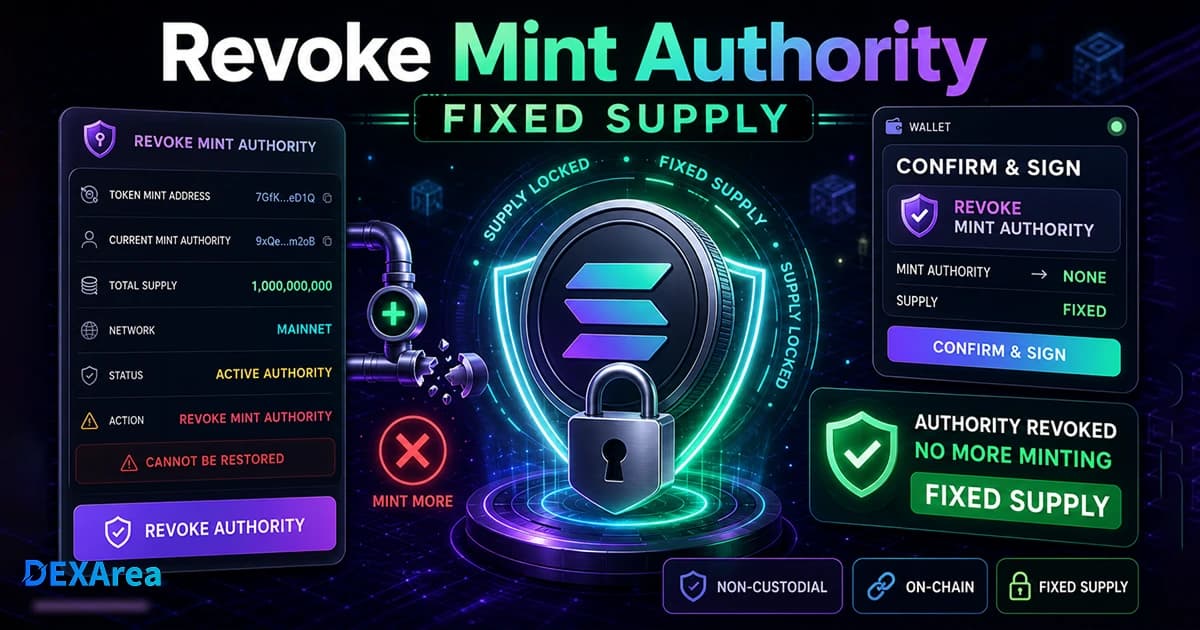
Releasing a token into the wild is an exercise in trust. Mint authority determines who can create more units of a token, and as long as that authority exists, the supply is technically unlimited. Revoking mint authority removes that privilege. For projects launching tokens on Solana, pulling back this power is a common step toward fixed supply and increased confidence. However, it's a serious, usually irreversible action that demands careful preparation. This guide explains what mint authority is, why and when you might want to revoke it, how it differs from freeze authority and immutability, and provides a safe, step-by-step workflow for using the DEXArea Revoke Mint Authority tool.
TL;DR
- Mint authority controls whether new tokens can be minted. When this field is set to an address, that account can create additional supply. When it is set to
None, no one can mint more tokens. - Revoking mint authority usually fixes the supply. Once the mint authority is set to
None, it cannot be restored. The supply becomes capped at whatever quantity currently exists. - Only revoke after all planned minting—team allocations, treasury, liquidity and airdrops—is complete. You cannot mint more after revocation.
- Mint authority is different from freeze authority. Freeze authority lets an account freeze or thaw individual token accounts; revoking mint authority does not affect freezing. Token metadata/update authority is another separate role.
- Revoking mint authority does not automatically create liquidity, lock tokens, or guarantee a safe launch. It's one part of a broader security checklist.
- DEXArea's Revoke Mint Authority tool is non-custodial. You connect a wallet that controls the mint, verify the mint address, sign the transaction, and the tool never holds your keys.
- Always verify you are acting on the correct mint address and network. Keep a small amount of SOL to cover transaction fees.
What Is Mint Authority on Solana?
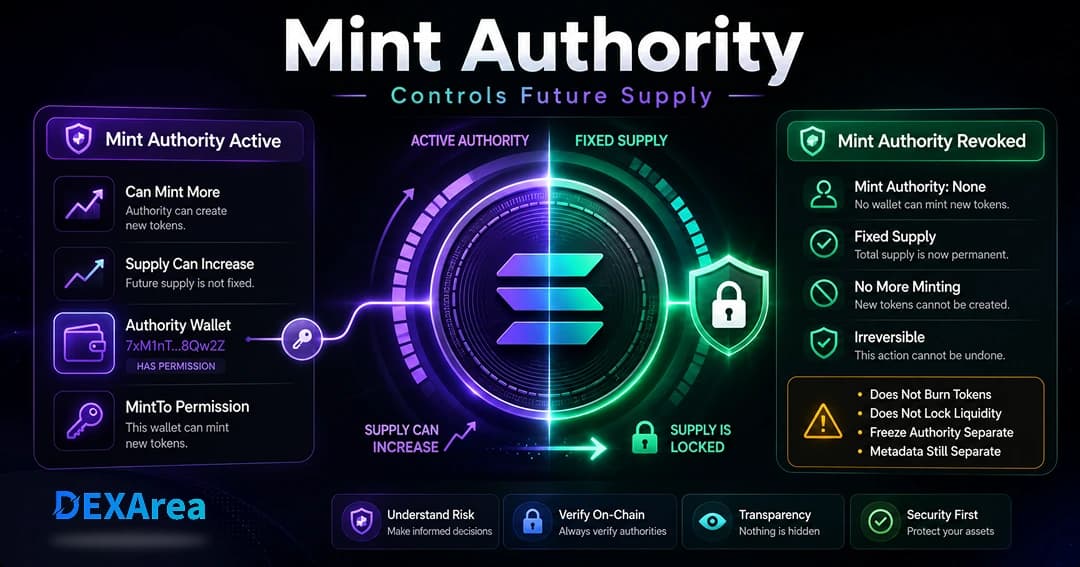
mint_authority field specifies who can create additional tokens. There are two states:-
Address set: When a wallet or program is listed as mint authority, that account can mint more tokens at any time. Stablecoins like USDC and governance tokens with ongoing emissions keep a mint authority to adjust supply as needed.
-
None: When themint_authorityis set toNone, no one can mint more tokens. This configuration yields a fixed-supply token. NFTs (supply of one) and meme coins that mint their maximum supply at launch commonly revoke mint authority.
Mint authority is independent from other roles. Freeze authority controls the ability to freeze (and thaw) specific token accounts. The update or metadata authority controls metadata changes (name, symbol, URI). You can revoke or transfer these authorities separately. Removing mint authority fixes supply but does not prevent the update authority from editing metadata or freeze authority from freezing accounts.
Why Token Creators Revoke Mint Authority
Revoking mint authority is primarily about trust and scarcity. Key reasons teams choose to do this:
- Fixed supply: Without an active mint authority, no new tokens can be created, which caps the supply and simplifies tokenomics.
- Reduce inflation risk: Keeping mint authority active gives the holder the power to inflate supply. Revocation signals that inflation will not occur unexpectedly.
- Increase holder confidence: For community tokens or meme coins, revoking mint authority reassures buyers that the team cannot rug-pull by secretly minting more tokens later.
- Launch preparation: Many projects revoke mint authority before or soon after launching on a decentralized exchange (DEX) to assure traders the supply is fixed.
- Liquidity pool support: Liquidity providers want assurance that supply will not suddenly increase. Revoking mint authority is often a prerequisite for listing on certain platforms.
- Transparency: Since mint account data is public, a revoked mint authority is visible on explorers. It's an easy way to demonstrate commitment to scarcity.
What Happens When You Revoke Mint Authority?
mint_authority field in the mint account is set to None. The consequences are:- Supply becomes fixed: No one can mint additional tokens. The existing supply is locked at its current amount. Burns (reducing supply) are still possible if burn instructions are executed.
- Previous authority loses minting power: The wallet or program that previously held mint authority cannot create more tokens. They retain any tokens they already hold, but cannot increase supply.
- Existing tokens and accounts are unaffected: Token holders keep their tokens. Liquidity pools and token accounts continue to function normally. Transfers, swaps and burns still work.
- Other authorities remain: Freeze authority and update/metadata authority are unaffected. If those authorities exist, they can still freeze accounts or modify metadata.
None, it cannot be restored. Confirm that your final supply has been minted and all allocations are distributed before proceeding.Revoke Mint Authority vs Revoke Freeze Authority
Solana tokens can have multiple authorities. Understanding the difference between revoking mint authority and freeze authority helps avoid confusion:
| Mint authority | Freeze authority | |
|---|---|---|
| Purpose | Controls whether new tokens can be minted | Allows freezing or thawing specific token accounts |
| Effect of revocation | Fixes the supply; no one can mint more tokens | Prevents anyone from freezing accounts in the future |
| Focus | Token supply and scarcity | Account-level transfer restrictions |
Revoke Mint Authority vs Make Token Immutable
Token immutability in the context of Solana often refers to the metadata update authority. When metadata is made immutable, the token's name, symbol and URI can no longer be changed. This differs from mint authority:
- Mint authority: Governs supply. Revoking it stops new tokens from being minted.
- Metadata/update authority: Governs metadata changes. Making a token immutable stops any metadata modifications.
- Freeze authority: Governs account freezing.
When Should You Revoke Mint Authority?
Timing matters. Revoking too early can prevent legitimate minting, while revoking too late can erode trust. Consider these scenarios:
Before Public Launch
If your project plans a fixed supply from the start, revoke mint authority before launching the token publicly. This signals to early buyers that the supply is capped and no hidden inflation will occur. Projects that mint the entire supply upfront—especially meme coins—often choose this option.
After Final Minting
Teams with structured tokenomics may need to mint tokens for the team, treasury, community incentives, airdrops or liquidity. In this case, keep mint authority active until all planned tokens are minted. Once the distribution is complete and verified, revoke mint authority to lock the supply.
After Creating Initial Liquidity
Some teams mint the entire supply, seed a liquidity pool and then revoke mint authority as part of their launch checklist. This gives liquidity providers assurance that the supply cannot suddenly increase after liquidity is added.
Never, If More Minting Is Required
Certain projects intentionally maintain mint authority. Stablecoins, governance tokens with emissions and protocols that implement inflationary mechanisms rely on active mint authority to adjust supply. Do not revoke mint authority if your token economics require future minting or burning as part of their design.
What You Need Before Revoking Mint Authority
Preparation ensures the process goes smoothly. Use this checklist to gather everything needed before initiating a revocation:
- Correct mint address: Copy the exact token mint address you intend to modify. Do not rely on a token's symbol or name, as duplicates exist. You can confirm details via View token metadata.
- Authority wallet: Use the wallet currently listed as mint authority. If you control the mint through a multisig, ensure you have enough signer approvals.
- Correct network: Verify whether your token is on Mainnet, Devnet or Testnet. Revoking on the wrong network has no effect on the real token.
- Supply reviewed: Confirm that the total supply matches your intended cap. Check team, treasury and incentive allocations.
- Final minting completed: Mint any remaining tokens for your launch plan, including liquidity pool allocations.
- Distribution plan: Decide how and when to distribute minted tokens (use Token multisender to send tokens to many addresses).
- Liquidity plan: Determine whether you will create a pool and add liquidity before or after revocation.
- SOL for fees: Keep enough SOL in your wallet to pay transaction fees.
- Understanding of permanence: Recognize that revoking mint authority is typically irreversible.
Step-by-Step: How to Revoke Mint Authority on Solana
You can revoke mint authority manually via command-line tools, but DEXArea simplifies the process. Follow these steps for a smooth, safe experience:
Step 1: Open the DEXArea Revoke Mint Authority Tool
Step 2: Connect the Authority Wallet
Click Connect Wallet and choose the wallet that currently holds mint authority. Supported wallets include Phantom, Solflare and Ledger via WalletConnect. DEXArea never has access to your private keys. If you connect a wallet that is not the current authority, the transaction will fail.
Step 3: Select or Paste the Token Mint Address
Enter the exact mint address of your token. Avoid selecting a token by name alone, because multiple tokens can share a name or symbol. Double-check the address against your records and explorers.
Step 4: Review Current Token Information
Step 5: Confirm You No Longer Need to Mint More Tokens
Pause here. Ensure that the final supply is correct. If you still need to mint tokens for airdrops, treasuries or liquidity, do not proceed. Remember: once you revoke mint authority, there is no going back.
Step 6: Sign the Revoke Transaction
set_authority instruction to the SPL Token program, setting mint_authority to None. After confirmation on the blockchain, the supply becomes fixed.Step 7: Verify Mint Authority Was Revoked
None). Optionally, copy the transaction signature and look it up on a Solana explorer. You can also use View token metadata to confirm that the mint_authority field is empty.What to Do After Revoking Mint Authority
Revocation is just one step in a broader launch and security plan. After finishing, consider the following:
- Verify authority status – Confirm that mint authority is
Noneand freeze authority, if any, matches your intention. - Revoke freeze authority (optional) – Use Revoke freeze authority if you want to prevent freezing altogether.
- Make metadata immutable (optional) – Use Make token immutable when name, symbol and URI are final.
- Create or manage liquidity – Create a pool and add liquidity.
- Distribute tokens – Use Token multisender or manual transfers.
- Snapshot holders – Use Snapshot token holders for governance or future airdrops.
- Communicate transparently – Share the transaction signature and explain that mint authority has been revoked.
Common Mistakes to Avoid
- Revoking too early – If you haven't minted all needed tokens, you cannot mint more after revocation.
- Using the wrong wallet – Only the current mint authority can revoke itself.
- Wrong token mint – Double-check addresses; duplicates exist.
- Mixing up authorities – Mint, freeze and metadata authorities are separate.
- Assuming it locks metadata or liquidity – Manage those separately.
- Insufficient SOL – Keep enough SOL for fees.
- Wrong network – Devnet actions do not affect Mainnet tokens.
- Not saving the transaction signature – Record it for audits and community updates.
- Acting without understanding permanence – Revocation is generally irreversible.
Security and Trust Checklist
- Mint address verified
- Authority wallet connected
- Correct network selected (Mainnet vs Devnet)
- Current supply reviewed
- Final supply confirmed (team, treasury, marketing, liquidity, airdrops)
- Distribution plan reviewed
- Liquidity plan reviewed
- Permanence acknowledged
- Freeze authority reviewed
- Metadata authority reviewed
- Transaction reviewed in wallet before signing
- Signature saved for transparency
Troubleshooting: Why Can't I Revoke Mint Authority?
- Wrong wallet – Only the account listed as mint authority can revoke itself.
- Wrong mint address – Verify the address on an explorer.
- Wrong network – Mainnet and Devnet are separate.
- Authority already revoked – If
mint_authorityis alreadyNone, nothing changes. - Insufficient SOL – Keep a small balance for fees.
- Wallet rejected the transaction – Reconnect and try again if the prompt looks wrong.
- RPC/network issues – Retry during congestion.
- Unsupported token configuration – DEXArea primarily supports standard SPL tokens.
FAQ
It's an optional field in the mint account that specifies which address can create more tokens. If it's set to
None, no additional tokens can be minted and supply becomes fixed.It sets the
mint_authority field to None, preventing any further minting. The supply becomes capped at its current amount. Existing tokens remain transferable and burnable.Yes. Once the mint authority is
None, the token's maximum supply is whatever currently exists.No. The SPL Token program does not support restoring mint authority once it's set to
None.5. Should I revoke mint authority before launching a token?
If your token is meant to have a fixed supply and you've minted all planned tokens, revoking before launch can increase trust. If you need to mint more later, wait until minting is complete.
6. Should I revoke mint authority before creating liquidity?
Many teams mint supply, seed a pool, then revoke mint authority so liquidity providers see a capped supply.
7. Is mint authority the same as freeze authority?
No. Mint authority controls supply; freeze authority controls the ability to freeze token accounts.
8. Does revoking mint authority lock liquidity or token transfers?
No. Tokens remain fully transferable.
No. Use Make token immutable to lock metadata.
10. Can I revoke mint authority without coding?
Yes. DEXArea provides a non-custodial web tool; you need the correct wallet and mint address.
11. Why can't I revoke mint authority?
Common reasons include wrong wallet, wrong mint, insufficient SOL, or authority already revoked.
12. Is revoking mint authority financial advice?
No. This guide is educational. Consult professionals for legal and tokenomics decisions.
Disclaimer
This guide is for educational purposes only and is not financial advice. Revoking mint authority is usually permanent and can affect your token launch plan. Always review every transaction in your wallet before signing, and test important flows on Devnet when possible. DEXArea is non-custodial: your wallet signs transactions, and your private keys stay in your wallet.