What Does LP Burned Mean on Solana?
LP burned means liquidity-provider tokens were destroyed. See what burned liquidity means on Solana and how it differs from removing liquidity.
What Does Burned Liquidity Mean on Solana?
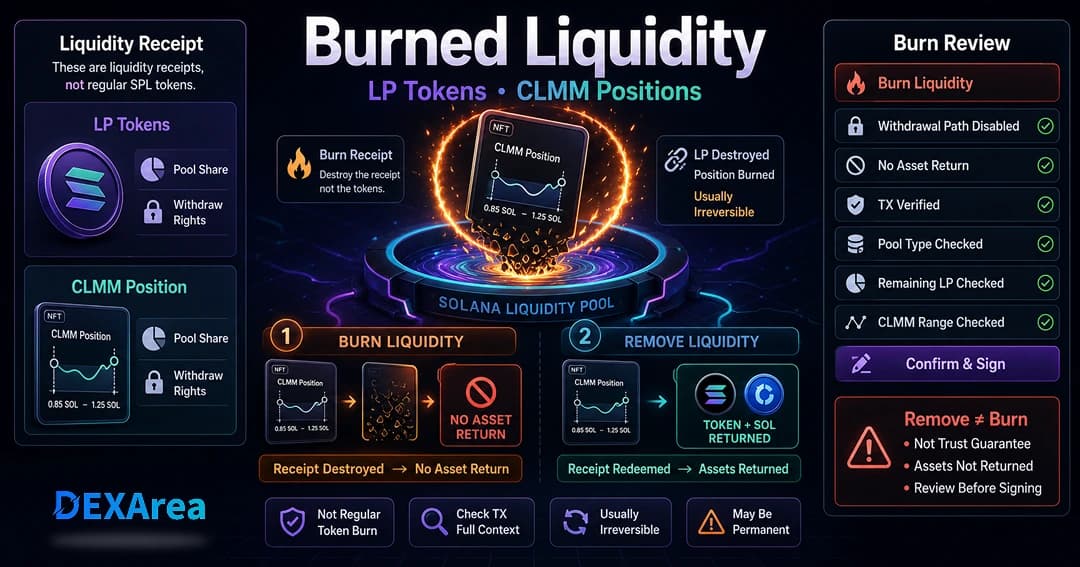
When people say burned liquidity, they usually mean that LP tokens or a CLMM position item connected to a liquidity pool were destroyed through a burn action or protocol-specific burn workflow. On Solana, the phrase often appears around Raydium pools: AMM and CPMM pools commonly use fungible LP tokens, while concentrated-liquidity pools use position-specific items such as NFTs. Burning those receipts is different from burning a regular SPL token, and burn liquidity vs remove liquidity leads to very different outcomes. A standalone burn typically does not return the underlying pool assets and is usually irreversible, so it may reduce or remove a withdrawal path. It also does not guarantee trust, price stability, demand, trading volume, liquidity depth, or project quality.
The wording can be confusing because a normal remove-liquidity transaction may also burn LP tokens as part of redeeming them. The important question is not only, "Were LP tokens burned?" It is, "What transaction burned them, and were the underlying assets returned?"
Ready to act? Use DEXArea Burn Liquidity when you intentionally want to destroy supported LP tokens or a position item. Use Remove Liquidity when you want the underlying pool assets returned to your wallet, where supported.
TL;DR
- Burned liquidity usually means LP tokens or a CLMM position item connected to a liquidity pool were destroyed.
- Burning liquidity is different from removing liquidity.
- A standalone burn typically does not return the underlying pool assets.
- Burning regular SPL tokens is different from burning LP tokens or CLMM positions.
- Burning liquidity may affect withdrawal ability and is usually irreversible.
- Burned liquidity does not guarantee trust, price stability, demand, trading volume, liquidity depth, or project quality.
- If you want underlying assets back, review Remove Liquidity instead of Burn Liquidity.
Burned Liquidity Meaning
Burned liquidity usually means that a receipt representing liquidity ownership was destroyed. Depending on the pool, that receipt may be:
- fungible LP tokens representing a proportional share of an AMM or CPMM pool;
- a CLMM position NFT or another position-specific item;
- a receipt or position item handled by a protocol-specific burn workflow;
The receipt matters because it is commonly connected to the right to manage or withdraw a liquidity position. Destroying it may reduce or remove the holder's ability to use that withdrawal path later.
Definition: Burned liquidity means that the liquidity receipt or position item was destroyed. It may reduce or remove the holder's ability to withdraw liquidity later, but the exact effect depends on the pool type, burn amount, transaction type, and pool structure.
A standalone LP-token burn typically reduces the holder's LP-token balance and the LP mint's supply without sending the underlying pool assets back through that burn instruction. By contrast, a protocol withdrawal can consume or burn LP tokens while simultaneously returning the holder's proportional share of the pool.
This is why a blockchain explorer entry that contains a token burn instruction is not enough by itself to explain what happened. You also need to inspect the full transaction and the pool accounts involved.
Simple example
LP Tokens vs Regular SPL Tokens
LP tokens and regular project tokens can both be implemented using Solana token programs, but they represent different things.
| Item | What it represents | What a burn changes |
|---|---|---|
| Regular SPL token | Units of a token mint held in token accounts | Reduces the burned account balance and the mint's total supply by the burned amount |
| LP token | A receipt or accounting share for a liquidity pool | Reduces or removes the holder's pool-share receipt and may affect withdrawal rights |
| CLMM position item | Ownership and configuration of a specific concentrated-liquidity position | May affect control of that position, including its liquidity, fees, and selected price range |
Burning regular SPL token units can reduce that token mint's supply. Burning LP tokens does not by itself burn the underlying project token or paired asset held by the pool. It also does not:
- revoke mint authority;
- revoke freeze authority;
- make token metadata immutable;
- prove that no other wallet controls LP tokens or positions;
- explain whether assets were withdrawn in another transaction.
Burn Liquidity vs Remove Liquidity
This distinction matters more than the wording used by a dashboard, project announcement, or explorer label.
| Action | What it does | Do you usually receive underlying assets? | When users look for it |
|---|---|---|---|
| Remove Liquidity | Redeems a pool share or reduces a position and withdraws underlying pool assets when withdrawal rights remain | Yes, where supported | When the user wants assets back |
| Burn Liquidity | Destroys LP tokens or a supported position item without redeeming the underlying assets through that burn action | Typically no | When the user intentionally wants to destroy the liquidity receipt or position |
| Lock Liquidity | Restricts access under a protocol, contract, or locker mechanism | Depends on the lock rules | When a project uses a specific lock workflow rather than a literal token burn |
Why the transaction context matters
Raydium's CPMM documentation explains that removing liquidity burns LP tokens and returns the underlying assets. So the presence of an LP-token burn does not automatically mean someone used a standalone burn-liquidity action. The same token receipt can be burned in two very different contexts:
- Redemption or withdrawal: LP tokens are consumed, and underlying assets are returned.
- Standalone destruction: LP tokens are destroyed, and the burn action itself does not redeem the underlying assets.
That distinction is easy to miss because the word burn can describe both receipt redemption and standalone receipt destruction. Check the complete transaction rather than relying on the label alone.
Important: Burning liquidity is not the same as removing liquidity. If you want the underlying pool assets back in your wallet, review Remove Liquidity instead of Burn Liquidity.
Burn Liquidity vs Lock Liquidity
Burning and locking can both restrict a holder's future control, but the mechanics are not interchangeable.
A literal token burn decreases the balance and supply of the burned receipt token. A lock usually transfers or assigns control to a locker program under defined rules. Some lock systems issue another receipt that preserves a right, such as the right to claim fees.
Raydium's Burn & Earn workflow illustrates the terminology problem. Its official documentation states that LP tokens and position NFTs are technically locked rather than burned, and the user receives a fee-key NFT. That is different from directly burning fungible LP tokens with a token-program burn instruction.
When reviewing a claim such as "liquidity burned," determine which mechanism was used:
- a literal LP-token burn;
- a pool withdrawal that burned LP tokens during redemption;
- a locker program;
- a transfer to another wallet or program;
- a CLMM-specific position action.
Labels provide context, but the on-chain effects determine what actually happened.
Raydium LP Tokens and CLMM Positions
AMM and CPMM liquidity
AMM and CPMM pools commonly use fungible LP tokens. When liquidity is added, LP tokens represent a proportional share of the pool. A wallet may hold all or only part of the LP-token supply.
Burning some LP tokens therefore tells you the amount of receipt supply destroyed, not automatically the status of every liquidity share connected to the pool. Other holders may still own LP tokens, and the same token pair may have liquidity in other pools.
CLMM liquidity
A concentrated-liquidity market maker uses position-specific liquidity rather than one fungible receipt shared across all positions. A CLMM position commonly includes:
- a selected lower and upper price boundary;
- a defined amount of liquidity;
- accrued fees or rewards;
- a position NFT or similar ownership item.
Raydium documents each CLMM position as an NFT that controls the position's liquidity and uncollected fees. Losing, transferring, or burning that ownership item can therefore have consequences that differ from burning fungible LP tokens.
A CLMM position action should be reviewed in the context of the protocol workflow. Do not assume that a generic NFT burn, a position close, a liquidity decrease, and a protocol lock all produce the same result. Where a tool supports CLMM actions, verify the position mint, pool, price range, position size, and expected outcome before signing.
Does Burned Liquidity Mean Liquidity Is Locked Forever?
Not always.
A burn may remove one holder's ability to withdraw through the burned LP tokens or position item. That does not automatically establish that every unit of liquidity for a token pair is inaccessible.
The practical effect depends on several questions:
- Was the entire LP-token balance burned or only part of it?
- How much of the LP mint supply did that balance represent?
- Do other wallets still hold LP tokens?
- Are there other CLMM positions in the same pool?
- Does the token pair have other pools?
- Was the action a literal burn, a withdrawal, or a lock workflow?
- Were underlying assets removed in a separate transaction?
- Does the protocol retain another management or fee-claim path?
For example, burning 20% of one wallet's LP balance does not establish that 100% of the pool's withdrawal rights were removed. Likewise, burning one CLMM position item says nothing about other positions in the same pool.
Burned liquidity can be a meaningful technical action, but it is not universally conclusive. Treat "LP burned" as a claim to verify, not a complete conclusion.
Does Burning Liquidity Prove a Project Is Trustworthy?
No.
Burning liquidity does not guarantee trust, price stability, demand, trading volume, liquidity depth, or project quality. It answers a narrower technical question about a specific liquidity receipt or position.
It also does not tell you whether:
- mint authority remains active;
- freeze authority remains active;
- metadata can still be changed;
- a concentrated position is inside or outside its active range;
- other wallets control large token balances;
- another pool contains withdrawable liquidity;
- insiders can sell tokens into the remaining pool;
- the project's public statements match its on-chain activity.
A liquidity burn is evidence of one transaction. It is not a substitute for reviewing the rest of the token, pool, authorities, holders, and project information.
How to Check a Liquidity Burn
Use a transaction-first checklist rather than relying on a badge, screenshot, or announcement.
- Find the pool address. Confirm the exact pool rather than searching only by token symbol.
- Identify the pool type. Determine whether it is AMM, CPMM, CLMM, or another design.
- Identify the ownership item. Check whether the pool uses fungible LP tokens, a CLMM position NFT, or another receipt.
- Find the transaction signature. Ask for or locate the on-chain transaction connected to the claim.
- Inspect the full instruction set. Determine whether it was a token burn, pool withdrawal, locker interaction, transfer, or position action.
- Check what was burned or moved. Verify the LP mint or position mint rather than relying on its displayed name.
- Check the amount. Compare the amount burned with the wallet's prior balance and the LP mint's supply.
- Check remaining ownership. Look for LP tokens or positions still controlled by the same wallet and by other holders.
- Check asset movements. See whether TOKEN, SOL, USDC, or other underlying assets left the pool or arrived in a wallet during the same or a nearby transaction.
- Check token authorities separately. A liquidity transaction does not revoke token authorities.
A useful verification record contains the pool address, transaction signature, LP mint or position mint, amount affected, remaining receipt supply, and any related asset transfers. A public claim may omit one or more of these details, so verify them independently.
When Would Someone Burn Liquidity?
Someone may use a burn-liquidity action to:
- destroy LP receipts or a supported position item;
- reduce or remove their own withdrawal path;
- carry out a published operational plan for a token launch or pool;
- finalize liquidity management in a specific setup;
- reduce the amount of LP-token supply they control;
- separate a standalone receipt burn from a normal withdrawal.
These are technical or operational scenarios, not recommendations. Whether a burn fits a particular project depends on the pool structure, ownership distribution, legal context, treasury plan, and the consequences the signer intends to accept.
What to Review Before Burning Liquidity
Review the following before preparing or signing a burn transaction:
- Network: Mainnet and Devnet have separate pools, balances, and transaction histories.
- Pool address: Confirm the exact pool rather than only the token pair name.
- Token pair: Verify both mint addresses to avoid look-alike symbols.
- Pool type: Confirm whether the position uses fungible LP tokens or a CLMM position item.
- Ownership: Verify the connected wallet holds the intended LP balance or controls the intended position.
- Burn amount: Check both the human-readable amount and its percentage of your balance.
- Pool-share context: Compare the burn amount with total LP supply and other positions where available.
- Desired result: Decide whether you actually want Remove Liquidity so the underlying assets return to your wallet.
- Future withdrawal ability: Consider how destroying the receipt or position may affect later management.
- Fees: Review any DEXArea platform fee, Solana network fee, and priority fee shown in the transaction flow.
- Wallet details: Read the transaction summary and verify the expected accounts before approval.
Review before signing. A burn action is usually irreversible. If the transaction does not match your intended pool, position, amount, and outcome, reject it and investigate the mismatch.
How DEXArea Helps
DEXArea is non-custodial. It does not hold private keys, and the wallet signs the transaction. A DEXArea platform fee and Solana network fees may apply; review the live transaction details before approval.
Use the tool that matches the intended outcome:
- Burn Liquidity to destroy a supported LP receipt or position item intentionally;
- Remove Liquidity to withdraw underlying assets where supported;
- Add Liquidity to increase a supported pool position;
- Create Pool to create a supported liquidity pool.
Common Mistakes
- Confusing LP-token burning with regular SPL-token burning. They affect different mints and represent different rights.
- Confusing burn liquidity with remove liquidity. Only the removal path is designed to return underlying pool assets where supported.
- Assuming every LP-token burn is a standalone liquidity burn. A withdrawal may burn LP tokens during redemption.
- Assuming all liquidity became inaccessible. Other LP tokens, positions, wallets, or pools may remain.
- Assuming burned liquidity proves project quality. It does not establish the quality, reliability, or future behavior of a token project.
- Ignoring CLMM structure. Position range, position mint, liquidity amount, and accrued fees matter.
- Ignoring lock mechanics. A product named "burn" may technically use a locker and issue another receipt.
- Not checking token authorities. Liquidity actions do not revoke mint authority, freeze authority, or metadata control.
- Not keeping enough SOL for fees. The wallet needs enough SOL for network costs and any displayed platform fee.
- Signing without reviewing wallet details. A wrong pool, mint, amount, or position can produce an unintended result.
Summary
Burned liquidity usually means LP tokens or a CLMM position item connected to a pool were destroyed. The phrase describes a liquidity receipt or ownership item, not the regular project token itself.
The key distinctions are:
- burning regular SPL tokens can reduce that token mint's supply;
- burning LP tokens affects liquidity receipts or pool-share representation;
- burning a CLMM position item may affect control of a specific range-based position;
- removing liquidity can burn LP tokens during redemption while returning underlying assets;
- a lock mechanism can restrict withdrawal without being a literal token burn;
- the real effect depends on the pool type, amount, ownership distribution, transaction instructions, and remaining positions.
A burn action may affect withdrawal ability and is usually irreversible. It does not guarantee trust, price stability, demand, trading volume, liquidity depth, or project quality. Verify the pool, receipt or position, amount, transaction instructions, remaining ownership, asset movements, and token authorities before drawing a conclusion or signing.
If you understand the consequences and want to burn supported Raydium LP tokens or a CLMM position item, use DEXArea Burn Liquidity. If you want the underlying assets back, review Remove Liquidity instead.
Frequently Asked Questions
What does burned liquidity mean?
Burned liquidity usually means LP tokens or a CLMM position item connected to a liquidity pool were destroyed. The burn action may affect withdrawal ability and typically does not return underlying assets through the burn action.
What does LP burned mean?
LP burned means liquidity provider tokens were burned. These tokens often act as receipts for a pool share, so burning them may affect the ability to remove liquidity later.
Is burning liquidity the same as removing liquidity?
No. Removing liquidity withdraws underlying assets when withdrawal rights remain. Burning liquidity destroys LP tokens or a position item and typically does not return the underlying assets through the burn action.
Do I get my SOL or tokens back when I burn liquidity?
What are Raydium LP tokens?
Raydium LP tokens are receipt tokens used by many AMM or CPMM pools to represent a share of the pool. CLMM pools may use position-style items instead of classic LP tokens.
What is a CLMM position?
A CLMM position represents liquidity placed in a concentrated-liquidity pool, often within a selected price range. Its burn and withdrawal behavior can differ from a simple LP token.
Does burned liquidity mean liquidity is locked forever?
Not always. Burning may remove the holder's ability to withdraw through those LP tokens or that position, but the exact effect depends on pool type, burn amount, ownership distribution, and pool structure.
Does burned liquidity guarantee trust?
No. Burned liquidity does not guarantee trust, price stability, demand, trading volume, liquidity depth, or project quality.
Does burning liquidity affect token supply?
Burning LP tokens or a CLMM position item does not by itself change the supply of the underlying token mint. Burning regular SPL tokens is a separate action.
Is burning LP tokens the same as burning SPL tokens?
No. Burning SPL tokens can reduce the supply of that token. Burning LP tokens affects liquidity receipts or positions connected to a pool.
Can burned LP tokens be recovered?
Usually no. Burned LP tokens or position items generally cannot be restored. Treat burn actions as usually irreversible unless the live transaction details clearly show otherwise.
How can I check if liquidity was burned?
Check the pool, LP token mint or CLMM position, burn transaction, amount burned, remaining LP tokens or positions, and whether any remove-liquidity transactions also occurred.
Should I remove liquidity instead of burning it?
Can I burn Raydium LP tokens without coding?
Is this financial advice?
No. This article explains a technical liquidity-management concept. It is not financial, investment, legal, or tax advice.