Freezable SPL Token on Solana: Freeze Authority (UI + CLI)
Step-by-step guide to creating a freezable SPL token. Learn freeze authority, security/compliance use cases, DEX impact, plus UI + TypeScript/CLI steps.
Freezable SPL Token on Solana: Freeze Authority (UI + CLI)
Freeze authority is one of Solana's most powerful—and controversial—token controls. When enabled, it allows you to freeze and unfreeze specific token accounts, providing security and compliance capabilities that standard tokens lack. But this power comes with tradeoffs: centralization concerns, DEX listing challenges, and irreversible revocation decisions.
This guide covers everything you need to know: how freeze authority works technically, when to use it (and when not to), step-by-step creation via UI generators and code, and best practices for managing this authority responsibly.
Why Freezable Tokens are a Game-Changer on Solana
SPL tokens are Solana's standard for fungible tokens, governed by the SPL Token Program. Solana's architecture offers significant advantages: sub-second finality, low transaction fees (often under $0.001), and high throughput. These features make Solana ideal for token-based applications, from DeFi protocols to community tokens.
A freezable token is an SPL token where the freeze authority is set to a specific address (wallet, multisig, or program). This authority can freeze or thaw individual token accounts associated with that mint. Unlike mint authority (which controls supply), freeze authority targets specific accounts, not the entire token.
What this guide covers:
- How freeze authority works at the protocol level
- Strategic benefits and compliance use cases
- Step-by-step creation (UI generator + developer paths)
- Post-creation management and verification
- Security best practices and common mistakes
Who Should Use This Feature?
Freeze authority is ideal for:
- Regulated projects requiring compliance controls (securities tokens, stablecoins)
- Enterprise tokens with incident response needs
- Gated ecosystems where account access must be revocable
- Security-conscious projects that need emergency controls
Not recommended for:
- Fully decentralized meme tokens
- Community-run projects without governance
- Tokens targeting broad DEX listings without restrictions
Understanding the Freezing Mechanism and SPL Standard
The Core Mechanism: How Freeze Authority Works
Freeze authority is a mint-level permission stored in the Mint Account. When you create a token with freeze authority enabled, you assign an address (typically your wallet or a multisig) as the freeze authority.
Key technical points:
- Freeze authority is stored on the mint account, not individual token accounts
- The authority can freeze or thaw specific token accounts (often ATAs) associated with that mint
- Freezing is selective—you target individual accounts, not all holders
- The freeze authority can be transferred to another address or revoked (irreversible)
How it works on-chain:
- Mint Account stores
freeze_authority: Option<Pubkey> - Token Account stores
state: AccountState(can beInitialized,Frozen, orClosed) - Freeze authority calls
freeze_accountinstruction → sets token account state toFrozen - Thawing calls
thaw_accountinstruction → sets token account state back toInitialized
Freeze Authority vs Mint Authority
Freeze authority controls whether specific token accounts can transfer tokens. Mint authority controls whether new tokens can be minted. These are separate permissions with different use cases.
Immediate Impact of a Frozen Address
When a token account is frozen, transfers into or out of that account fail. This means:
- Sending tokens from a frozen account → transaction fails with "Frozen account" error
- Receiving tokens to a frozen account → transaction fails
- Swapping tokens from a frozen account → DEX transaction fails
- Staking tokens from a frozen account → typically fails (depends on protocol)
What users see:
- Wallet shows the token balance, but transfer attempts fail
- Transaction errors like:
Error: Account is frozenor0x0000000000000001(SPL Token error code) - Explorer shows the token account state as "Frozen"
Important clarification: Freezing affects the token account (often an ATA), not the wallet itself. A user's wallet can still hold other tokens normally; only the frozen token account for that specific mint is blocked.
Strategic Deployment: Benefits, Challenges, and Compliance
Enhancing Security and Ensuring Regulatory Compliance
Freeze authority provides powerful security and compliance capabilities:
Security use cases:
- Incident response: Freeze compromised accounts immediately after detecting hacks or unauthorized access
- Account recovery: Freeze accounts during wallet recovery processes to prevent further unauthorized transfers
- Smart contract bugs: Freeze accounts if a bug is discovered before it's exploited
Compliance use cases:
- Sanctions compliance: Freeze accounts associated with sanctioned addresses
- Regulatory requirements: Meet KYC/AML requirements for securities tokens
- Legal holds: Freeze accounts during legal proceedings or investigations
- Stablecoin controls: Centralized stablecoins (like USDC) use freeze authority for compliance
Not Legal Advice
This guide provides technical information only. Freeze authority and compliance requirements vary by jurisdiction. Consult legal counsel for advice on regulatory compliance, securities laws, and sanctions requirements.
Centralization Concerns and Maintaining Community Trust
Freeze authority introduces centralization risk. The authority holder can freeze any account at any time, which conflicts with decentralization principles. This creates a trust problem: users must trust that the authority won't be misused.
Transparency policy template:
To maintain community trust, document your freeze policy publicly:
- When freezing occurs: Only for security incidents, compliance requirements, or legal holds
- Approval process: Require multi-signature approval or governance vote before freezing
- Communication: Publicly announce freezes with clear reasoning and timelines
- Appeals process: Provide a clear path for users to dispute freezes
- Revocation timeline: Commit to revoking freeze authority after a specific milestone (e.g., after mainnet launch + 6 months)
Best practices:
- Use a multisig wallet for freeze authority (not a single hot wallet)
- Transfer authority to a governance program when possible
- Publish your freeze policy on your project's website
- Log all freeze actions on-chain and make them publicly visible
- Consider revoking freeze authority after your project matures
Implications for Decentralized Exchanges (DEXs)
Many DEXs and token listing platforms dislike freeze controls because they conflict with decentralization principles. Some may:
- Require freeze authority revocation before listing
- Display warnings about freeze authority on token pages
- Restrict trading of tokens with active freeze authority
- Lower trust scores for tokens with freeze authority
Why markets care:
- Freeze authority can be used to manipulate markets or censor users
- It creates counterparty risk—users must trust the authority holder
- It conflicts with "code is law" principles that many DeFi users value
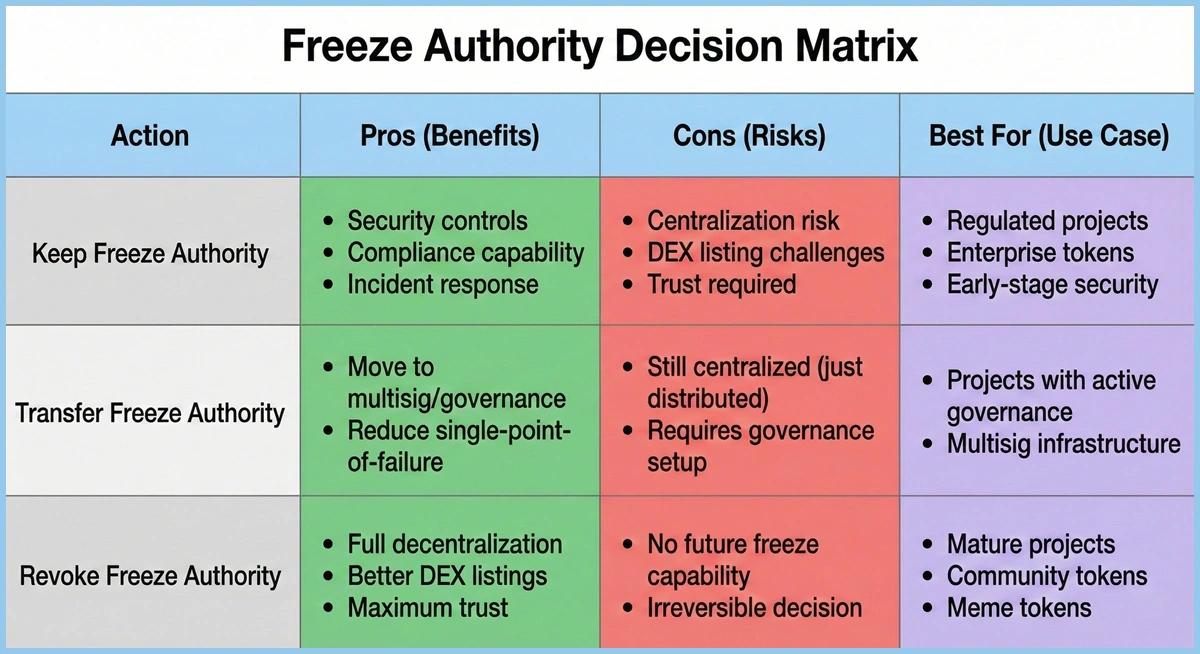
Irreversibility warning:
Revocation is Permanent
If you revoke freeze authority, you cannot restore it. This decision is irreversible. Consider:
- Will you need freeze controls in the future?
- Can you achieve your goals without freeze authority?
- Are you ready to commit to full decentralization?
Decision matrix:
Step-by-Step Creation: Launching Your Freezable SPL Token
This section covers two implementation paths: Path A (no-code UI generator) and Path B (developer path with CLI and TypeScript).
Phase 1: Preparation and Wallet Connection
Connect wallet + choose network (Mainnet vs Devnet/Testnet)
Before creating your token, decide which network to use:
- Devnet: Free SOL via airdrop, perfect for testing. Use this first.
- Mainnet: Real SOL required, permanent on-chain records. Use only after thorough testing.
For UI generators:
- Open your chosen token creation tool (e.g., DEXArea Token Creator)
- Connect your wallet (Phantom, Solflare, Backpack, or Nightly)
- Select your network (Devnet recommended for first-time testing)
For developers:
# Set CLI to Devnet
solana config set --url https://api.devnet.solana.com

# Check current config
solana config get

# Fund wallet (Devnet only)
solana airdrop 2
Ensure wallet network matches the UI network
Critical step: Verify your wallet's network matches the tool's network. Mismatched networks cause transaction failures.
- Phantom: Click the network selector (top right) → Choose Devnet or Mainnet
- Solflare: Settings → Network → Select Devnet or Mainnet
- CLI: Run
solana config getto verify RPC URL
Network Mismatch
If your wallet is on Mainnet but the tool is on Devnet (or vice versa), transactions will fail. Always verify network alignment before proceeding.
Phase 2: Defining Core Token Attributes
Name, Symbol, Total Supply (tokenomics)
Token name: Full name (e.g., "My Project Token")
Symbol: Ticker symbol (e.g., "MPT")
Total supply: Initial supply to mint (consider tokenomics carefully)
UI generator steps:
- Enter token name and symbol
- Enter total supply (tool handles decimals conversion automatically)
- Review tokenomics implications
Developer considerations:
- Name and symbol are often stored in metadata (Metaplex or Token-2022 extensions)
- Total supply = amount to mint initially (can mint more later if mint authority is active)
- Consider vesting schedules, airdrops, and liquidity pool allocations
Decimals (typically 6 or 9)
Common choices:
- 6 decimals: Common for stablecoins (USDC uses 6)
- 9 decimals: Common for native-like tokens (SOL uses 9)
- 0 decimals: For non-divisible tokens (NFT-like, but still fungible)
Important: Decimals are immutable after creation. Choose carefully.
UI generator: Select from dropdown (typically 6 or 9)
Developer:
# CLI example (9 decimals)
spl-token create-token --decimals 9
Recipient wallet for initial supply
UI generator:
- Enter recipient address (your wallet or another address)
- Tool creates ATA automatically if needed
Developer:
- Specify recipient when minting initial supply
- Ensure recipient has an ATA (create if needed)
Phase 3: Activating and Assigning Freeze Authority
Enable "Freezable"
UI generator:
- Look for "Freeze Authority" or "Freezable Token" toggle/checkbox
- Enable the option
- Tool will prompt for freeze authority address
Developer: Set freeze authority during mint creation (see Path B below)
Choose/confirm freeze authority wallet
Best practices:
- Use a multisig wallet (not a single hot wallet)
- Use a cold wallet or hardware wallet for security
- Consider a governance program for decentralized control
UI generator:
- Enter freeze authority address (defaults to your connected wallet)
- Confirm the address is correct before proceeding
Policy reminder (responsible use)
Before deploying, remind yourself:
- Freeze authority is powerful—use responsibly
- Document your freeze policy publicly
- Consider revoking after project maturity
- Understand DEX listing implications
Phase 4: Final Review and Deployment
Review settings (what can/can't be changed)
Immutable after creation:
- Decimals
- Token program (SPL Token vs Token-2022)
- Mint address
Can be changed later:
- Freeze authority (transfer or revoke)
- Mint authority (transfer or revoke)
- Metadata (if mutable)
UI generator: Review summary page showing all settings
Developer: Double-check CLI flags or TypeScript parameters
Validate / simulate if available
UI generator:
- Some tools offer "Preview" or "Simulate" before deployment
- Review estimated transaction fees
Developer:
- Test on Devnet first
- Verify mint creation succeeds
- Check freeze authority is set correctly
Approve and confirm transaction
UI generator:
- Click "Create Token" or "Deploy"
- Approve transaction in wallet
- Wait for confirmation (usually 1-2 seconds on Solana)
- Save mint address for future reference
Developer:
- Confirm transaction signature
- Verify on Solana Explorer
- Save mint address and authority keypairs securely
Path A: No-Code / UI Generator Approach
Step 1: Connect wallet and select network (Devnet recommended first)
Step 2: Fill in token details:
- Name: "My Freezable Token"
- Symbol: "MFT"
- Decimals: 9
- Initial supply: 1,000,000
Step 3: Enable freeze authority:
- Toggle "Freezable" option ON
- Enter freeze authority address (or use connected wallet)
- Review freeze policy reminder
Step 4: Review and deploy:
- Check all settings
- Approve transaction
- Save mint address
Advantages:
- No coding required
- Automatic ATA creation
- Decimal handling built-in
- Visual confirmation of settings
What happens on-chain: The UI tool executes the same on-chain instructions as CLI/SDK methods—your wallet signs transactions, so you maintain full control.
Path B: Developer Path (CLI + TypeScript)
CLI Example: Creating a Freezable Token with spl-token
Prerequisites:
# Install Solana CLI and spl-token CLI
# macOS: brew install solana
# Linux: sh -c "$(curl -sSfL https://release.solana.com/stable/install)"
# Then: cargo install spl-token-cli

# Verify installation
solana --version
spl-token --version
Step 1: Set up Devnet environment
solana config set --url https://api.devnet.solana.com
solana airdrop 2
solana address  # Save this address
Step 2: Create mint with freeze authority
# Create mint (9 decimals, freeze authority = your wallet)
spl-token create-token --decimals 9

# Output: Creating token ABC123...xyz
# Save the mint address!
Step 3: Verify freeze authority
# Check mint info
spl-token account-info <MINT_ADDRESS>

# Look for: "Freeze Authority: <YOUR_ADDRESS>"
Step 4: Create token account (ATA)
spl-token create-account <MINT_ADDRESS>
Step 5: Mint initial supply
# Mint 1,000,000 tokens (with 9 decimals = 1,000,000 * 10^9 base units)
spl-token mint <MINT_ADDRESS> 1000000000000000
Step 6: Test freeze/unfreeze
# Freeze the token account
spl-token freeze-account <TOKEN_ACCOUNT_ADDRESS>

# Verify it's frozen
spl-token account-info <TOKEN_ACCOUNT_ADDRESS>
# Should show: "State: Frozen"

# Thaw (unfreeze) the account
spl-token thaw-account <TOKEN_ACCOUNT_ADDRESS>

# Verify it's thawed
spl-token account-info <TOKEN_ACCOUNT_ADDRESS>
# Should show: "State: Initialized"
TypeScript Example: Programmatic Creation
Complete example using @solana/web3.js and @solana/spl-token:
import {
  Connection,
  Keypair,
  clusterApiUrl,
  LAMPORTS_PER_SOL,
} from "@solana/web3.js";
import {
  createMint,
  getOrCreateAssociatedTokenAccount,
  mintTo,
  freezeAccount,
  thawAccount,
  TOKEN_PROGRAM_ID,
} from "@solana/spl-token";

async function createFreezableToken() {
  try {
    // 1) Connect to Devnet
    const connection = new Connection(clusterApiUrl("devnet"), "confirmed");
    console.log("Connected to Devnet");

    // 2) Generate keypairs (or load from secure storage)
    const payer = Keypair.generate();
    const mintAuthority = Keypair.generate();
    const freezeAuthority = Keypair.generate(); // Separate authority for security

    console.log("Payer:", payer.publicKey.toBase58());
    console.log("Mint Authority:", mintAuthority.publicKey.toBase58());
    console.log("Freeze Authority:", freezeAuthority.publicKey.toBase58());

    // 3) Request airdrop
    console.log("Requesting airdrop...");
    const airdropSignature = await connection.requestAirdrop(
      payer.publicKey,
      2 * LAMPORTS_PER_SOL
    );
    await connection.confirmTransaction(airdropSignature, "confirmed");
    console.log("Airdrop confirmed");

    // 4) Create mint with freeze authority enabled
    const decimals = 9;
    console.log("Creating mint with freeze authority...");
    const mint = await createMint(
      connection,
      payer,
      mintAuthority.publicKey, // Mint authority
      freezeAuthority.publicKey, // Freeze authority (set to null to disable)
      decimals,
      undefined, // Keypair (auto-generated)
      undefined, // Confirm options
      TOKEN_PROGRAM_ID
    );
    console.log("Mint created:", mint.toBase58());

    // 5) Create recipient ATA
    const recipient = payer.publicKey; // Or another address
    console.log("Creating ATA...");
    const ata = await getOrCreateAssociatedTokenAccount(
      connection,
      payer,
      mint,
      recipient
    );
    console.log("ATA address:", ata.address.toBase58());

    // 6) Mint tokens to ATA
    const uiAmount = 1000000; // 1 million tokens
    const baseUnits = BigInt(uiAmount) * 10n ** BigInt(decimals);
    console.log(`Minting ${uiAmount} tokens (${baseUnits} base units)...`);

    await mintTo(
      connection,
      payer,
      mint,
      ata.address,
      mintAuthority,
      baseUnits
    );
    console.log("Minting confirmed");

    // 7) Verify supply
    const supply = await connection.getTokenSupply(mint);
    console.log("Token supply:", supply.value.uiAmountString);

    // 8) Test freeze functionality
    console.log("\n--- Testing Freeze Functionality ---");

    // Freeze the account
    console.log("Freezing token account...");
    await freezeAccount(
      connection,
      payer,
      ata.address,
      mint,
      freezeAuthority
    );
    console.log("Account frozen");

    // Attempt transfer (should fail)
    // This would fail: await transfer(...) - account is frozen

    // Thaw the account
    console.log("Thawing token account...");
    await thawAccount(
      connection,
      payer,
      ata.address,
      mint,
      freezeAuthority
    );
    console.log("Account thawed");

    // 9) Summary
    console.log("\n✅ Success!");
    console.log("Mint:", mint.toBase58());
    console.log("Mint Authority:", mintAuthority.publicKey.toBase58());
    console.log("Freeze Authority:", freezeAuthority.publicKey.toBase58());
    console.log("ATA:", ata.address.toBase58());
    console.log("\n⚠️  Save these keypairs securely!");

  } catch (error) {
    console.error("Error:", error);
    process.exit(1);
  }
}

createFreezableToken();
To run:
- Install dependencies:
npm install @solana/web3.js @solana/spl-token - Save as
create-freezable-token.ts - Run:
npx ts-node create-freezable-token.ts
Key TypeScript functions:
createMint(..., freezeAuthority, ...)- Set freeze authority during creationfreezeAccount(connection, payer, tokenAccount, mint, freezeAuthority)- Freeze an accountthawAccount(connection, payer, tokenAccount, mint, freezeAuthority)- Unfreeze an account
Post-Creation Management: Utilizing Token Controls
Essential Tools for Managing Freeze Status and Authority
After creating your freezable token, you'll need tools to manage freeze operations:
Token overview:
- View mint address, supply, decimals
- Check current freeze authority
- Verify token account states
Freeze controls:
- Check freeze status: Verify if a token account is frozen
- Freeze account: Freeze a specific token account
- Unfreeze account: Thaw a frozen token account
- Transfer freeze authority: Move authority to another address (multisig, governance)
- Revoke freeze authority: Permanently remove freeze capability
DEXArea tools for freeze management:
- Freeze Accounts - Freeze specific token accounts
- Unfreeze Accounts - Thaw frozen accounts
- Transfer Authority - Transfer freeze authority to another wallet
- Revoke Freeze Authority - Permanently revoke freeze authority
CLI commands:
# Check freeze status
spl-token account-info <TOKEN_ACCOUNT_ADDRESS>

# Freeze account
spl-token freeze-account <TOKEN_ACCOUNT_ADDRESS>

# Thaw account
spl-token thaw-account <TOKEN_ACCOUNT_ADDRESS>

# Transfer freeze authority
spl-token authorize <MINT_ADDRESS> freeze <NEW_AUTHORITY_ADDRESS>

# Revoke freeze authority
spl-token authorize <MINT_ADDRESS> freeze --disable
Verification of the Freezing Function
Simple test scenario:
- Create a test token account (or use an existing one)
- Freeze the account using your freeze authority
- Attempt a transfer from the frozen account → Should fail with "Frozen account" error
- Thaw the account
- Attempt transfer again → Should succeed
What you'll see:
Frozen account transfer attempt:
Error: Account is frozen
Transaction failed: 0x0000000000000001
Explorer verification:
- Visit
https://solscan.io/token/<MINT_ADDRESS>?cluster=devnet - Check token account details → State should show "Frozen" or "Initialized"
- Transaction logs show
freeze_accountorthaw_accountinstructions
Programmatic verification:
import { getAccount } from "@solana/spl-token";

const accountInfo = await getAccount(connection, tokenAccountAddress);
console.log("Account state:", accountInfo.state); // "Frozen" or "Initialized"
Security Checklist
Before deploying a freezable token to Mainnet, verify:
- Freeze authority is secured (multisig or cold wallet, not a hot wallet)
- Freeze policy is documented and publicly available
- Network is correct (tested on Devnet, verified Mainnet before deployment)
- Decimals are correct (immutable after creation)
- Mint address is saved securely for future reference
- Authority keypairs are backed up securely (hardware wallet, encrypted storage)
- Freeze functionality is tested on Devnet before Mainnet
- DEX listing implications are understood (some require revocation)
- Revocation decision is considered (irreversible)
- Communication plan exists for freeze actions (transparency)
Trust & Transparency
Best practices for maintaining community trust:
- Public freeze policy: Document when and why freezes occur
- Multi-signature approval: Require multiple signatures before freezing
- Public announcements: Announce freezes with clear reasoning
- Appeals process: Provide a path for users to dispute freezes
- On-chain logging: Make freeze actions publicly visible
- Revocation timeline: Commit to revoking authority after maturity
- Governance integration: Consider transferring authority to a governance program
Transparency template:
Freeze Authority Policy for [Token Name]

- Freeze authority holder: [Address/Multisig]
- When freezing occurs: [Security incidents, compliance, legal holds]
- Approval required: [Multi-signature / Governance vote]
- Communication: [Public announcements within X hours]
- Appeals: [Contact method / Process]
- Revocation timeline: [After mainnet launch + X months]
Common Mistakes
Avoid these pitfalls:
- Setting freeze authority to a hot wallet → Use multisig or cold storage
- Not testing on Devnet first → Always test freeze/unfreeze before Mainnet
- Revoking freeze authority too early → Consider future needs before revoking
- Not documenting freeze policy → Transparency builds trust
- Mismatched networks → Verify wallet network matches tool network
- Losing authority keypairs → Back up securely before deployment
- Freezing without communication → Announce freezes publicly
- Ignoring DEX requirements → Some DEXs require revocation for listing
- Confusing freeze authority with mint authority → These are separate permissions
- Not understanding irreversibility → Revocation cannot be undone
When You Should NOT Enable Freeze Authority
Don't enable freeze authority if:
- Fully decentralized meme tokens → Community expects no controls
- Community-run projects without governance → No process for responsible use
- Tokens targeting broad DEX listings → Many DEXs prefer revoked authority
- You can't commit to transparency → Freeze authority requires public policy
- No security/compliance need → Adds centralization without benefit
- You plan to revoke immediately → Consider skipping freeze authority entirely
Alternative approaches:
- Use multisig for mint authority instead (controls supply, not accounts)
- Implement governance-based controls (decentralized decision-making)
- Use smart contract restrictions (programmatic limits, not account freezing)
Conclusion: Launching Your Secure Token Ecosystem
Freeze authority is a powerful tool that balances security, compliance, and decentralization. When used responsibly with transparency and proper governance, it can enhance token security and meet regulatory requirements. However, it introduces centralization risks and may limit DEX listings.
Key takeaways:
- Test on Devnet first → Verify freeze/unfreeze functionality before Mainnet
- Secure your authority → Use multisig or cold storage, not hot wallets
- Document your policy → Transparency builds community trust
- Understand tradeoffs → Centralization vs. security vs. DEX listings
- Plan revocation carefully → It's irreversible, so consider future needs
Next steps:
- Try creating a freezable token on Devnet → Test the process risk-free
- Document your freeze policy → Build transparency from day one
- Use management tools → Safely manage freeze operations
- Consider revocation timeline → Plan for decentralization
Whether you're building a regulated securities token, an enterprise token with incident response needs, or exploring Solana's token capabilities, understanding freeze authority is essential for making informed decisions.
FAQs
- Token Creator— Create SPL or Token-2022 tokens
- Transfer Authority— Transfer token authority to another wallet
- Revoke Freeze Authority— Remove ability to freeze accounts