How to Add Liquidity to a Solana Token on Raydium
Learn how to add liquidity to a Solana token on Raydium, prepare both sides of the pair, understand LP tokens, and review risks before signing.

Adding liquidity to a Raydium pool means depositing both assets of a Solana trading pair into an existing pool. For token creators, this usually means adding your token plus SOL, USDC, or another quote asset so swaps can occur through supported Raydium workflows and interfaces.
DEXArea is non-custodial: your wallet signs transactions, and your private keys stay in your wallet.
Not Financial Advice
This guide explains the technical process of adding liquidity to a Raydium pool. It is not financial or investment advice. Liquidity provision can expose you to price volatility, impermanent loss, smart contract risk, and total loss of deposited value.
TL;DR
- Adding liquidity means depositing both assets into an existing Raydium pool.
- If no Raydium pool exists for the pair yet, create the pool first.
- The pool’s current ratio determines the paired deposit amount.
- Your wallet needs both sides of the pair, such as SOL and your token, or USDC and your token.
- Standard pools may issue LP tokens that represent withdrawal rights.
- Concentrated liquidity pools may use positions instead of simple fungible LP tokens.
- Removing liquidity and burning liquidity are different actions.
- Burning LP tokens or a position may affect the ability to withdraw later and is usually irreversible.
- Adding liquidity does not guarantee demand, trading volume, price stability, liquidity depth, or project trust.
- DEXArea is non-custodial: your wallet signs the transaction.
Create Pool vs Add Liquidity on Raydium
| Action | What it does | When to use it | DEXArea tool |
|---|---|---|---|
| Create Pool | Creates a new Raydium pool for a token pair and sets the initial ratio | Use when no pool exists yet | Create Pool |
| Add Liquidity | Deposits more assets into an existing Raydium pool using the current pool ratio | Use when a pool already exists and you want to increase reserves | Add Liquidity |
| Remove Liquidity | Withdraws your share of pooled assets when withdrawal rights remain | Use when you still control the required LP tokens or position | Remove Liquidity |
| Burn Liquidity | Burns LP tokens or a position, which may affect future withdrawal ability | Use only if this matches the project’s operational plan | Burn Liquidity |
These actions are related, but they are not interchangeable. Creating a pool defines the initial pool. Adding liquidity increases an existing pool. Removing liquidity withdraws assets when you still hold withdrawal rights. Burning liquidity may remove or limit those rights.
What Adding Liquidity Means on Solana
A Solana liquidity pool is an on-chain reserve of two assets. When a user swaps, the pool uses its reserves and pricing rules to calculate the output amount. On Raydium, the exact mechanics depend on the pool type.
For a token creator, adding liquidity usually means depositing your token plus a quote asset such as SOL or USDC into an existing pool. The pool’s current ratio determines how much of the paired asset is required.
Common Raydium pair examples:
SOL / YOURTOKENUSDC / YOURTOKEN
When you add liquidity, you deposit both assets into the pool. In many standard pools you receive LP tokens representing your share; CLMM pools may use a position with a selected price range instead.
Raydium Pool Types: What Changes When Adding Liquidity
Raydium supports different pool models on Solana. The Add Liquidity workflow should show relevant pool details before you sign.
Standard AMM / CPMM pools
AMM and CPMM pools usually require adding liquidity according to the current pool ratio across the full curve (constant-product style behavior where supported). Review pool type and mint addresses in the tool before signing.
Concentrated liquidity (CLMM) pools
CLMM pools require a selected price range and may return a position rather than a simple fungible LP receipt. If price trades outside your range, the position may stop earning fees until adjusted. Review range and position details before signing.
Stable or correlated asset pools
Stable or correlated pairs are for assets expected to trade near a similar value, where supported on Raydium. They still carry market and protocol risk and are not automatically lower risk than volatile pairs.
Before You Add Liquidity: Preparation Checklist
Review these items before signing an add-liquidity transaction:
- Confirm the correct token mint — verify the mint address, not name or symbol alone. Use View Metadata or an explorer.
- Confirm the correct Raydium pool and pair — load the intended pool ID and match both mints.
- Confirm the network — Mainnet vs Devnet; pools do not cross networks.
- Confirm metadata is final enough for launch — name, symbol, image, and links where you plan to publish them.
- Review mint, freeze, and update authority status — what is mint authority on Solana; revoke mint, revoke freeze when appropriate for your plan.
- Prepare both sides of the pair — SOL/USDC (or other quote) plus your token in the connected wallet.
- Keep enough SOL for network fees and token account operations.
- Understand LP tokens vs CLMM positions — know what receipt or position the pool may return.
- Decide how liquidity will be managed after the deposit — keep, remove, lock per mechanism, or burn only if that matches your operational plan.
- Review transaction details in your wallet before signing.
Authority settings can affect what can be changed after liquidity is added:
- Mint authority controls future minting.
- Freeze authority controls account freezing/thawing.
- Update authority controls metadata where supported.
Revoking authority is usually irreversible and does not guarantee trust, price stability, liquidity, or project quality.
How to Add Liquidity with DEXArea
DEXArea provides a guided interface for adding liquidity to existing Raydium pools without writing code.
Step 1: Open the Add Liquidity tool
Step 2: Connect wallet and select the correct network
Connect a compatible Solana wallet. Choose Mainnet for production liquidity or Devnet for testing where supported.
Step 3: Load or select the Raydium pool
Paste or select the pool for your pair. Confirm the loaded pool matches the token you intend to support.
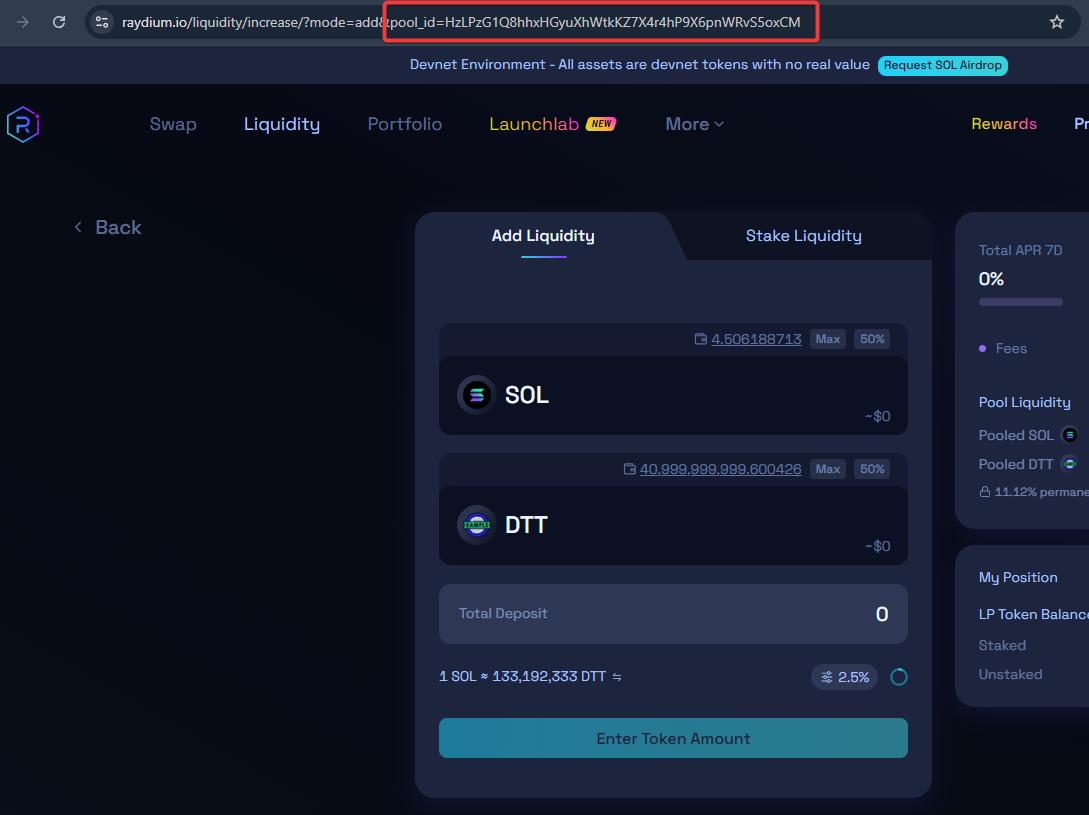
Example of finding a Raydium pool ID before adding liquidity.
Step 4: Verify token pair, pool type, and mint addresses
Check pool pair, pool type, mint addresses, current price ratio, and wallet balances. If the pair is wrong, stop and reload the correct pool.
Step 5: Enter one side of the deposit
Enter SOL, USDC, or your token amount on one side. DEXArea calculates the matching amount for the other side using the current pool ratio.
Step 6: Review the calculated paired amount
Confirm the paired deposit matches the pool ratio and your intent.
Step 7: Check balances, expected LP receipt or position output, and estimated fees
Review the pool information panel before signing.

Look for correct pair, network, pool type, balances, deposit amounts, fees, and any price impact warning.
Step 8: Review risks and wallet transaction details
Read risk warnings and every field in the wallet preview. DEXArea does not guarantee pricing outcomes or prevent all user errors.
Step 9: Sign in your wallet
Click Add Liquidity, review the wallet popup, and sign. DEXArea is non-custodial: your wallet signs client-side; DEXArea does not hold your private keys.
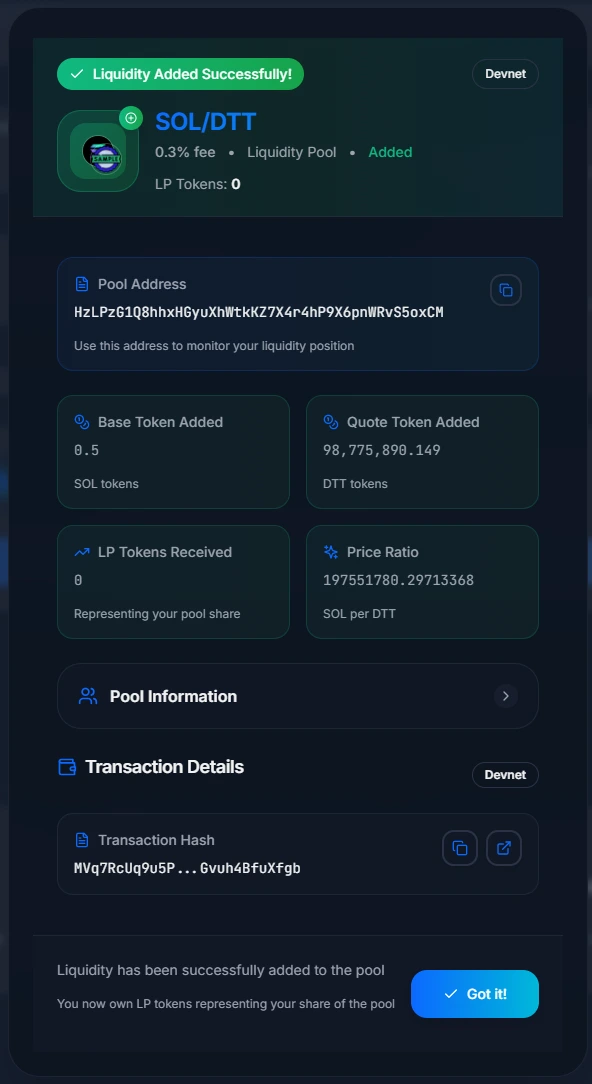
Step 10: Verify the result
Confirm the transaction on a Solana explorer, your LP token or position balance, and the pool state in the tool or a supported Raydium interface when available.

How Much Liquidity Should You Add?
There is no universal amount of liquidity that fits every token. The amount affects slippage, depth, and treasury exposure. More liquidity can reduce slippage for a given trade size, but it also puts more value at market and smart-contract risk.
For launch planning, review the pair, expected trade sizes, treasury limits, volatility risk, and whether additional liquidity can be added later.
This section is educational only—not financial advice. Do not deposit more than your project can afford to lose.
LP Tokens, CLMM Positions, and Withdrawal Rights
If they are locked, burned, transferred, or lost, future withdrawal ability may be limited or unavailable.
If you keep LP tokens or positions
You may be able to remove liquidity later, depending on the pool type and whether you still control the required receipt or position.
If you lock LP tokens or positions
Locking may restrict withdrawal until specific conditions are met. Review the lock mechanism, unlock conditions, and operational impact before signing or publishing any claim.
If you burn LP tokens or positions
Locking vs Burning Liquidity: What Changes?
Locking restricts access based on the lock mechanism until conditions are met.
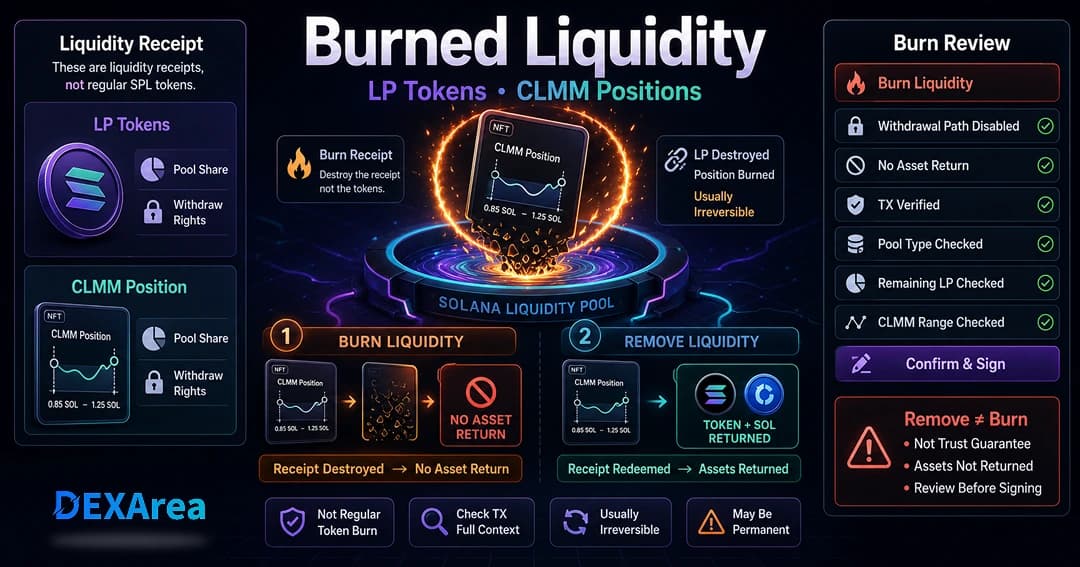
Burning liquidity destroys or gives up the LP receipt or position in many workflows. It is not the same as removing liquidity. Burning is usually irreversible and may affect the ability to withdraw later.
Neither locking nor burning guarantees trust, price stability, trading volume, or project quality. Choose based on your operational plan, not as a substitute for clear communication about authorities and pool details.
Risks of Adding Liquidity
Adding liquidity exposes deposited assets to market, protocol, and operational risks. A pool can enable swaps where supported, but it does not guarantee demand, trading volume, price stability, or profit.
Impermanent loss
Impermanent loss can occur when the value of your LP position diverges from simply holding both assets. Fees may offset some losses but do not guarantee profit.
Token price movement or collapse
If your token loses value, your LP position may lose value as well. Adding liquidity does not prevent market losses.
Smart contract and protocol risk
Raydium pools use on-chain programs. Verify addresses, pool type, and tool interfaces before committing meaningful value.
Wrong pool or wrong mint
Confirm pool ID and mint addresses. Duplicate names and symbols exist on Solana.
Active authorities
Slippage and price impact
Thin reserves increase price impact on swaps. Adding liquidity may change depth for future trades but does not guarantee demand.
Pool-type mismatch and CLMM out-of-range liquidity
CLMM positions may stop earning fees when price moves outside the selected range until adjusted.
Losing or burning LP receipts or positions
Burning or losing withdrawal receipts may limit future removal ability.
Network or wallet signing mistakes
Wrong network, wrong amounts, or unreviewed wallet prompts can cause failed or unintended transactions.
This guide is not financial advice.
Common Mistakes When Adding Liquidity
- Adding liquidity before confirming the pool pair.
- Adding liquidity before metadata and authority settings are reviewed.
- Confusing create pool with add liquidity.
- Not holding both sides of the pair.
- Not keeping enough SOL for fees.
- Assuming equal token amounts mean equal value.
- Forgetting LP tokens or positions may control withdrawal.
- Burning LP tokens too early.
- Ignoring price impact and slippage.
- Assuming liquidity guarantees demand or trust.
Recommended Token Launch Flow
- Create the token with Token Creator.
- Review metadata with View Metadata.
- Review mint, freeze, and update authorities (revoke mint, revoke freeze when appropriate for your plan).
- Create a Raydium pool if none exists.
- Add liquidity to the existing pool.
- Verify LP tokens or CLMM position in wallet and explorer.
- Decide whether to keep, lock, remove, or burn liquidity based on your operational plan.
- Communicate pool address and authority status clearly.
- Monitor pool state and update public documentation if relevant; snapshot token holders when holder tracking is needed.
This sequence does not guarantee a successful launch, trading volume, or demand.
FAQ
Open the DEXArea Add Liquidity tool, load an existing pool, enter one side of the deposit, review the calculated paired amount and fees, then sign from your wallet.
2. What is the difference between creating a pool and adding liquidity?
Creating a pool creates a new Raydium pool for a token pair and sets the initial ratio. Adding liquidity deposits more assets into an existing pool according to the current pool ratio.
Yes. Adding liquidity requires an existing pool. If your token pair does not have a Raydium pool yet, create the pool first, then add liquidity afterward.
4. What assets do I need to add liquidity?
Both sides of the pair (for example SOL and your token) plus SOL for network fees. Deposits usually follow the pool’s value ratio, not equal token counts.
5. Why does the tool calculate the second token amount automatically?
Liquidity must follow the pool’s current price ratio. DEXArea calculates the paired amount to help prevent unbalanced deposits.
6. What are Raydium LP tokens?
LP tokens are receipt tokens that may represent a share of a standard liquidity pool. Holding the required LP tokens usually allows liquidity removal later. If LP tokens are locked, burned, transferred, or lost, withdrawal ability may be limited or unavailable.
7. What is a CLMM position?
A CLMM position represents liquidity placed within a selected price range. It may not behave like a simple fungible LP token. Review the pool type, price range, and position details before signing.
Yes, if you still control the required LP tokens or CLMM position and the program allows withdrawal. Use Remove Liquidity.
9. Is burning liquidity the same as removing liquidity?
No. Removing liquidity withdraws underlying assets when you still control the required LP tokens or position. Burning liquidity may destroy or give up the item needed to withdraw later and is usually irreversible.
10. Should I lock or burn LP tokens?
That depends on the project’s operational plan. Locking restricts access according to the lock mechanism. Burning may remove future withdrawal ability and is usually irreversible. Neither action guarantees trust, price stability, trading volume, or project quality.
11. Can adding liquidity change price impact or slippage?
Yes. Larger reserves relative to trade size can reduce price impact for a given swap, depending on pool type and conditions. Adding liquidity does not guarantee trading volume or demand.
12. Is adding liquidity profitable?
Not necessarily. Liquidity providers may receive trading fees, but deposited assets are exposed to impermanent loss, volatility, protocol risk, and loss of value. Fees do not guarantee profit.
13. Can I test adding liquidity before Mainnet?
Use Devnet or a test workflow where supported before using Mainnet with real value. Always verify network, pool, mint addresses, amounts, and wallet transaction details before signing.
14. Is this financial advice?
No. This guide is educational only and is not financial advice.
Final Checklist Before Adding Liquidity
Before signing the transaction, confirm:
- Token mint address is correct
- Raydium pool pair and pool ID are correct
- Network is correct
- Wallet has both assets and enough SOL for fees
- Mint, freeze, and update authorities reviewed
- You understand LP tokens or CLMM positions and withdrawal rights
- You have a plan for managing liquidity after the deposit
- You understand impermanent loss and market risk