How to Get Listed on CoinGecko: A Step-by-Step Guide
A practical, step-by-step tutorial for token teams: CoinGecko listing requirements, application form walkthrough, timelines (including Fast Pass), costs, and common rejection reasons.
How to Get Listed on CoinGecko: A Step-by-Step Guide
Getting your token listed on CoinGecko can dramatically increase its visibility and credibility in the crypto community. CoinGecko is one of the world's largest independent cryptocurrency data aggregators, tracking thousands of crypto assets across many exchanges. The site attracts millions of users each month, providing real-time market data and insights.
In this tutorial-style guide, we'll walk you through the prerequisites for listing, the application process, expected timelines, and how to avoid common pitfalls that could lead to rejection. By the end, you'll have a clear, actionable roadmap to successfully get your coin or token listed on CoinGecko.
How this guide is maintained
- Last updated: 2025-12-24
- Sources: This guide is based exclusively on official CoinGecko resources: Help Center articles, Listing Terms & Conditions, and Methodology documentation. All claims are verifiable through linked official sources.
- Disclaimer: This guide is for informational purposes only. Not financial or legal advice. CoinGecko has final decision authority on all listings. There is no guarantee of approval, even if you meet all requirements.
Table of Contents
- What Is CoinGecko?
- Why List Your Token on CoinGecko?
- Quick Start: 4-Step Process
- Official CoinGecko Resources
- CoinGecko's Core Listing Requirements
- Evidence Checklist: What to Provide
- 4 Steps to Get Listed on CoinGecko
- Public Verification Post (Verification step requested by CoinGecko)
- Action Needed: How to Respond
- Solana/SPL Tokens: Extra Proof Links
- Costs and Timeline
- Why CoinGecko Might Reject Your Application
- Frequently Asked Questions
- Final Checklist Before You Apply
What Is CoinGecko?
CoinGecko is a leading independent platform that aggregates cryptocurrency market data. It provides up-to-date information on coin prices, trading volume, market capitalization, and community statistics across thousands of cryptocurrencies. Unlike an exchange, CoinGecko doesn't facilitate trading; instead, it gathers data from hundreds of exchanges to give users a comprehensive view of the crypto market.
Why List Your Token on CoinGecko?
-
Massive Exposure: CoinGecko's website and app attract millions of users every month. Listing your token here puts it in front of one of the largest crypto audiences globally.
-
Credibility Boost: Being listed on CoinGecko signals that your project has passed basic vetting and is transparent. CoinGecko is known for neutral and reliable data, so a presence on the platform can enhance your project's reputation.
-
Real-Time Data Access: Once listed, your token's page on CoinGecko will display real-time updates on price, trading volume, market cap, and other key metrics. This makes it easy for investors to track your token's performance live.
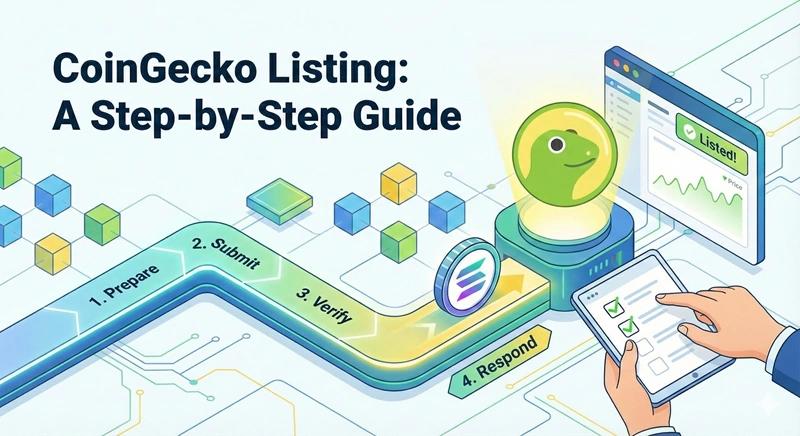
Quick Start: 4-Step Process
Step 1: Prepare
- Ensure token is tradable on a tracked exchange
- Verify circulating supply is transparent and verifiable
- Confirm website and documentation are live and professional
Step 2: Submit
- Create CoinGecko account
- Fill out the official Request Form with accurate details
- Submit and save your request ID (e.g., CLxxxxxx)
Step 3: Verify
- Make a public verification post on your official social media
- Include your CoinGecko request ID in the post
- Keep the post link for reference
Step 4: Respond
- Monitor your request status in CoinGecko account
- Respond promptly to any "Action Needed" requests
- Stay professional and patient throughout the process
Official CoinGecko Resources
Essential Links:
- CoinGecko Request Form — Submit your listing application
- How to List New Cryptocurrencies — Official listing guide
- Verification Guide — Public verification requirements
- Why Is My Token Not Listed? — Common rejection reasons
- How Long Does It Take? — Timeline expectations
- Listing Terms & Conditions — Official terms
- CoinGecko Methodology — How CoinGecko evaluates projects
CoinGecko's Core Listing Requirements
Before you apply, ensure your project meets CoinGecko's listing criteria. Failing to meet these prerequisites is the primary reason tokens get rejected or delayed.
1. Tradable on a Tracked Exchange
Your token should be actively traded on at least one cryptocurrency exchange that CoinGecko tracks. If your token is only available on an unsupported exchange or DEX, CoinGecko may not list it. Tokens available only on unverified decentralized exchanges may face extra scrutiny due to security and liquidity concerns.
What this means:
- Your token should be trading on an exchange that CoinGecko monitors
- Check CoinGecko's supported exchanges list to verify your venue is tracked
- If you're only on a DEX, ensure it's a well-known, reputable platform
2. Healthy Trading Volume and Market Capitalization
There is no strict numeric threshold published, but your token should demonstrate organic trading activity and interest. Very low daily volume or a tiny market cap suggests weak market interest and may lead to rejection.
What this means:
- Steady, consistent trading activity (avoid fake or wash trading)
- Reasonable market cap formation based on circulating supply
- Price discovery that doesn't look like one-wallet trading
3. Transparent Circulating Supply
You should provide a clear and accurate disclosure of your token's circulating supply. CoinGecko uses this to calculate market capitalization, so transparency is key.
What this means:
- Total supply and circulating supply clearly documented
- Explanation of what's excluded from circulation (vesting, locked treasury, team allocations)
- Verifiable methodology via blockchain explorers
- Labeled team, treasury, or vesting wallets
4. Functional Website and Documentation
Ensure you have a professional website and comprehensive project documentation (e.g., a whitepaper or litepaper). The website should clearly explain your project's purpose, technology, team members, and tokenomics.
What this means:
- Working official website (no broken pages, no "coming soon" only)
- Clear project explanation and utility
- Tokenomics section (supply, distribution, vesting/locks if any)
- Whitepaper or docs link (not empty or outdated)
- All links functional and up-to-date
5. Active Social Media Accounts
CoinGecko typically looks at community interest and engagement as part of their evaluation. Make sure your project has active social media channels with a real following and regular updates.
What this means:
- Active Twitter/X, Telegram, Discord, or other channels
- Regular updates and community engagement
- Consistent branding (same name/logo as your application)
- Links to official social profiles in your application
6. Sufficient Liquidity
Having your token trade on an exchange isn't enough – it also needs adequate liquidity on its trading pair(s). This means there should be enough buy and sell orders or pool depth that people can trade your token without huge price slippage.
What this means:
- Enough depth so trades don't cause extreme price swings
- Healthy market pair(s) with reasonable bid-ask spreads
- A liquidity plan that looks sustainable (not "one day only" liquidity)
Evidence Checklist: What to Provide
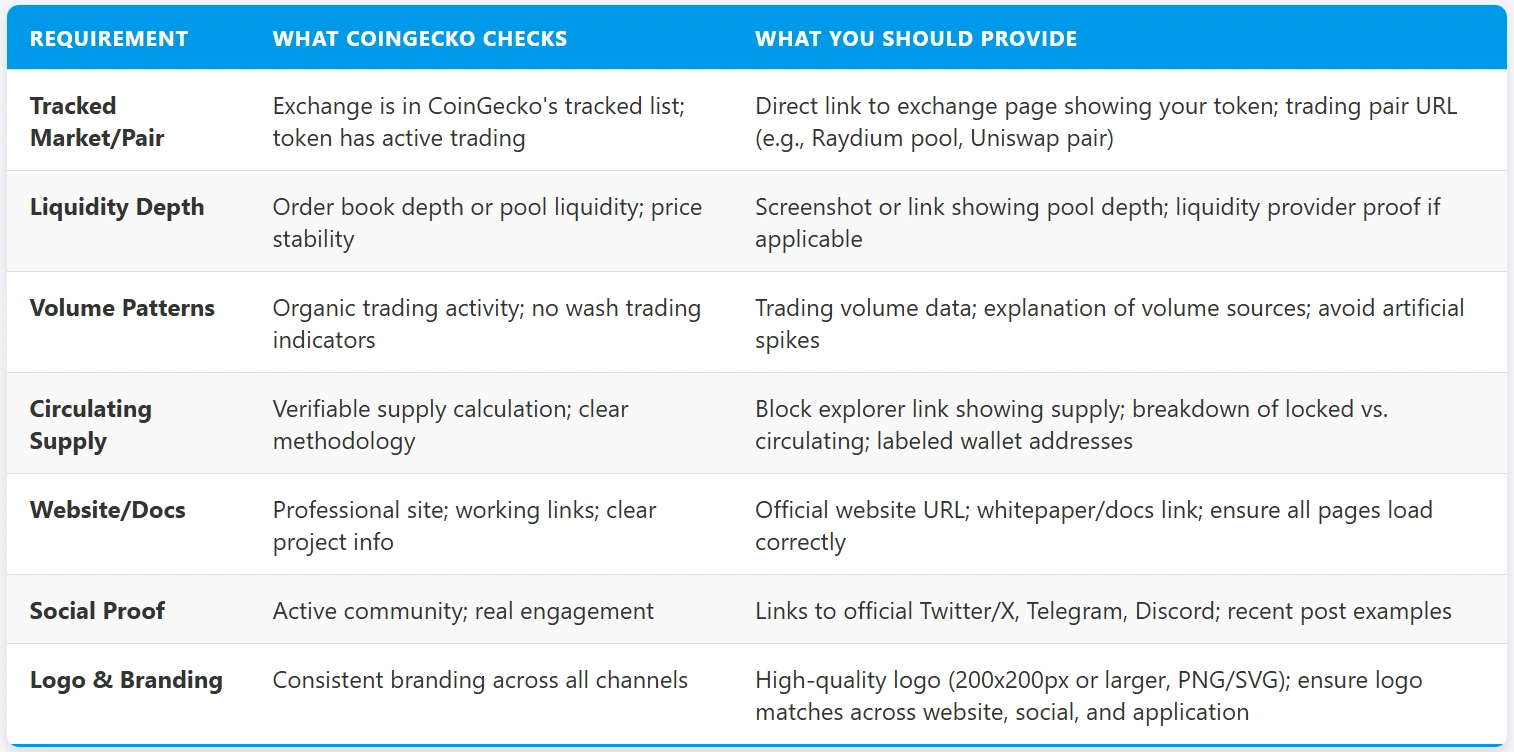
Use this checklist to prepare all required evidence before submitting your application:
Required Evidence:
- Request ID: Your CoinGecko request ID (CLxxxxxx for listings, CUxxxxxx for updates) from the confirmation email
- Official Website: URL to your project's official website (should be live and professional)
- Documentation/Whitepaper: Link to your whitepaper, litepaper, or comprehensive project documentation
- Contract/Mint Address: Smart contract address (for tokens) or mint address (for Solana SPL tokens) — double-check accuracy
- Circulating Supply Proof: Block explorer links showing total supply, circulating supply, and breakdown of locked/vested tokens
- Exchange/Pair Links: Direct links to at least one exchange page and trading pair where your token is actively traded
- Social Media Links: URLs to official Twitter/X, Telegram, Discord, and other active community channels
- GeckoTerminal URL (if applicable): If your token is already trading on a DEX, include the GeckoTerminal page URL
Note: The screenshot below is a visual reference only. Use the checklist above to ensure you have all required evidence ready.
4 Steps to Get Listed on CoinGecko
Once you've ensured your project meets the above requirements, you can proceed to submit a listing request.
Step 1: Open a CoinGecko Account
Create an account on CoinGecko (if you don't have one already) and log in. Visit the CoinGecko website and sign up with your email and a password. Registration is free and only takes a minute.
Why an account is needed:
- CoinGecko uses your account to manage the listing request
- You'll be able to submit the application form and check its status
- All communications about your request will be tied to this account
Tip: Use an official email (preferably tied to your project's domain) to add credibility to your request.
Step 2: Fill Out and Submit the Listing Application Form
After logging in, navigate to the bottom of CoinGecko's main page and click on the "Request Form" link (in the footer section). This will open CoinGecko's online submission form for listings.
Choose the Right Request Type:
- Select "Token/Coin Listing" as the option
- If your project has its own blockchain (coin), choose "New Coin"
- If it's built on another chain (token), choose "New Token"
- Select listing status: Active Listing (token is already trading) or Preview Listing (upcoming token / presale / not trading yet)
Provide Comprehensive Details:
The form will ask for information about your project and token. Fields marked with an asterisk (*) are mandatory, but fill out every relevant field with accurate, up-to-date information.
- Token Name and Symbol: Exact name and ticker symbol
- Contract Address and Blockchain: Smart contract address and blockchain/network (double-check for accuracy)
- Total Supply and Circulating Supply: Accurate, verifiable figures with links to block explorer if possible
- Project Website URL: Link to your official website (ensure it's live and professional)
- Whitepaper or Documentation Link: URL to your whitepaper, litepaper, or docs site
- Social Media Links: URLs to official Twitter (X), Telegram, Discord, etc.
- Description: Brief description of your project (may be used on your CoinGecko listing page)
- Exchange and Market Pair Links: At least one exchange and trading pair where your token is traded (for Active listings)
- Logo/Image: Upload your token's logo (square image, 200x200px or larger, PNG or SVG format)
Agree to Terms and Submit:
At the end of the form, acknowledge CoinGecko's terms and conditions for listing. Ensure you read the key points (you affirm that you're an official representative and that the info provided is true and not misleading). Once everything is filled out and reviewed, hit the "Submit" button.
After submission, you should see a confirmation that your request was received. CoinGecko will also send a confirmation email that includes your request ticket ID (something like CLxxxxxx) for reference. Keep this ID handy – you'll need it for the verification step.
Step 3: Make a Public Verification Post (Verification step requested by CoinGecko)
Choose a Platform:
- Most common: Twitter (now X)
- Can also use: Facebook, Instagram, or any platform where your project has an official, public presence
- The account used should be one linked on your official website
Write the Verification Post:
Copy-paste verification post template
Use this template for your verification post (X/Twitter):
We have just submitted a request to list [PROJECT NAME] on @CoinGecko! 🎉

Request ID: [YOUR REQUEST ID - e.g., CL123456]
Official site: [YOUR WEBSITE URL]
Market/Pair: [LINK TO YOUR TRADING PAIR IF AVAILABLE]

#CoinGecko #CryptoListing
Replace placeholders:
[PROJECT NAME]— Your token/project name[YOUR REQUEST ID]— The CLxxxxxx ID from your confirmation email[YOUR WEBSITE URL]— Your official project website[LINK TO YOUR TRADING PAIR IF AVAILABLE]— Optional: GeckoTerminal URL or DEX pair link
Post and Share:
Publish the post and make sure it's publicly visible. Keep the link to this post handy; you may want to include it in your CoinGecko application (there may be a field for additional info), or the team might ask for it later.
The CoinGecko team will look for this post as part of their verification review. It helps them confirm that the listing request is legitimate and that the details match. This step can help speed up trust and credibility.
Step 4: Follow Up and Track Your Application Status
After submitting the form (and making the verification post), wait for CoinGecko's review and respond to any follow-up if needed.
Track the Status:
Log in to your CoinGecko account and click the "Your Requests" button (usually found in your account dashboard or via the same Request Form page). There you can see the status of your listing request. It may show as "Pending" initially. CoinGecko may update the status to things like "In Review," "Action Needed," or hopefully "Listed" when done.
Professional Communication:
Be patient and professional in all communications. CoinGecko's team reviews many requests, so refrain from spamming them with repeated questions or pressure like "when will we be listed?" emails.
Instead, if you have a genuine inquiry or need to provide more info, use CoinGecko's support ticket system or reply to the request email in a courteous manner. Once you've applied and provided all necessary info, trust the process and give the team time to evaluate.
Check for Listing:
If all goes well, you may eventually see your token listed on CoinGecko's site. You might not get a special email saying "approved" immediately; often the indication is simply that your coin page goes live on coingecko.com. Keep searching for your token on CoinGecko – once it appears with pricing, it's listed!
Action Needed: How to Respond
If your request status changes to "Action Needed", it means the CoinGecko team requires additional information or clarification from you before they can proceed.
Common reasons for Action Needed:
- Missing or unverified data (e.g., they couldn't find your token's supply info)
- Website was down when they checked
- Contract address needs correction
- Proof of team affiliation required
- Additional verification needed
You typically have a limited time window to respond before your request may be closed or rejected. So, if you see "Action Needed," immediately gather the requested info and respond.
Action Needed response template
Use this template when responding to an "Action Needed" request:
Subject: Re: Action Needed - Request ID [YOUR REQUEST ID]

Dear CoinGecko Team,

Thank you for reviewing our listing request. We have addressed the following:

[LIST EACH REQUESTED ITEM AND YOUR RESPONSE]

1. [Item 1]: [Your response/proof]
2. [Item 2]: [Your response/proof]
3. [Item 3]: [Your response/proof]

Attachments:
- [Proof document 1]
- [Proof document 2]

Please let us know if you need any additional information.

Best regards,
[Your Name]
[Project Name]
[Contact Information]
Checklist before sending:
- Read the Action Needed message carefully
- Gather all requested information
- Provide direct links to proofs (block explorer, website pages, etc.)
- Attach any required documents
- Keep the response professional and concise
- Respond within the time window (typically a few days)
Solana/SPL Tokens: Extra Proof Links
If you're listing a Solana SPL token or Token-2022 token, these additional proof links can help strengthen your application:
Block Explorer Links:
- Solscan:
https://solscan.io/token/[YOUR_MINT_ADDRESS]— Shows mint details, supply, and holder distribution - Solana Explorer:
https://explorer.solana.com/address/[YOUR_MINT_ADDRESS]— Official Solana explorer
DEX Pool Links (if applicable):
- Raydium Pool: If you have a Raydium liquidity pool, include the pool page URL
- Orca Pool: If you have an Orca pool, include the pool page URL
- Jupiter Aggregator: Can help verify your token's trading pairs
Token Metadata:
- Include a link to your token's metadata JSON if hosted separately
- Ensure metadata matches what's on-chain (name, symbol, logo URI)
- You can view your token's metadata to verify accuracy, and update it if any details need correction before submission
Why these help:
- CoinGecko can quickly verify your token's on-chain data
- Shows transparency and professionalism
- Makes it easier for reviewers to validate your information
- Create Liquidity Pool— Create a Raydium liquidity pool
- Add Liquidity— Add liquidity to an existing pool
- Token Creator— Create SPL or Token-2022 tokens
- Update Metadata— Modify token name, symbol, or URI
- View Metadata— Inspect token metadata and balances
Costs and Timeline
Listing Cost
One of the great things about CoinGecko is that getting listed is free. CoinGecko does not charge any listing fee for coins or tokens. If anyone approaches you claiming they can "get you listed on CoinGecko for a fee," be very cautious – those are likely scammers, since CoinGecko does not accept payment for normal listings.
Expediting the Process (Fast Pass)
Important: Fast Pass is only available through CoinGecko's official site. Beware of third-parties (impersonators on Telegram, etc.) who might claim they can guarantee a CoinGecko listing for money. CoinGecko has no affiliates who do this – listings (besides Fast Pass through the official site) are not for sale.
Review Timeline
Under the standard (free) process, listing reviews typically take a few days up to a couple of weeks. CoinGecko's support articles indicate that it usually takes several working days for the team to evaluate a submission if all information is complete. However, times can vary based on:
- High volumes of requests
- Holidays or peak periods
- Complexity in verifying your data
- Whether additional information is needed
The best way to ensure a quick listing is to meet the criteria and submit a complete, accurate application the first time around.
Why CoinGecko Might Reject Your Application
Even with careful preparation, some applications get denied. CoinGecko doesn't always explicitly tell you the reason for rejection, but based on their official guidelines, these are frequent causes for rejection and what you can do about them:
1. Low Trading Volume
If your token has very little trading activity, CoinGecko may view it as lacking market interest and choose not to list it.
Solution:
- Focus on boosting your token's trading volume organically
- Engage a market maker or liquidity provider to facilitate trades
- Increase marketing efforts to attract more traders
- Get listed on an exchange with higher traffic
- Pair with a more popular base currency (like ETH, BNB, USDT)
- Important: Ensure any volume growth is legitimate – avoid wash trading or fake volume, as CoinGecko can detect anomalies
2. Inadequate Liquidity
CoinGecko might reject tokens that have extremely low liquidity in their trading pairs. If a token has such shallow liquidity that a modest buy or sell causes a huge price swing, CoinGecko sees that as a risk.
Solution:
- Improve liquidity by adding more funds to your token's trading pair
- For DEX: Add more of your token and the counterpart (ETH/BNB, etc.) to the pool
- For CEX: Work with the exchange or a market maker to place resting buy/sell orders
- Build a healthy order book or pool with tighter bid-ask spread and ample quantity on both sides
- Allocate part of your project's treasury specifically to liquidity provisioning
3. Non-Original or Unclear Project
CoinGecko gives preference to projects with a clear unique value proposition. If your token is essentially a duplicate of many others, or it has no distinguishable purpose, it may be flagged and rejected.
Solution:
- Emphasize what makes your project unique
- Clearly articulate the utility or innovation your token brings
- Address any concerns about being a copy by highlighting differences or improvements
- Build a narrative that your project has its own identity and community
- If you inadvertently chose a name or ticker that conflicts with another entity, consider rebranding or proactively clarifying any confusion
4. Incomplete or Inaccurate Documentation
An application with missing information, broken links, or inconsistencies will likely be rejected or delayed. CoinGecko expects professionalism – a working website with all the key details, functioning contact links, and correct data.
Solution:
- Perform a thorough audit of all your materials before submitting
- Click every link you're giving to CoinGecko to ensure they load properly
- Read through your application and see if anything is vague or confusing
- Double-check numerical figures like supply or volume
- Ensure your token's contract address on your website matches what you put in the form
- If you made an error, fix the underlying issue and use CoinGecko's support/request form to resubmit or update the information
5. Spamming or Community Pressure
Do not send a mob of community members to harass CoinGecko asking "when listing?" CoinGecko's team has explicitly stated that projects which encourage this may not be listed. They view it as unprofessional and it clutters their support system.
Solution:
- Avoid this behavior entirely
- Communicate to your community that you have applied and that it's in CoinGecko's hands now
- Discourage fans from tagging CoinGecko in posts or spamming their inbox
- If you've already made the mistake of spamming, stop immediately and perhaps issue a polite apology to CoinGecko
- Patience is key; let the process play out
- Focus on meeting any outstanding requirements and building your project's fundamentals
Tip: If you are rejected and unsure why, read CoinGecko's email or the support knowledge base articles carefully for hints. Make the necessary improvements and demonstrate them clearly in any follow-up application. Many projects get listed on the second try after cleaning up issues that were previously present.
Frequently Asked Questions
Final Checklist Before You Apply
Before submitting your CoinGecko listing request, verify you have everything ready:
- Token is tradable on at least one tracked exchange/market
- Liquidity is sufficient for stable trading (no extreme price swings)
- Trading volume is consistent and organic (not artificial spikes)
- Circulating supply is clearly defined and verifiable via block explorer
- Total supply and circulating supply numbers are accurate and match across all sources
- Website is live, professional, and matches branding
- All website links work correctly (no broken pages)
- Whitepaper/docs are accessible and current
- Social accounts are active and linked
- Logo is high-quality (200x200px or larger, PNG/SVG)
- Contract address is correct and verified
- Token metadata is accurate and matches your application details (you can verify this before submitting)
- All application fields are complete, accurate, and consistent
- You have your CoinGecko account ready
- You're prepared to make a public verification post
Listing your token on CoinGecko is a major milestone that can open your project to a broad audience of crypto enthusiasts and investors. By preparing diligently (ensuring you meet all requirements) and following the proper application steps, you greatly increase your chances of a successful listing. Stay patient and responsive during the review process, and soon your project could be showcased alongside thousands of others on CoinGecko, gaining the exposure and credibility it deserves.
Good luck with your CoinGecko listing journey!
About This Guide
Who wrote this: DEXArea Editorial
Last updated: 2025-12-24
Editorial process: This guide is based exclusively on official CoinGecko resources, including the CoinGecko Help Center, Listing Terms & Conditions, and Methodology documentation. All claims are verifiable through the official sources linked throughout the article and in the References section below.
Disclaimer: This guide is for informational purposes only. It is not financial or legal advice. CoinGecko decides all listings independently, and there is no guarantee of approval, even if you meet all requirements.
References
All sources are official CoinGecko resources: