How to Burn Solana Tokens: SPL Token Burn Guide
Learn how Solana token burning works, how SPL token burns affect token balances or supply, and what to review before signing a wallet transaction.
How to Burn Solana Tokens: SPL Token Burn Guide
TL;DR
- Burning destroys tokens from the selected token account; for standard SPL tokens, the burned amount is removed from supply and the action is usually irreversible. See the mint’s total supply docs for program behavior.
- Verify mint address, amount, and decimals before signing.
- Burning does not transfer tokens, close the token account, or revoke mint authority.
- Closing an account is separate: it returns rent lamports when balance is zero.
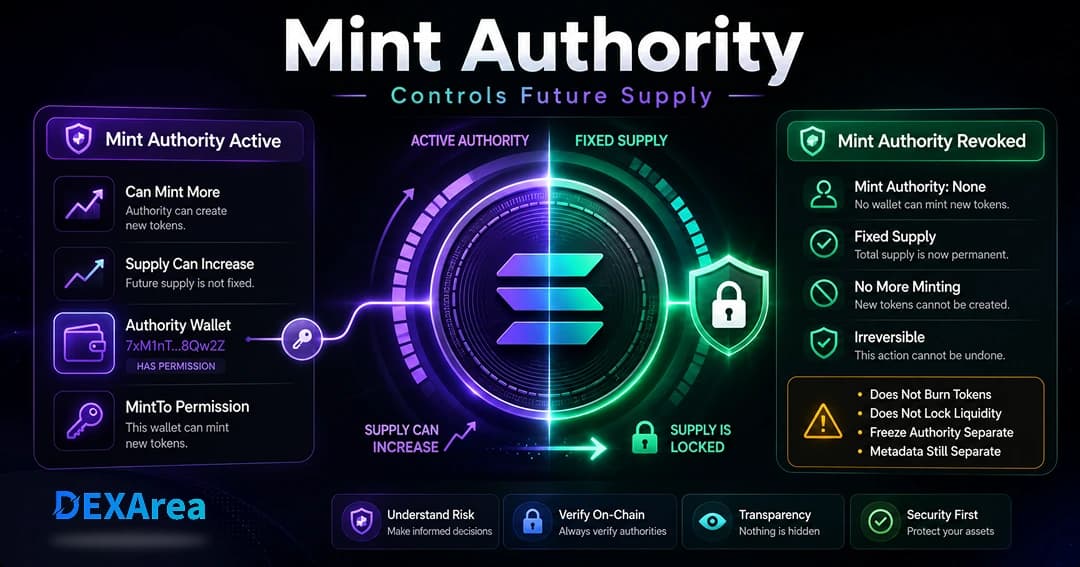
- Revoking mint authority stops future minting; it does not burn existing supply.
- DEXArea is non-custodial—your wallet signs every transaction.
What does it mean to burn Solana tokens?
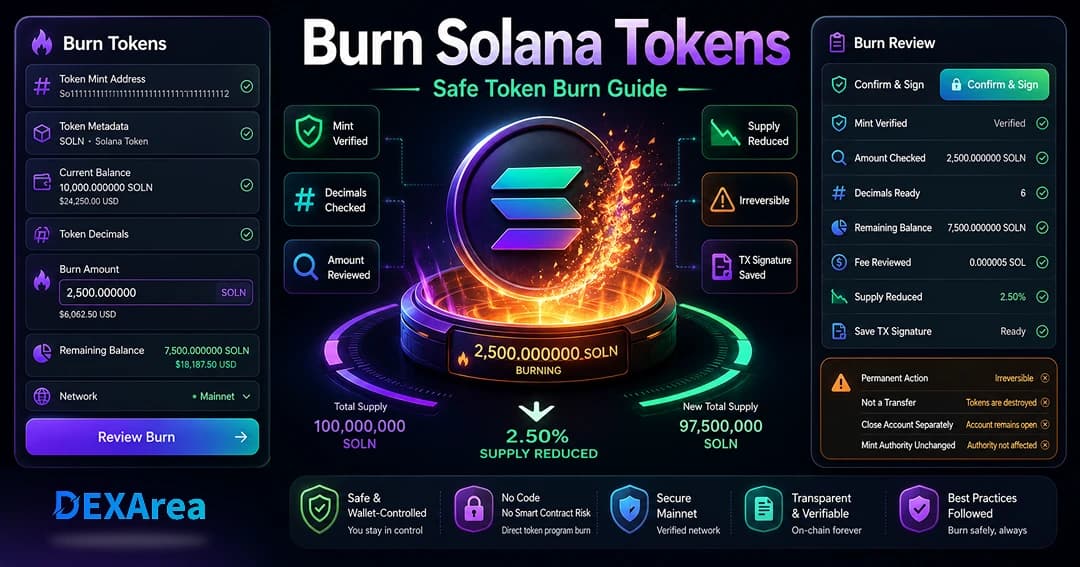
Burn or BurnChecked instructions. The burned amount is deducted from your account and, on standard SPL tokens, the mint’s total supply decreases by the same amount. Destroyed tokens cannot be recovered via transfer or airdrop.Burning does not send tokens to another user and does not automatically close the token account. If you burn your entire balance, the account can remain open with zero tokens while still holding rent-exempt SOL until you close it separately.
Burning also does not change mint authority. If mint authority is still active, more tokens could be minted later. To cap supply at the protocol level, revoke mint authority after final minting.
Why burn tokens on Solana?
Common reasons include:
- Removing dust or unwanted test tokens
- Reducing circulating or total supply after a sale or allocation change
- Cleaning up test campaign tokens
- Aligning supply with tokenomics after over-minting
- Preparing to close a token account (balance must be zero first)
- Publishing burn transaction signatures for transparency
Burning supports supply and wallet hygiene; it does not guarantee price growth or trust. Avoid assuming “burn = price increase.”
What happens when you burn tokens?
After confirmation:
- Tokens are destroyed — removed from your account; standard SPL mint supply decreases.
- Wallet balance updates — immediately; a full burn leaves zero tokens in the account.
- Account may stay open — rent-exempt SOL remains until you close the account.
- On-chain record — save the transaction signature for accounting and communications.
- Usually irreversible — unless you can mint again, burned tokens are gone.
- Mint authority unchanged — revoke separately if you want fixed supply.
- Claim Your SOL (after balance is zero)
- Revoke mint authority
Burn tokens vs transfer tokens
| Burn | Transfer |
|---|---|
| Destroys tokens from account (usually irreversible) | Moves tokens to another address |
| Reduces total supply (standard SPL) | Supply unchanged; ownership changes |
| Usually irreversible | Reversible only if recipient sends back |
| Remove dust, reduce supply | Payments, airdrops, treasury moves |
Burn tokens vs close empty token accounts
| Burning | Closing account |
|---|---|
| Removes token balance; may reduce supply | Deletes the account from the ledger |
| Does not return rent by itself | Returns rent lamports to destination when balance is zero |
| Account can remain open at zero balance | Requires zero balance first (close account) |
To reclaim SOL, burn or transfer tokens to zero, then close the account. Do not try to close an account with a non-zero balance.
Burn tokens vs revoke mint authority
| Burning | Revoke mint authority |
|---|---|
| Destroys existing tokens | Prevents future minting when set to None |
| Does not stop new mints if authority remains | Does not burn current supply |
What you need before burning
- Correct wallet and network (mainnet vs devnet)
- Verified mint address (view metadata)
- Reviewed balance and decimals
- Chosen burn amount deliberately
- Enough SOL for fees
- Confirmed tokens are not needed for liquidity, treasury, vesting, or obligations
- Understanding that burns are usually irreversible
Step-by-step: burn Solana tokens with DEXArea
Step 1: Open DEXArea Burn Tokens
Step 2: Connect your wallet
Connect the wallet that holds the tokens. Confirm network before proceeding.
Step 3: Select the token
Paste the mint address or pick from your accounts. Verify name, symbol, and decimals—do not rely on symbol alone.
Step 4: Enter the burn amount
Enter the amount in human-readable form as the tool displays it. Test with a small burn if decimals are unfamiliar. Avoid burning your full balance unless that is intentional.
Step 5: Review the burn summary
Check mint, current balance, burn amount, remaining balance, network, and estimated fee.
Step 6: Confirm in your wallet
Verify mint, account, amount, and fee in the wallet prompt. Sign only when correct.
Step 7: Verify the burn
Token decimals and burn amounts
1.0 as 1,000,000 base units; 9 decimals use 1,000,000,000. Misreading decimals is a common burn mistake—verify in view metadata and test small amounts first.When should you not burn tokens?
- Unverified mint address
- Tokens needed for liquidity pools or market making
- Tokens owed to investors, presale buyers, or contributors
- Treasury, vesting, or budget allocations
- When your goal is only reclaiming SOL (burn/transfer to zero, then close account)
- Expecting guaranteed price or trust effects
- Unclear transaction details—pause and verify first
Common mistakes to avoid
- Burning the wrong mint (duplicate symbols)
- Decimal errors
- Burning required treasury or LP tokens
- Assuming burns are reversible
- Assuming burn revokes mint authority or closes the account
- Insufficient SOL for fees
- Not saving transaction signatures
- Signing without reviewing the wallet prompt
Security checklist before burning
- Correct wallet and network
- Mint verified via metadata tool
- Name, symbol, decimals confirmed
- Balance and burn amount reviewed
- Liquidity and distribution obligations checked
- Mint authority status understood
- SOL available for fees
- Transaction reviewed before signing
- Signature saved after confirmation
Troubleshooting
| Issue | What to check |
|---|---|
| Wrong wallet | Wallet must own the token account |
| Wrong network | Devnet burns do not affect mainnet |
| Balance too low | Cannot burn more than you hold |
| Amount formatting | Avoid commas; confirm decimals |
| Insufficient SOL | Keep fee buffer |
| Wallet rejected tx | Retry; review extension settings |
| RPC congestion | Wait and retry |
| Program restrictions | Some tokens need delegate permissions |
Try a smaller test burn if errors persist. Verify mint, wallet, and amount on an explorer.
What to do after burning tokens
- Save the transaction signature
- Verify wallet balance and, for projects, total supply
- Communicate the burn to your community when appropriate
- Revoke mint authority if fixed supply is the goal — Revoke mint
- Close empty accounts via Claim Your SOL
- Update tokenomics documentation
- Optional: Snapshot token holders before/after for records
FAQ
What does it mean to burn Solana tokens?
Burning destroys tokens from a token account and is usually irreversible. For standard SPL tokens, the burned amount is removed from supply.
Use DEXArea Burn Tokens or CLI: connect wallet, select mint, enter amount, review, sign.
Yes for standard SPL tokens. The native SOL mint does not support burning the same way—see Solana burn docs.
Is burning reversible?
Usually no.
Is burning the same as transferring?
No. Transfers move tokens; burns destroy them.
Is burning the same as closing an account?
No. Close returns rent when balance is zero.
Does burning revoke mint authority?
No. Use a separate authority transaction.
Can I burn part of my balance?
Yes, up to your full balance.
Why can’t I burn?
Common causes: insufficient balance, wrong wallet/network, low SOL, or program restrictions.
What happens to the token account after burning?
It can remain open at zero balance until you close it.
Should I revoke mint authority after burning?
If you want fixed supply and minting is finished, yes—burning alone is not enough.
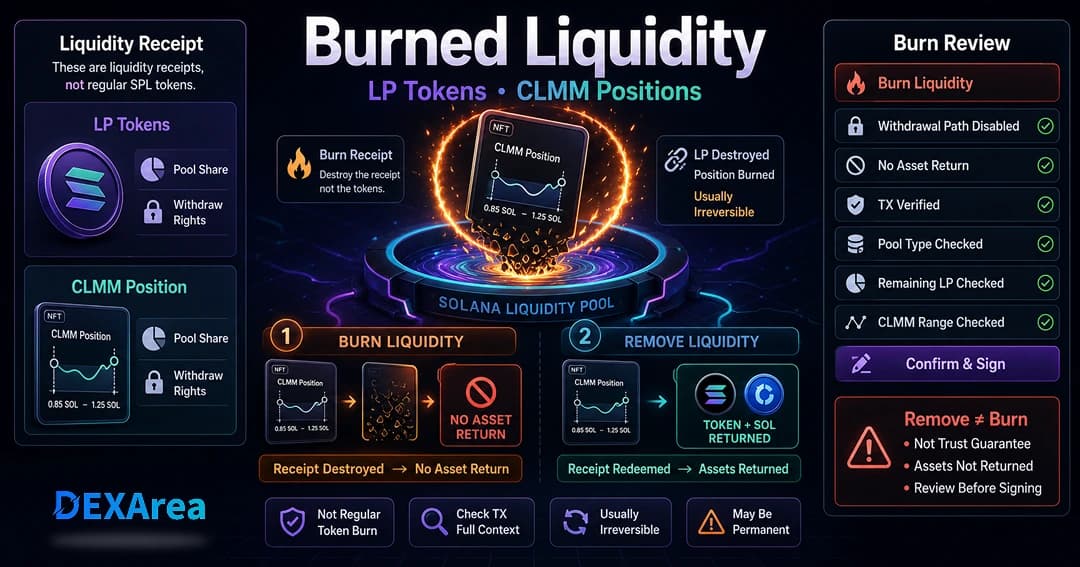
No. Burning SPL tokens affects regular token units and may reduce token supply. Burning Raydium LP tokens or CLMM position items affects liquidity receipts or positions. For the liquidity-specific concept, read What Does Burned Liquidity Mean on Solana?.
Is this financial advice?
No. Educational content only.
Disclaimer
This guide is for educational purposes only and is not financial advice. Burning tokens is usually irreversible and can affect tokenomics and holder expectations. Review every transaction in your wallet before signing. Test on devnet when possible.
DEXArea is non-custodial. Your wallet signs transactions, and your private keys stay in your wallet.