How to Claim Your SOL from Empty Token Accounts
Reclaim rent-exempt SOL locked in empty SPL token accounts: how CloseAccount works, which accounts are safe to close, and a step-by-step DEXArea Claim Your SOL workflow.
How to Claim Your SOL from Empty Token Accounts
CloseAccount transactions for you to sign. DEXArea is non-custodial: your wallet signs; keys never leave your wallet.TL;DR
- Empty token accounts can still hold rent-exempt SOL (~0.002 SOL per typical ATA, varies by size).
- CloseAccount transfers lamports to a destination and deletes the account—but only when the token balance is zero (SPL Token
CloseAccount). - Only close accounts you understand: no tokens left, not tied to active DeFi, bots, or expected future receives.
- Claiming SOL ≠ burning tokens. Burning removes token supply; closing returns the rent deposit.
- DEXArea prepares transactions; your wallet signs. Review accounts, destination, and net recovery before approving.
Why Is SOL Locked in Token Accounts?
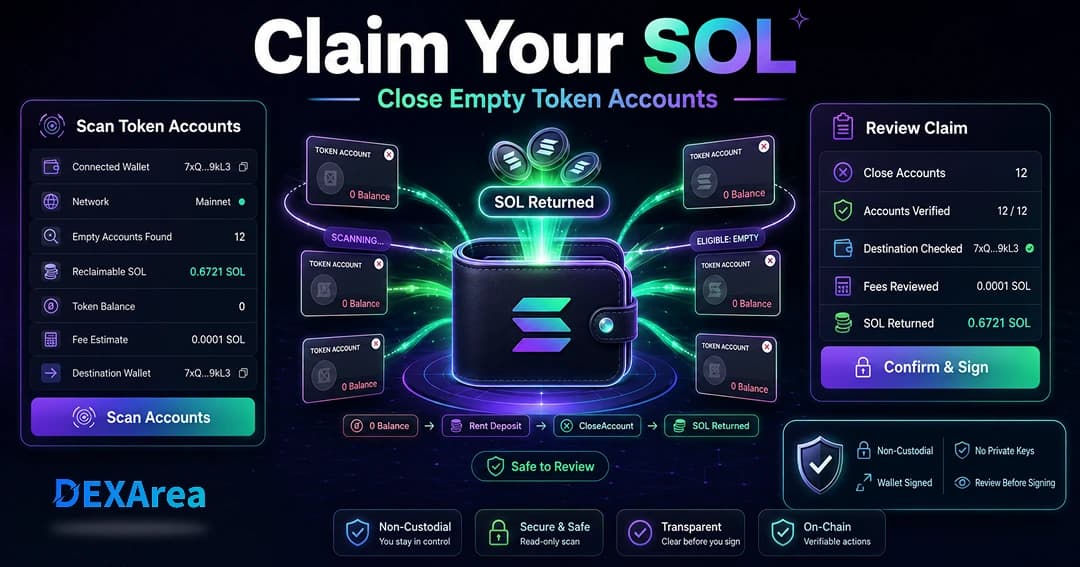
Swaps, airdrops, and NFT mints create accounts and fund rent. If you later sell or transfer all tokens, the account can sit at zero token balance while the SOL deposit remains. Closing those accounts sends the lamports back.
What Does “Claim Your SOL” Mean?
CloseAccount instruction moves all lamports in the account to a destination, then removes the account. You are not minting new SOL or receiving an airdrop.Important: This is not staking rewards, protocol yield, or a “free SOL” promotion.
Which Token Accounts Can Be Closed?
Safe candidates
- Accounts with zero token balance and no ongoing use
- Old ATAs for tokens you no longer hold or expect to receive
- Leftover accounts from swaps or spam airdrops after balance is zero
Leave open
- Any account with a non-zero balance (transfer or burn first)
- Accounts tied to active liquidity, farming, staking, or bots
- ATAs for tokens you will receive again soon (recreating costs rent again)
- Unknown mints or accounts you have not verified on an explorer
Claiming SOL vs burning vs transferring
| Action | What it does | When to use | DEXArea tool |
|---|---|---|---|
| Claim SOL / close empty accounts | CloseAccount deletes the account and returns lamports | Wallet cleanup, spam ATAs, recover rent | Claim Your SOL |
| Burn tokens | Destroys token balance; does not close the account or return rent by itself | Reduce supply, remove unwanted tokens | Burn tokens |
| Transfer tokens | Moves tokens; rent deposit stays until you close | Sends to another wallet | Token multisender for bulk |
Claiming SOL vs closing your wallet
Closing a token account is not closing your wallet. Your wallet address stays active. Recovered lamports go to the destination you approve in the transaction (typically your wallet). You can create a new ATA later if you receive that token again.
What you need before claiming SOL
- Wallet connected — Correct address and network (mainnet vs devnet)
- Empty token accounts — Zero token balance on accounts you plan to close
- SOL for fees — Small balance for transaction fees even while you recover rent
- Reviewed list — Skip active DeFi, bots, and unknown mints
- Expect recreation cost — Receiving the same token again may require a new ATA and rent deposit
Never share seed phrases or private keys.
Step-by-step: claim SOL from empty token accounts
1 — Open DEXArea Claim Your SOL
2 — Connect your wallet
Use Phantom, Solflare, Backpack, or another supported wallet. Confirm the address and network.
3 — Scan for empty token accounts
Run Scan Accounts. The tool lists token accounts owned by your wallet and flags those with zero token balance, showing mint, account address, and estimated reclaimable SOL.
4 — Review before closing
5 — Select accounts to close
Start with obvious spam or old airdrop ATAs. Avoid accounts tied to automation or protocols you still use.
6 — Review recovery and fees
Check total lamports returned, transaction fee estimate, and destination address. Ensure net recovery is worth the fee.
7 — Confirm in your wallet
CloseAccount instructions, zero balances, and the correct destination. Save the transaction signature after confirmation.How much SOL can you recover?
Depends on how many eligible accounts you have and their sizes. Many wallets recover a few cents per ATA; dozens of accounts can add up. Transaction fees reduce net recovery—batching many closes in one transaction is often more efficient than many tiny separate sends. Rent parameters can change over time; treat ~0.002 SOL per standard ATA as a rough guide, not a guarantee.
When should you not close token accounts?
- Non-zero token balance
- Active DeFi, LP, bot, or staking workflows
- Tokens you expect to receive again soon
- Unverified or unrecognized accounts
- Non–token-account types (stake, system accounts)—different rules apply
Claiming SOL is responsible cleanup, not maximizing every lamport at the cost of breaking workflows.
Common mistakes to avoid
- Treating claim SOL as “free money” or yield
- Closing accounts without reviewing the list
- Confusing token accounts with your main wallet
- Assuming burn automatically closes the account and returns rent
- Ignoring fees vs recovery
- Wrong destination address in the transaction
- Sharing private keys with any site
Security checklist before claiming SOL
- Correct wallet and network
- Only zero-balance accounts selected
- Active positions and bots checked
- Estimated recovery vs fees reviewed
- Destination address confirmed
- Transaction reviewed before signing
- Signature saved for records
- No seed phrase entered on third-party sites
Troubleshooting
| Problem | Possible cause | What to check |
|---|---|---|
| No SOL recoverable | No empty accounts | Rescan; you may have already closed them |
| Transaction fails | Low SOL for fees | Keep a small SOL balance |
| Account not closable | Non-zero balance or wrong owner | Transfer/burn first; confirm ownership |
| Wrong wallet/network | Devnet vs mainnet | Reconnect on correct cluster |
| RPC issues | Temporary outage | Retry or switch RPC |
| Too many in one tx | Compute limits | Close fewer accounts per transaction |
| Recovery lower than expected | Fees or account size | Compare estimate to actual rent |
What to do after claiming SOL
- Confirm wallet balance increased (minus fees)
- Save the transaction signature
- Verify intended accounts are closed; needed accounts remain
- Repeat periodically if you trade many tokens
- Use other DEXArea tools as needed: multisender, snapshot, create pool, add / remove liquidity
FAQ
Why is SOL locked in my token accounts?
Each token account must hold a rent-exempt lamport deposit to stay on-chain.
Close zero-balance token accounts with
CloseAccount via DEXArea Claim Your SOL or your wallet/CLI.Is claiming SOL the same as earning rewards?
No. You recover your own deposit; no new SOL is created.
What happens when I close a token account?
Lamports go to the destination address and the account is removed until recreated.
Can I close an account that still has tokens?
No. Balance must be zero first.
Does closing token accounts close my wallet?
No. Your wallet address stays the same.
How much can I recover?
Roughly ~0.002 SOL per typical empty ATA, times the number of eligible accounts, minus fees.
Is it safe?
Yes if you review each account and only close unused zero-balance ATAs.
Will I need the account again?
Receiving that token again may create a new ATA and rent cost.
Why can’t I claim anything?
No eligible accounts, wrong wallet/network, or insufficient SOL for fees.
Is this financial advice?
No. Educational content only.
Disclaimer
This guide is for educational purposes only and is not financial advice. Closing accounts can affect future token workflows; recovered amounts vary. Review every transaction in your wallet before signing.
DEXArea is non-custodial. Your wallet signs transactions, and your private keys stay in your wallet.