Solana Token Multisender: Send Tokens to Multiple Wallets
Send SPL tokens to many wallets at once: prepare a recipient list, handle decimals and fees, test batches, and use DEXArea Token Multisender from your wallet.
Solana Token Multisender: Send Tokens to Multiple Wallets
Distributing a newly minted Solana token isn't just a celebratory moment—it's a critical operational task. After the token is created, teams need to allocate portions to founders, investors and partners, reward early supporters and NFT holders, fulfil presale commitments and run airdrops. Doing this manually one recipient at a time is tedious and error-prone. A token multisender helps you send SPL tokens to many wallets in one workflow, with your own wallet signing the transactions.
In this guide you'll learn how to use a Solana token multisender effectively. You'll discover when to use the tool, how to prepare a recipient list, why decimals and fees matter and how to avoid common mistakes. By the end you'll be ready to distribute your token safely and confidently.
What Is a Solana Token Multisender?
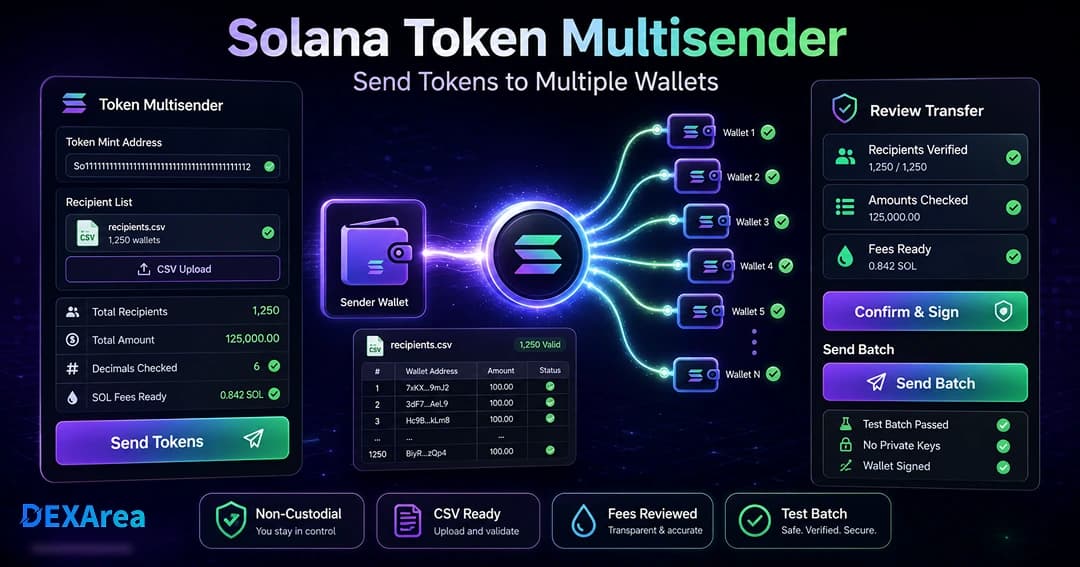
A token multisender is a tool for distributing an existing SPL token to multiple wallets at once. Instead of manually repeating a transfer for each recipient, you prepare a list of addresses and amounts. The multisender tool builds the transfer instructions, and your connected wallet signs the transaction.
Important points to understand:
- It distributes, not creates. A multisender does not mint or create a token. You must already have a token mint and enough balance in your wallet.
- Non-custodial workflow. DEXArea's multisender is non-custodial—you connect your wallet and sign each transaction. Your private keys never leave your wallet.
- Supports variable amounts. You can send the same or different amounts to each recipient. Formatting decimals correctly is vital because the mint defines how many digits exist after the decimal place.
- Fees and associated accounts. Every transfer incurs Solana network fees. If a recipient does not yet have an associated token account (ATA) for your SPL token, the transaction must create one. ATAs must be rent-exempt, requiring approximately 0.00203928 SOL to be deposited per new account. Keep SOL in your wallet to cover these costs.
When Should You Use a Token Multisender?
Bulk sending is beneficial whenever you need to distribute tokens to many addresses. Common situations include:
- Airdrops to early community members or contest winners
- Presale fulfilment to investors according to purchase amounts
- Team and contributor allocations
- Holder rewards and staking payouts
- Campaign rewards or grants
- Treasury management across multiple wallets or multisig vaults
A multisender helps with distribution but cannot ensure legal or regulatory compliance. Always verify that your campaign is permissible in your jurisdiction and does not constitute an unregistered security sale.
What You Need Before Sending Tokens
Prepare these items before opening the multisender tool:
- Mint address – The unique address of your SPL token's mint account
- Token balance – Enough tokens for the total distribution; check decimals
- Recipient list – Clean list of wallet addresses and amounts (CSV recommended)
- SOL for fees – Base fee (~0.000005 SOL per signature) plus ATA creation (~0.00203928 SOL per new recipient account)
- Network selection – Mainnet, testnet or devnet in your wallet
- Token metadata verification – View Metadata or Solana Explorer
- Distribution plan – Record who receives what and why
Preparing Your Recipient List
A well-prepared recipient list is the heart of any bulk transfer. Follow these guidelines:
- Use exact wallet addresses – Copy from recipients or snapshot data; typos cause failed transfers
- Clean duplicates – Remove duplicate rows unless intentional
- Validate formatting – CSV: wallet address and amount per row
Example CSV format:
wallet,amount
7sExampleWallet...,100
9xExampleWallet...,250
- Check decimals – For 9 decimals,
1.23means 1.23 tokens - Remove private data – Never include private keys or seed phrases
- Backup original data – Keep an unedited copy
- Test small – Try a few addresses before a large batch
Warning: Never paste or upload your private keys or seed phrases. Multisender tools only require recipient addresses and amounts.
Step-by-Step: Sending Solana Tokens to Multiple Wallets
1. Open the Multisender
2. Connect Your Wallet
Select the wallet that holds your tokens (Phantom, Solflare, Backpack, etc.). Confirm the correct network and enough tokens and SOL for fees. The tool is non-custodial—your keys stay in your wallet.
3. Select the Token
4. Add Recipient Addresses and Amounts
Upload your CSV or paste your list. Remove invalid rows, check duplicates, and confirm amounts respect decimals.
5. Review Totals and Fees
Before sending, review:
- Total token amount – Matches your plan and wallet balance
- Estimated fees – Base fees plus ATA creation for new recipients
- Number of recipients – Very large lists may need multiple batches
6. Send a Test Batch
Start with one to three addresses. Wait for confirmation and verify amounts before the full distribution.
7. Confirm the Transaction
Review total amount, mint and recipient count in your wallet. Ensure sufficient SOL. Sign only when correct—failed transactions can still consume base fees. Save transaction signature(s) for records.
Understanding Token Amounts and Decimals
The decimals field of a mint account defines digits after the decimal point. When entering amounts in the multisender:
- Use human-readable amounts (e.g.
1.5for 1.5 tokens on a 9-decimal mint) - Avoid commas or spaces
- If uncertain, send a small test to yourself first
Fees and Associated Token Accounts
Every Solana transaction includes a base fee (5,000 lamports per signature, ~0.000005 SOL). Optional prioritization fees can speed up transactions; default priority is often enough for multisender use.
Associated token accounts (ATAs) are derived from owner and mint. Sending to a wallet without an ATA for your mint creates one at roughly 0.00203928 SOL rent-exempt deposit, paid by the sender. Budget extra SOL when many recipients are new wallets.
Airdrop vs Multisender: Understanding the Difference
An airdrop is a campaign or strategy for distributing tokens, often as a promotional reward. A multisender is the tool that executes the distribution. Many airdrops use multisender tools; not every multisender use is an airdrop (e.g. presale or team payouts).
Using Snapshot Data for Distribution
If you distribute based on holder or NFT snapshots:
- Clean duplicates and validate addresses
- Verify eligibility rules
- Check amounts against decimals
- Keep snapshot data for auditing
Common Mistakes to Avoid
- Wrong network (devnet vs mainnet)
- Incorrect mint (relying on symbol only)
- Unverified or typo'd addresses
- Duplicate rows
- Wrong decimals
- Insufficient SOL (fees still apply on failure)
- No test batch
- Uploading private keys or seed phrases
- Missing transaction records
Security Checklist Before Bulk Sending Tokens
- Correct wallet connected
- Correct network selected (mainnet/testnet/devnet)
- Token mint address verified
- Token metadata checked (name, symbol, decimals, authorities)
- Sufficient token balance in wallet
- Recipient list cleaned and validated
- Duplicates reviewed
- Token amounts reviewed and decimals considered
- Total amount cross-checked with plan
- SOL balance checked for base fees and associated accounts
- Test batch completed and verified
- Transaction details reviewed before signing
- Transaction signatures saved after confirmation
Troubleshooting: Why Did My Bulk Send Fail?
Even with careful preparation, transactions can fail. Use this table to diagnose common problems:
| Problem | Possible cause | What to check |
|---|---|---|
| Transaction fails | Insufficient SOL for fees or account creation | SOL balance for base fees and ATA deposit |
| Some rows fail validation | Invalid wallet addresses or malformed CSV | Validate list and remove bad rows |
| Wrong token selected | Similar symbol used | Verify mint address and metadata |
| Amounts look wrong | Decimal formatting issue | Confirm decimals; test with a small send |
| Transaction too large | Too many recipients or compute limits | Split list into smaller batches |
What to Do After Sending Tokens
After a successful distribution:
- Save transaction signatures for proof and debugging
- Verify recipients – Spot-check wallets received correct amounts
- Communicate – Announce to community when appropriate (avoid sharing private data)
- Take a snapshot – Snapshot Token for audits or future campaigns
- Plan next steps – Create Pool and Add Liquidity if launching publicly
FAQ
1. What is a Solana token multisender?
A tool that builds transfer instructions to send an existing SPL token to multiple wallets. It does not create new tokens.
2. How do I send Solana tokens to multiple wallets?
Connect your wallet, select your token, upload a CSV of addresses and amounts, review totals and fees, and sign.
3. Can I bulk send SPL tokens without coding?
Yes. DEXArea and similar tools support non-developers.
4. Do I need a CSV file?
Recommended for large lists; small lists can be pasted directly.
5. What information should be in my recipient list?
Only wallet address and amount—never private keys.
6. Do recipients need associated token accounts first?
No. Solana can create ATAs automatically; you pay ~0.00203928 SOL per new account.
7. How much SOL do I need for a bulk send?
Base fees per signature plus ATA creation for new recipients; keep a buffer.
8. Can I use a multisender for airdrops?
Yes. Airdrops often use multisender tools for execution.
9. What happens if one wallet address is invalid?
Invalid addresses typically cause the transaction to fail. Validate first.
10. Can I send different amounts to different wallets?
Yes. Each CSV row can specify a unique amount.
11. Should I send a test batch first?
Absolutely. It reduces risk and saves SOL on failed full batches.
12. Is using a token multisender financial advice?
No. This guide is educational; consult professionals for legal and financial questions.
Conclusion
Distributing a token across many wallets can be one of the most time-consuming parts of launching a project. A token multisender streamlines the process: upload a recipient list, review totals and sign from your wallet. Before you begin, verify your mint, hold enough SOL for fees and ATA deposits, prepare a clean list and test with a small batch.
Disclaimer
This guide is for educational purposes only and is not financial advice. Token distributions, airdrops and reward campaigns can involve legal, operational and financial risks. Always review every transaction in your wallet before signing, and test important flows with small batches when possible. DEXArea is non-custodial—your wallet signs transactions, and your private keys stay in your wallet.