Solana Liquidity Pools Explained for Token Creators
Understand how Solana liquidity pools work, including pool types, LP tokens, liquidity depth, and the differences between creating, adding, removing, and burning liquidity.
Solana Liquidity Pools Explained for Token Creators
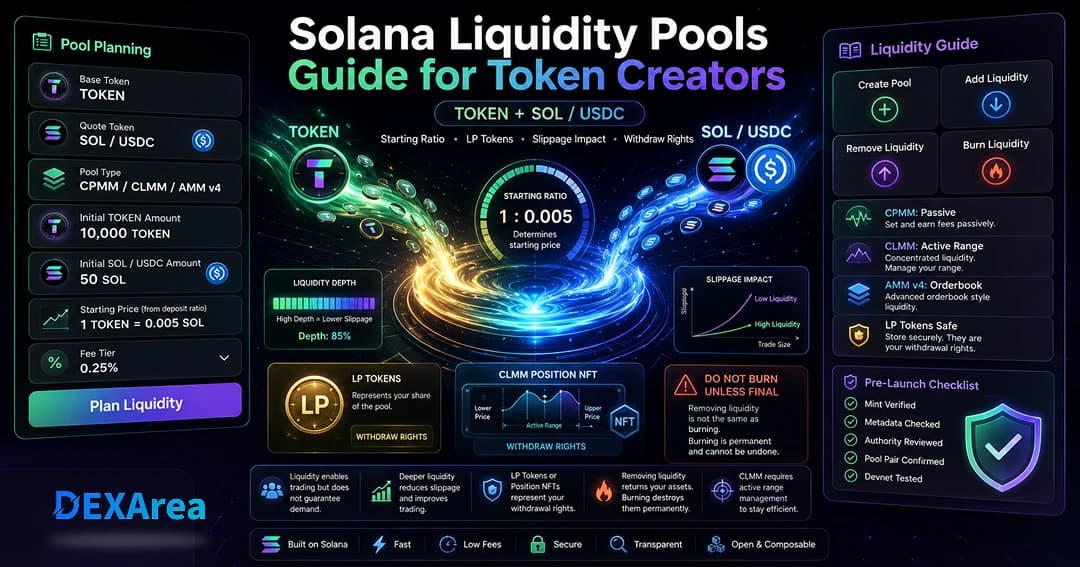
Solana liquidity pools allow tokens to be traded through decentralized exchanges such as Raydium. For token creators, understanding liquidity is important before launching a market, adding funds to a pool, removing liquidity, or burning LP tokens.
This guide explains how Solana liquidity pools work, what token creators should check before creating a pool, how adding and removing liquidity differ, and why burning liquidity is not the same as withdrawing liquidity.
DEXArea provides non-custodial tools for creating Raydium pools, adding liquidity, removing liquidity, and burning liquidity. Your wallet signs transactions, and your private keys stay in your wallet.
TL;DR
- Solana liquidity pools let users swap between token pairs through DEXs such as Raydium.
- Creating a pool sets the initial token pair and starting ratio.
- Adding liquidity deposits assets into an existing pool and may provide LP tokens or a CLMM position depending on pool type.
- Removing liquidity withdraws underlying assets from a liquidity position.
- Burning LP tokens is different from removing liquidity and may affect the ability to withdraw liquidity later.
- Liquidity does not guarantee demand, price stability, trading volume, or project trust.
- DEXArea tools are non-custodial: your wallet signs transactions, and your private keys stay in your wallet.
What Is a Solana Liquidity Pool?
A liquidity pool holds two assets (a token pair) in on-chain reserves. Traders swap one asset for the other along an automated pricing curve on DEXs such as Raydium. When someone swaps, pool balances shift and the effective price updates based on pool math and available depth.
Liquidity providers deposit both sides of the pair (or follow CLMM range rules) so swaps can execute. Standard pools may issue LP tokens representing a share of the pool; CLMM pools may represent liquidity through a CLMM position with range-specific behavior. Always review how the live form displays the pool type before signing.
Why Liquidity Matters for Token Creators
Without a pool, your token may be difficult to trade on Raydium-style DEX interfaces. Liquidity can:
- Provide a swap path between your token and a familiar quote asset
- Influence slippage and price impact for typical trade sizes
- Affect launch perception when users review depth and pair setup
| Pair | Often used for | Notes |
|---|---|---|
| TOKEN/SOL | Many Solana-native launches | SOL price adds quote-side volatility |
| TOKEN/USDC | Stable quote reference | Easier dollar-style framing; still not a price guarantee |
Creating a Liquidity Pool
Creating a pool opens a new market for a token pair. You typically choose:
- Token mint and quote asset (for example SOL or USDC)
- Pool type (CPMM, CLMM, or legacy AMM v4 where supported)
- Initial token and quote amounts, which set the starting ratio and implied launch price
- Fee tier options shown in the form
Low initial liquidity can increase slippage for later trades. Review the live fee summary and wallet transaction before signing. Test on Devnet when possible.
Adding Liquidity
Adding liquidity means depositing into an existing pool at the current ratio (or CLMM range rules). You may receive LP tokens or a CLMM position depending on pool type. Providers may receive a share of trading fees when swaps occur, but fee income is not guaranteed and depends on pool activity, pool type, and your share.
Deposits are exposed to price movement, slippage, and impermanent loss. Review calculated amounts in the form before signing.
Removing Liquidity
Removing liquidity withdraws underlying pool assets from your liquidity position when you redeem LP tokens or close a CLMM position according to pool rules. This is the normal way to exit a position while recovering deposited assets (subject to pool state and fees).
Burning Liquidity
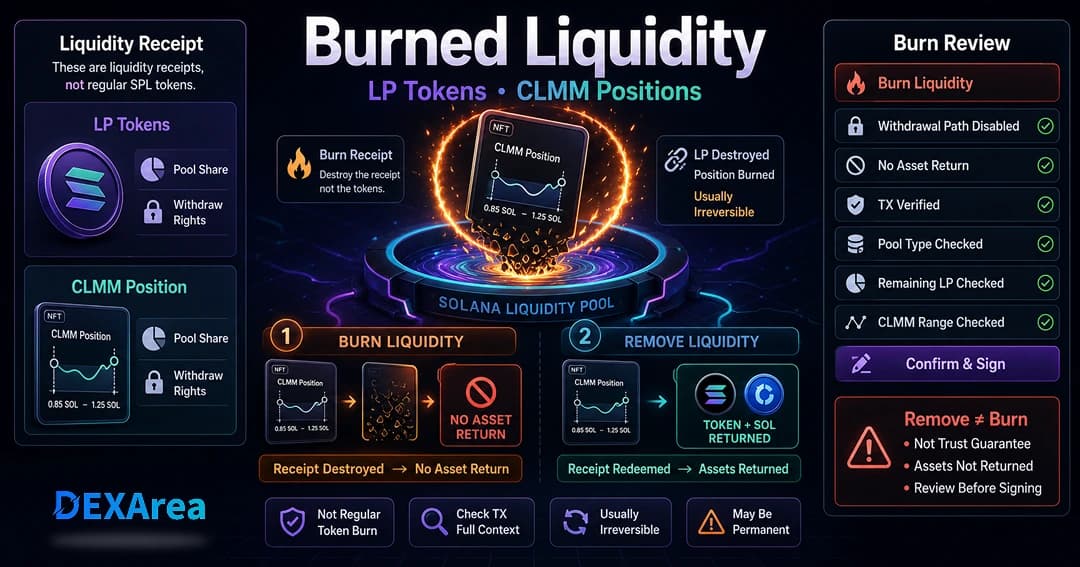
Burning liquidity is not the same as removing liquidity.
- Remove liquidity — Withdraws underlying assets from a liquidity position when you still hold the correct LP tokens or CLMM position.
- Burn LP tokens / CLMM position — May destroy the item used to claim that liquidity later. In most cases, treat burn actions as serious and usually irreversible. Burning does not guarantee trust, price stability, or locked liquidity in every setup—review pool details and transaction output.
AMM vs CPMM vs CLMM
Raydium supports multiple pool programs. At a high level:
| Type | Summary |
|---|---|
| CPMM | Constant-product style pools; often passive; fungible LP tokens for many setups |
| CLMM | Concentrated liquidity in a price range; CLMM position; may need active range management |
| AMM v4 | Legacy hybrid model; less common for typical new token launches |
Liquidity Checklist Before Launch
- Correct token mint and network (Mainnet vs Devnet)
- Token pair and quote asset
- Pool type shown in the live form
- Initial token amount and quote asset amount (or add-liquidity amounts)
- Starting or current ratio and implied price
- Slippage and transaction preview
- Fees shown in the UI (platform + network)
- Mint authority and freeze authority — see revoke mint, revoke freeze, how to revoke mint authority, and how to revoke freeze authority
- Metadata — view metadata, make immutable when appropriate
- Wallet transaction details before signing
Slippage and Pool Depth
Slippage is the difference between an expected swap price and the executed price. Price impact grows when trade size is large relative to pool depth. More liquidity can reduce slippage for typical sizes, but depth alone does not guarantee volume or demand.
Common Mistakes to Avoid
- Wrong token mint or network before creating a pool
- Unintended initial ratio (arbitrage and poor implied price)
- Too little liquidity (high slippage)
- Confusing remove vs burn liquidity
- Assuming liquidity equals demand or guaranteed fees
- Creating a pool before metadata or authority review is complete
- Not reviewing transactions before signing
What to Do After Creating a Pool
- Save pool address and transaction signature.
- Verify pair, fee tier, and quote asset on-chain.
- Run a small test swap if appropriate.
- Monitor depth and slippage; add liquidity if needed.
- Share official mint and pool links—avoid impersonation pools.
- Avoid burning or removing liquidity without understanding consequences.
FAQ
What is a Solana liquidity pool?
A pool holding two assets that enables swaps on a DEX such as Raydium along an automated curve.
Why do token creators need liquidity?
It provides a trading path for your token. It does not guarantee demand or volume.
Choose pair, pool type, initial amounts, and fees in the form, then sign from your wallet. Use Create Pool or see how to create a Raydium liquidity pool.
What is initial liquidity?
The first deposit when a pool is created; amounts set the starting ratio and implied price.
Does the initial ratio affect starting price?
Yes for typical constant-product pools—the deposit ratio influences implied price and launch slippage.
What happens when I add liquidity?
You deposit both sides at the current ratio (or CLMM rules) and may receive LP tokens or a CLMM position.
What are LP tokens?
Receipts representing your share of a standard pool, used to withdraw later if you still hold them.
What is a CLMM position?
Concentrated liquidity in a range on a CLMM pool; behavior differs from fungible LP tokens.
Can I remove liquidity later?
Usually yes if you hold LP tokens or the CLMM position needed to withdraw.
Is burning liquidity the same as removing liquidity?
No. Removing liquidity withdraws underlying assets from a liquidity position. Burning LP tokens or a CLMM position may destroy the item used to claim liquidity later and is usually irreversible. It does not guarantee trust or price stability.
Does liquidity guarantee token demand or trading volume?
No.
What should I check before creating or adding liquidity?
Mint, network, pair, pool type, amounts, ratio, slippage, fees, authorities, metadata, and wallet transaction details.
Yes via DEXArea create, add, remove, and burn tools—non-custodial wallet signing.
Is this financial advice?
No. Educational content only.
Disclaimer
This guide is for educational purposes only and is not financial advice. Liquidity creation and management can affect trading experience, slippage, token balances, and launch perception. Review every transaction in your wallet before signing.
DEXArea is non-custodial: your wallet signs transactions, and your private keys stay in your wallet.