How to Create a Mintable SPL Token on Solana
Create a mintable SPL token on Solana with active mint authority. Choose supply and decimals, mint more later, and revoke authority when supply is final.
How to Create a Mintable SPL Token on Solana
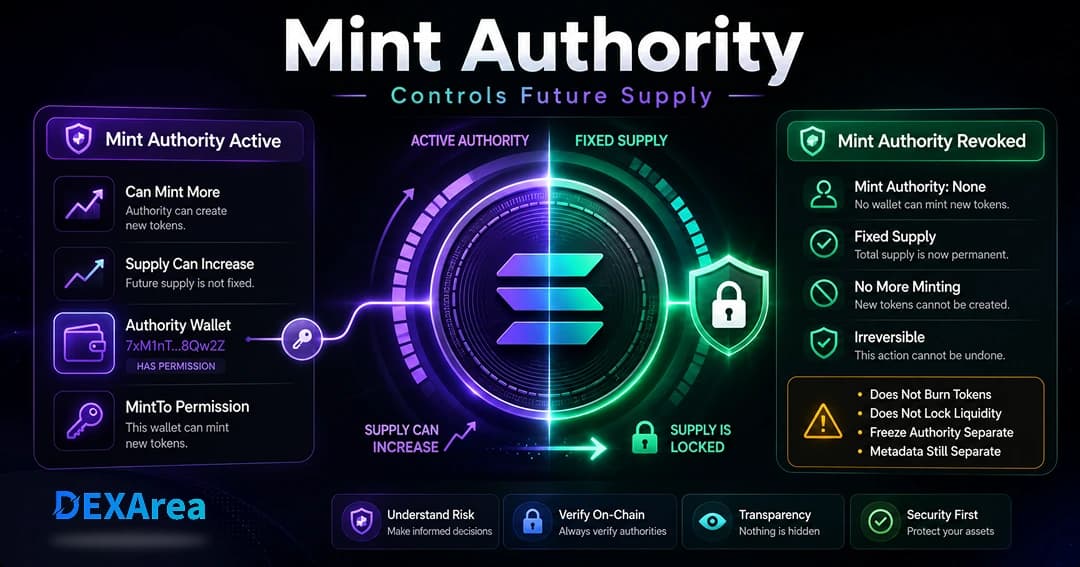
A mintable SPL token is a Solana token whose mint authority is still active. That means the current authority holder may be able to mint more supply later for rewards, vesting, treasury operations, staged launches, or other planned token mechanics.
This guide explains how to create a mintable SPL token on Solana, how mint authority works, how decimals affect supply, how to mint more tokens later, and when to revoke mint authority after your final supply plan is ready.
DEXArea provides a no-code, non-custodial token creation workflow. Your wallet signs transactions, and your private keys stay in your wallet.
Security note
A mintable token requires clear authority management. Test on Devnet first, keep authority wallets secure, and do not revoke mint authority until your planned supply is complete.
- Token Creator— Create SPL or Token-2022 tokens
- Revoke Mint Authority— Permanently revoke minting capability
TL;DR
- A mint account represents the token itself, including decimals, supply, mint authority, and optional freeze authority.
- A token account / ATA holds a wallet's balance for a specific mint.
- A token is mintable when mint authority is active.
- If mint authority is revoked, future minting is unavailable in most standard cases.
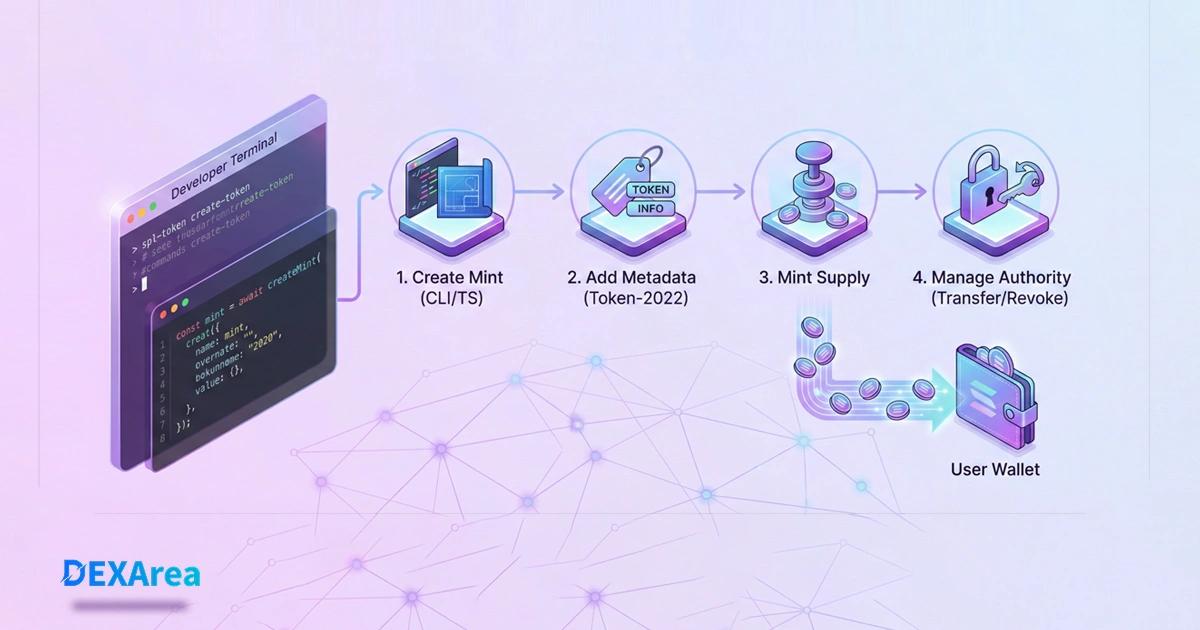
- Create the token, set metadata, mint the planned supply, then decide whether to keep, transfer, or revoke mint authority.
- Use DEXArea Token Creator for a no-code wallet-based flow, then Mint Tokens or Revoke Mint Authority when needed.
What is a mintable SPL token?
SPL tokens are Solana's standard token format. They are managed by Solana's Token Program or Token-2022 Program. A token's mint account stores the shared state for that token, including supply, decimals, mint authority, and optional freeze authority.
A token is mintable when its mint authority is active. The mint authority can approve additional minting through standard token minting flows. This can be useful when a project has planned emissions, rewards, vesting, treasury releases, or staged distribution.
Mintable vs fixed-supply token
| Token type | Mint authority status | Future minting | Common use case |
|---|---|---|---|
| Mintable token | Active | May be possible by the authority holder | Rewards, emissions, vesting, staged launches |
| Fixed-supply token | Revoked | Usually unavailable in standard mint flows | Public launches after final supply is ready |
Important
Mint authority controls supply. Metadata authority controls token metadata. Freeze authority controls whether token accounts can be frozen. These are separate authorities—review each before launch.
Option 1: Create a Mintable SPL Token with DEXArea
The no-code path is best if you want to create a Solana token through a wallet-based interface instead of writing CLI commands or TypeScript code. DEXArea lets you enter token details, review metadata, choose supply settings, and sign the creation transaction from your wallet.
Basic no-code flow
- Open the Solana Token Creator.
- Connect your Solana wallet.
- Choose the network: Devnet for testing or Mainnet for production.
- Enter token name, symbol, decimals, image, and metadata.
- Set the initial supply.
- Decide whether the token should remain mintable.
- Create the token and confirm the transaction in your wallet.
- Verify the mint address in a Solana explorer.
When to keep mint authority active
Keeping mint authority active can make sense if your project needs:
- Future emissions
- Staking or reward distribution
- Vesting unlocks
- Treasury-controlled supply expansion
- Programmatic minting through a smart contract or PDA
When to revoke mint authority
You should consider revoking mint authority when:
- The full supply is already minted
- You want a fixed-supply launch plan after minting is complete
- You want future minting unavailable in most standard cases
- Your public communication states no further minting is planned
Option 2: Create a mintable SPL token with Solana CLI
The CLI path is useful when you want direct control and a repeatable developer workflow.
Use Devnet first
The commands below should be tested on Devnet before Mainnet. Mainnet transactions use real SOL and create real on-chain assets.
1. Set your CLI to Devnet
solana config set --url https://api.devnet.solana.com
solana address
solana balance
If you need Devnet SOL:
solana airdrop 2
2. Create the token mint
Create a standard SPL token mint with 9 decimals:
spl-token create-token --decimals 9
The CLI will print a mint address. Save it.
Creating token <MINT_ADDRESS>
Signature: <TRANSACTION_SIGNATURE>
That mint address is the token's unique on-chain identifier.
3. Create your token account / ATA
A mint account is not where wallet balances live. You also need a token account, usually an Associated Token Account (ATA), to hold your balance.
spl-token create-account <MINT_ADDRESS>
4. Mint the initial supply
spl-token CLI, the displayed token amount is commonly entered as a UI amount. For example, this mints 100 tokens to your default token account for that mint:spl-token mint <MINT_ADDRESS> 100
Then verify:
spl-token balance <MINT_ADDRESS>
spl-token supply <MINT_ADDRESS>
Decimals still matter
CLI tools may accept human-readable token amounts, while SDK instructions often use raw base units. With 9 decimals, 1 UI token equals 1,000,000,000 base units. Always check the tool or SDK you are using before minting supply.
5. View mint details
spl-token account-info <MINT_ADDRESS>
Check:
- Decimals
- Supply
- Mint authority
- Freeze authority
- Token program
Option 3: Create and mint a token with TypeScript
Use TypeScript if your app needs to create token mints programmatically or prepare transactions for wallet signing.
Install dependencies:
npm install @solana/web3.js @solana/spl-token
TypeScript example
import {
  Connection,
  Keypair,
  clusterApiUrl,
  LAMPORTS_PER_SOL,
} from "@solana/web3.js";
import {
  createMint,
  getOrCreateAssociatedTokenAccount,
  mintTo,
  TOKEN_PROGRAM_ID,
} from "@solana/spl-token";

async function main() {
  const connection = new Connection(clusterApiUrl("devnet"), "confirmed");

  const payer = Keypair.generate();
  const airdropSignature = await connection.requestAirdrop(
    payer.publicKey,
    2 * LAMPORTS_PER_SOL
  );
  await connection.confirmTransaction(airdropSignature, "confirmed");

  const decimals = 9;
  const mintAuthority = payer;
  const freezeAuthority = payer.publicKey;

  const mint = await createMint(
    connection,
    payer,
    mintAuthority.publicKey,
    freezeAuthority,
    decimals,
    undefined,
    undefined,
    TOKEN_PROGRAM_ID
  );

  const ata = await getOrCreateAssociatedTokenAccount(
    connection,
    payer,
    mint,
    payer.publicKey
  );

  const uiAmount = 100n;
  const rawAmount = uiAmount * 10n ** BigInt(decimals);

  await mintTo(
    connection,
    payer,
    mint,
    ata.address,
    mintAuthority,
    rawAmount
  );

  const supply = await connection.getTokenSupply(mint);

  console.log("Mint:", mint.toBase58());
  console.log("ATA:", ata.address.toBase58());
  console.log("Supply:", supply.value.uiAmountString);
}

main().catch((error) => {
  console.error(error);
  process.exit(1);
});
Why rawAmount is multiplied
mintTo amount is a raw token amount. If decimals are 9, minting 100 UI tokens means minting 100 * 10^9 raw units.For production apps, this example is for Devnet learning only. Do not use generated keypairs as authority wallets. Use wallet signing, secure key management, multisig, governance, or a program-controlled authority depending on your architecture.
Token Program vs Token-2022
Solana has the original Token Program and the newer Token-2022 Program. Most basic SPL tokens use the original Token Program. Token-2022 supports extensions such as transfer fees, metadata pointer patterns, confidential transfer features, and other advanced options.
| Program | Best for | Notes |
|---|---|---|
| Token Program | Standard SPL tokens | Broad wallet and exchange compatibility |
| Token-2022 | Advanced token extensions | Useful for transfer fees and extension-based features |
You can create Token-2022 mints with the Token-2022 program ID:
spl-token --program-id TokenzQdBNbLqP5VEhdkAS6EPFLC1PHnBqCXEpPxuEb create-token --decimals 9
Metadata: name, symbol, image, and URI
Wallets and explorers need metadata to display your token properly. Metadata usually includes:
- Token name
- Symbol
- Description
- Image URL
- Metadata JSON URI
For standard SPL tokens, metadata is commonly handled with the Metaplex Token Metadata Program. For Token-2022 mints, metadata can also use extension-based patterns.
Metadata is not the same as supply authority
Metadata authority is separate from mint authority. Updating metadata does not change token supply, and revoking mint authority does not make metadata immutable.
Mint authority: keep, transfer, or revoke?
After creating a mintable SPL token, you need a plan for the mint authority.
Keep mint authority
Keep it only if future minting is part of your token design. For example:
- Reward programs
- Staking emissions
- Vesting schedules
- Treasury releases
- DAO-controlled supply expansion
Transfer mint authority
Transferring mint authority can reduce hot-wallet exposure compared with keeping it on a single active wallet. You may transfer authority to:
- A multisig
- A governance-controlled wallet
- A program-derived address (PDA)
- A more secure cold wallet
Revoke mint authority
Revoking mint authority makes future minting unavailable in most standard cases and is usually irreversible. This is commonly done after the planned supply has been minted and verified.
CLI example (verify syntax with official docs or local CLI help):
spl-token authorize <MINT_ADDRESS> mint --disable
Revoking is usually irreversible
After mint authority is revoked, future minting is unavailable in most standard cases. Do not revoke it unless your planned supply is already minted and verified.
Common mistakes when creating mintable Solana tokens
1. Choosing the wrong decimals
Most Solana tokens use 6 or 9 decimals. Decimals are effectively fixed after the mint is initialized. Changing them usually requires creating a new mint.
2. Minting to the wrong token account
A wallet address and a token account address are not the same thing. Each wallet usually needs an ATA for each token mint.
3. Forgetting metadata
A token without metadata may look broken or suspicious in wallets and explorers.
4. Keeping mint authority on a hot wallet
If your mint authority wallet is compromised, an attacker may mint new supply. This can create serious supply and reputation issues for a project.
5. Revoking too early
If you revoke mint authority before minting the intended planned supply, future minting is unavailable in most standard cases and the on-chain supply may remain capped at the current amount.
6. Testing directly on Mainnet
Always test the full flow on Devnet first: create token, mint supply, update metadata, transfer tokens, revoke authority, and verify on explorer.
Recommended launch checklist
- Test the full flow on Devnet before Mainnet: create token, mint supply, update metadata, transfer tokens, and review authority changes.
- Confirm name, symbol, decimals, image, and metadata URI.
- Mint the planned initial supply and verify supply in a Solana explorer.
- Check mint authority status on View Metadata.
- Check freeze authority status; see Revoke Freeze Authority and how to revoke freeze authority when appropriate.
- Check metadata/update authority; use Make Token Immutable when appropriate.
- Decide whether mint authority should be kept, transferred, or revoked.
- Decide whether freeze authority should be kept or revoked.
- Test transfers to another wallet; test Burn Tokens if burn behavior matters for your plan.
- Document authority status for your community.
- Repeat on Mainnet only after the Devnet flow works.
- Token Creator
- Mint Tokens
- Update Metadata
- Revoke Mint Authority
- Revoke Freeze Authority
- Make Token Immutable
FAQ
Final thoughts
Creating a mintable SPL token on Solana is straightforward. Managing mint authority, metadata, and launch planning is the longer-term work.
A practical launch flow:
- Create the token (Devnet first).
- Add metadata.
- Mint the planned supply.
- Verify the mint and token accounts.
- Transfer or distribute tokens if needed.
- Keep, transfer, or revoke authority based on your tokenomics plan.