How to Create a Token Page for Your Solana Crypto Project (No-Code Guide)
Learn how to create a professional token page for your Solana project without coding, including tokenomics, links, team, roadmap, and SEO basics.
How to Create a Token Page for Your Crypto Project
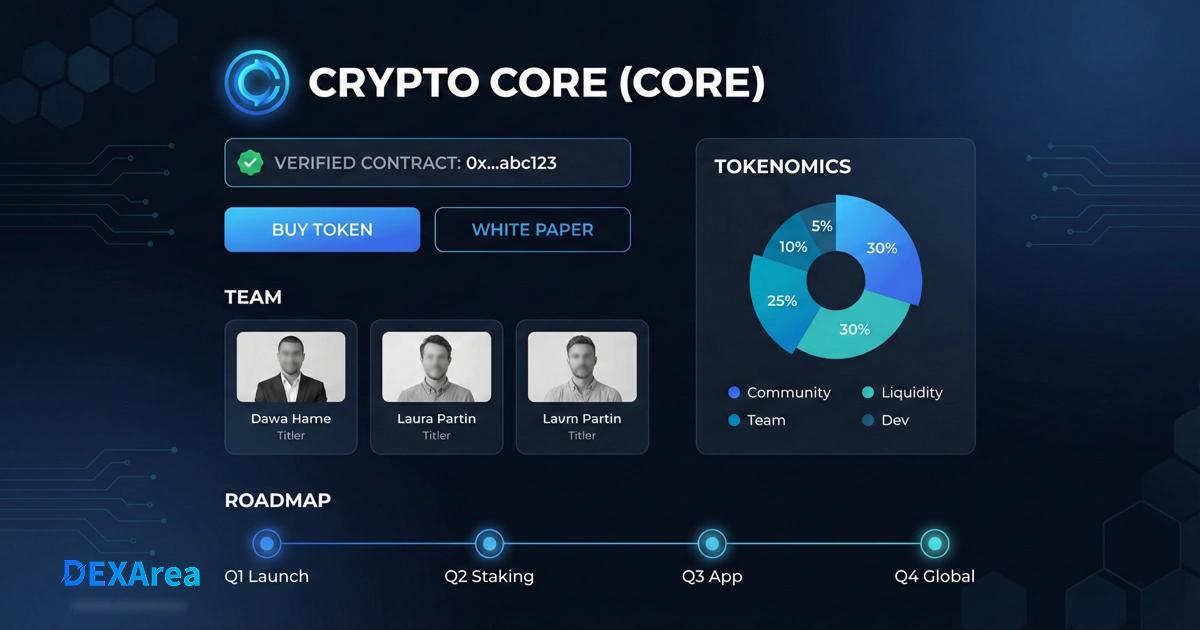
A token page is your project's official showcase. It's the single link you want investors, community members, and partners to open when they ask: "What is this token, who's behind it, and what's the plan?"
A good token page does three things:
- Creates a trustworthy first impression with clear, complete information (no mystery-meat token vibes).
- Centralizes key details like contract address, links, tokenomics, team, roadmap, and media.
- Works without advanced technical skills because most token page builders are no-code and dashboard-driven.
SEO + Trust Note (Google quality basics):
Financial topics require higher trust. Avoid "filler," be clear about who's responsible for the content, and make the page purpose obvious. (This is how you avoid looking like spam.)
- Token Creator— Create SPL or Token-2022 tokens
- Update Metadata— Modify token name, symbol, or URI
- View Metadata— Inspect token metadata and balances
- Create Liquidity Pool— Create a Raydium liquidity pool
- Add Liquidity— Add liquidity to an existing pool
Step-by-Step Token Page Creation Process
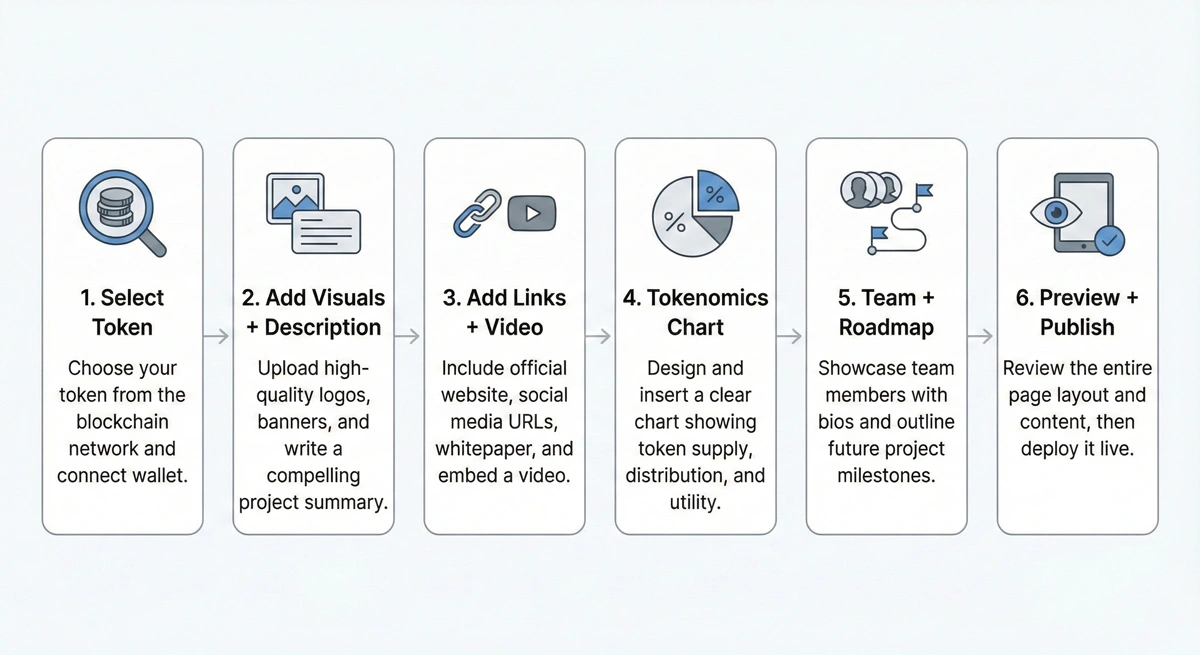
Step 1: Finding the Token Page Section
- Open your owner dashboard (or project dashboard).
- Find the Token Page / Token Profile / Project Page section.
- Select your network + token standard:
- ERC20 (Ethereum)
- BEP20 (BNB Smart Chain)
- SPL (Solana)
- Or your supported L2 / alt chain
- Choose the exact token you want to feature (usually via contract address, mint address, or a token selector).
Tip (developer-friendly): Save the contract/mint address in a "Verified Details" section so users can quickly confirm they're looking at the real token.
Step 2: Enter Complete Information About Your Project
Focus on clarity and credibility:
- Upload a high-quality token logo (square, crisp edges, transparent background if possible).
- Add a header/background image that matches your branding (avoid noisy backgrounds that kill readability).
- Write a simple, compelling description:
- What does the token do?
- Who is it for?
- Why does it exist?
- What's the core utility (governance, payments, access, rewards, etc.)?
Mini template (copy/paste):
- One-liner: What your project does in one sentence
- Problem: What issue you solve
- Solution: How you solve it
- Utility: What the token enables
- Status: Current stage (testnet, mainnet, launched, etc.)
Step 3: Adding Links and Interactive Elements
This is where conversion happens.
CTA Buttons (Action)
Add at least one primary CTA:
- Buy / Trade (link to your DEX pool or swap page like Uniswap or Raydium)
- Presale / Launch (only if real and live)
- Docs (if your docs answer technical questions clearly)
CTA sanity check: If your link sends users to a dead page or wrong pool, you're actively farming distrust.
Social Media Links (Trust)
Add official icons/links for:
- X (Twitter)
- Telegram
- Medium
- Website
- GitHub (if you have one)
Promotional Video (Clarity)
Embed a short YouTube video that explains:
- what the project is
- what users can do with it
- what's coming next
Step 4: Tokenomics Configuration
Tokenomics should be easy to verify and hard to misunderstand.
- Create a supply distribution chart.
- Use clear labels like:
- Team
- Marketing
- Liquidity
- Community
- Ecosystem
- Treasury
- Ensure categories total 100%.
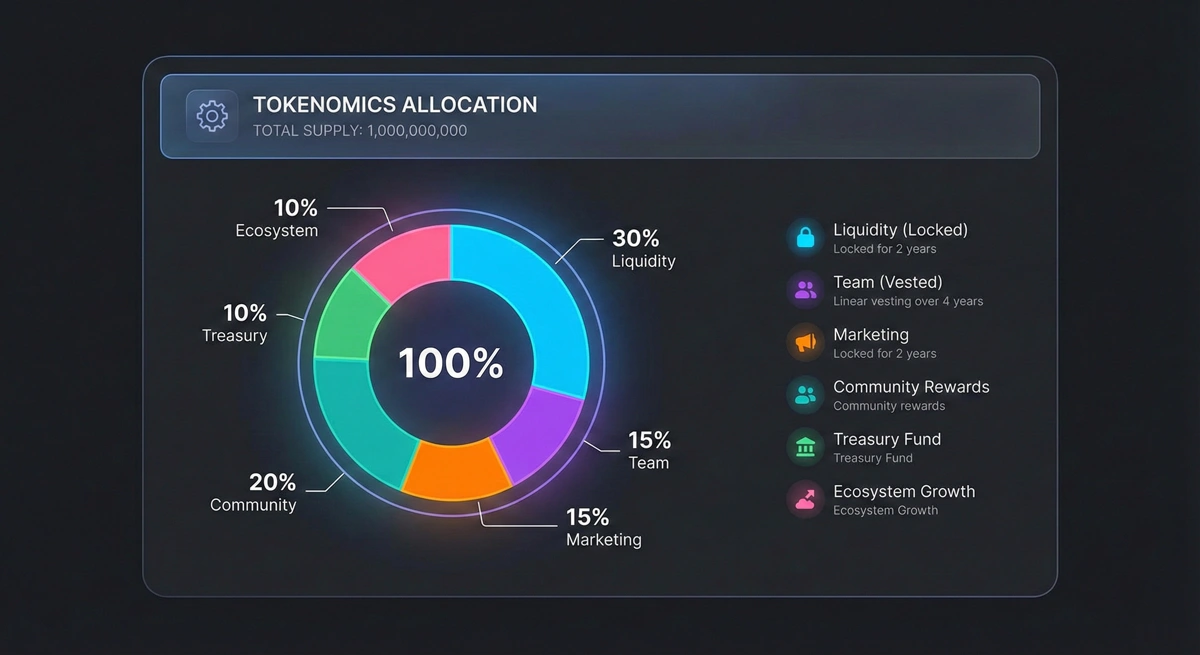
Optional but recommended:
- Add vesting notes (e.g., Team 12-month cliff + 24-month vest)
- Add lock proof links (if liquidity or allocations are locked)
Step 5: Token Project Team and Roadmap
Team Section (Trust Builder)
Show real people when possible (or at minimum, consistent identities + roles):
- Name
- Role
- Short bio (1–2 lines)
- Links (X/LinkedIn/GitHub)
If your team is anonymous, be transparent about why and what safeguards exist (multisig, audits, timelocks, etc.).
Roadmap (Clarity Builder)
Use a drag-and-drop roadmap builder to list:
- Completed milestones (with dates)
- In-progress milestones
- Future milestones (with realistic targets)
Roadmap rule: If you can't explain a milestone in one sentence, it's probably fluff.
Step 6: The Final Stretch
- Preview the page exactly as users will see it.
- Check:
- spelling and clarity
- all links work
- contract/mint address is correct
- images look clean on mobile
- Publish the page so it can be indexed by Google.
SEO Hint: Once published, submit the URL to Google Search Console if you control the domain, and ensure the page isn't blocked bynoindexor robots rules.
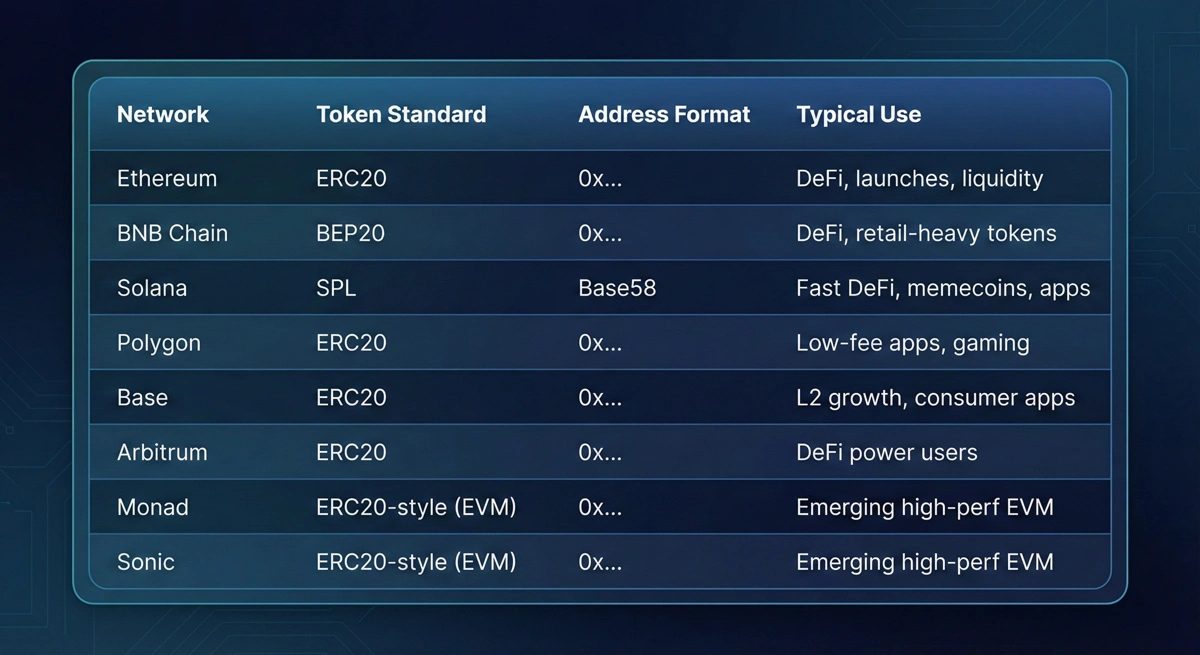
Supported Blockchains for Token Pages
Most token page generators support a wide range of networks.
Commonly supported:
- Ethereum (ERC20)
- BNB Smart Chain (BEP20)
- Solana (SPL)
- Polygon
- Base
- Arbitrum
- Emerging EVM chains like Monad and Sonic (availability depends on your generator)
Quick reference table
Why Your Project Needs a Dedicated Token Profile Page
1) Real-time Statistics (Verified Contract Info)
When your page integrates with chain data, users can verify core facts like contract/mint address, supply, and other token stats instead of relying on screenshots or random posts.
2) Investor Trust (A single source of truth)
Investors and experienced users do quick credibility checks. A clear token page helps you pass the "is this real?" test:
- transparent tokenomics
- real links
- clear team/roadmap
- consistent branding
3) SEO Benefits (Discoverability)
A public token page gives search engines something indexable and structured, which helps:
- brand discovery
- long-tail queries ("[token name] contract", "how to buy [token]", etc.)
- reducing scam confusion by ranking an official source
Frequently Asked Questions (FAQs)
Token Page SEO and Quality Checklist (Quick Win)
Because crypto touches finance, trust signals matter:
- Clear purpose: The page should obviously be "Official token information."
- No filler: Don't pad the page with empty buzzwords.
- Who's responsible: Add About/Team/Contact or a "Maintained by" note.
- Accurate, consistent data: Contract/mint address, links, supply, and tokenomics must match reality.
- Mobile readability: Token pages get shared in chats; most visits are mobile.
- Fast load: Compress images, avoid heavy embeds, lazy-load video.
Optional Add (Schema Prompt):
"Generate JSON-LD schema for a token profile page (TechArticle or WebPage + Organization + FAQPage), including headline, description, author, datePublished, and mainEntity FAQ."