How to Update Solana Token Metadata
Update Solana token metadata safely: name, symbol, logo, URI, and update authority vs mint authority, immutability, caching, and a step-by-step DEXArea workflow.

How to Update Solana Token Metadata
TL;DR
- Metadata includes name, symbol, image/logo, description, and an off-chain URI (JSON). It does not change supply or mint authority.
- Only the update authority wallet can modify metadata (Metaplex on Solana).
- If metadata is immutable (
is_mutablefalse or update authority removed), it cannot be changed (Metaplex update docs). - Always use the mint address—names and symbols are not unique (mint accounts).
- DEXArea is non-custodial; review mint and new values before signing.
- Wallets may cache metadata; on-chain updates are immediate, but UI refresh can take minutes or hours.
What is Solana token metadata?
Metadata is descriptive data stored with or linked to a mint. It tells wallets how to display the token; it does not define identity or supply.
Typical Metaplex metadata fields include:
- update_authority — who may edit metadata
- mint — unique token identifier
- name and symbol — display strings
- uri — link to off-chain JSON (description, image, links)
- is_mutable — whether updates are allowed
uri often holds the image URL, description, external_url, and attributes. Verify tokens by mint address, not symbol alone.Token-2022 metadata extensions follow similar ideas: a metadata account and an update authority control changes.
What can you update?
When metadata is mutable and you hold update authority, you may change:
- Name and symbol
- Logo/image (usually via JSON +
uri) - Description and attributes in JSON
- Metadata URI if hosting moves
- Website/social links in JSON
Exact fields depend on the program (Metaplex vs Token-2022). If metadata is immutable, none of these can be changed on-chain.
What is update authority?
The update authority is the public key allowed to sign metadata updates. Only that wallet (or a delegate) can change descriptive fields.
| Authority | Controls | Does not |
|---|---|---|
| Update authority | Name, symbol, image, URI | Change supply |
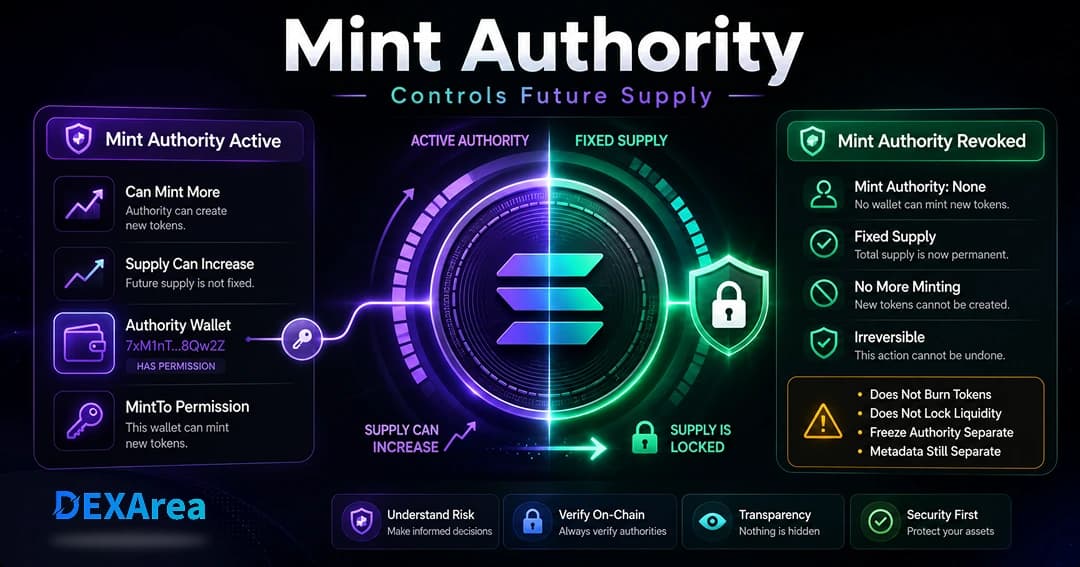
| Mint authority | Minting new tokens | Modify metadata by itself |
| Freeze authority | Freezing accounts | Modify metadata or supply |
Update metadata vs make token immutable
Update metadata — Change name, symbol, logo, description, or URI while update authority remains and metadata is mutable.
is_mutable false or update authority set to None). No one can fix typos or links afterward (Metaplex).Update metadata vs revoke mint authority
Revoking mint authority stops new minting; it does not lock metadata. You might revoke mint for fixed supply while still updating branding.
When should you update token metadata?
- Fix typos in name or symbol
- Replace placeholder logos
- Fix a broken URI or moved JSON hosting
- Improve description and add official links
- Rebrand name, symbol, or imagery
- Pre-launch polish before making metadata immutable
Communicate major changes publicly so holders are not confused.
What you need before updating
- Correct mint address (copy/paste from wallet or explorer)
- Update authority wallet connected
- Correct network (mainnet vs devnet)
- Current metadata reviewed via View Metadata
- New name, symbol, logo, description, and hosted JSON/URI (Arweave, IPFS, or reliable hosting)
- Enough SOL for fees
- Decision on whether to lock metadata after this update
Step-by-step: update metadata with DEXArea
Step 1: Open Update Metadata
Step 2: Connect the update authority wallet
Connect the wallet that holds update authority. If not, transfer authority or ask the current holder to sign.
Step 3: Select the mint address
Paste the full mint address. Do not rely on name or symbol alone.
Step 4: Review current metadata
Confirm name, symbol, image, URI, and network. If already immutable, editing will be disabled.
Step 5: Enter new metadata
Update only the fields you intend to change: name, symbol, logo link, description, URI, and JSON attributes as needed.
Step 6: Review the summary
Compare old vs new values. Open image URLs in a browser tab. Re-check mint and network.
Step 7: Confirm in your wallet
Sign only if mint, authority, and fields match your intent. Save the transaction signature.
Step 8: Verify the update
Token images, URI, and caching
uri. When you change a logo:- Host on durable storage (Arweave, IPFS, etc.)
- Update JSON and/or
uriwith an on-chain transaction - Expect cache delay in wallets and explorers even after confirmation
Always verify on-chain metadata, not only wallet UI.
When metadata cannot be updated
- Wrong wallet (not update authority)
- Metadata immutable
- Wrong mint or network
- Insufficient SOL
- Invalid or malformed JSON at the URI
- RPC issues or unsupported custom metadata programs
Should you make metadata immutable after updating?
Immutability can increase trust by preventing surprise rebrands—but it is irreversible for standard Metaplex-style locks. Before locking:
- Finalize name, symbol, logo, description, and links
- Confirm durable hosting for
uri - Communicate with your community
- Understand you cannot fix future typos on-chain
Common mistakes to avoid
- Updating the wrong mint
- Connecting the wrong wallet
- Assuming revoked mint authority locks metadata
- Making metadata immutable too early
- Low-quality or broken image/URI links
- Expecting instant display everywhere
- Skipping community communication on public tokens
- Thinking metadata updates change supply
Metadata update checklist
- Mint address verified
- Correct network selected
- Update authority wallet connected
- Current metadata reviewed
- New name, symbol, logo, description reviewed
- Metadata URI accessible and valid JSON
- Immutability decision made
- Transaction reviewed before signing
- Signature saved; on-chain verification done
Troubleshooting
| Problem | Possible cause | What to check |
|---|---|---|
| Transaction fails | Wrong authority wallet | Connect update authority |
| Token not found | Wrong mint/network | Verify mint and cluster |
| UI still shows old data | Cache | View Metadata on-chain |
| Logo missing | Broken image URL | Open URL; use reliable hosting |
| Cannot edit | Immutable metadata | is_mutable / update authority |
| Fees fail | Low SOL | Keep SOL buffer |
| Tool errors | Bad JSON at URI | Validate JSON file |
What to do after updating metadata
- Save the transaction signature
- Verify on-chain with View Metadata
- Check multiple wallets/explorers after cache refresh
- Update website and docs to match
- Announce material changes to your community
- Optionally make token immutable
- Review mint and freeze authority if appropriate
FAQ
Connect update authority, paste mint, enter new values in Update Metadata, review, and sign.
Yes if mutable: update JSON/image hosting and
uri as needed.Can I change name or symbol?
Yes if mutable; mint address still identifies the token.
What is update authority?
The wallet allowed to sign metadata update transactions.
Why can’t I update?
Wrong wallet, immutable metadata, wrong mint/network, low SOL, or bad URI/JSON.
Can I change metadata after making it immutable?
No.
Is update authority the same as mint authority?
No.
Does updating metadata change supply?
No.
How long until wallets show updates?
On-chain is immediate; UIs may lag due to caching.
Can I update without coding?
Yes via DEXArea with mint, authority wallet, and new values.
Should I make metadata immutable after updating?
Only when details are final and you want to prevent future edits.
Is this financial advice?
No. Educational content only.
Conclusion
Disclaimer
This guide is for educational purposes only and is not financial advice. Metadata updates affect how users identify and trust a token. Verify mint address, update authority, and new metadata before signing.
DEXArea is non-custodial. Your wallet signs transactions, and your private keys stay in your wallet.