How to Find Solana Token Holders
Find and export Solana token holders: mint address, holder lists vs snapshots, CSV export, filters, whale analysis, and DEXArea Snapshot Token Holders workflow.
How to Find Solana Token Holders
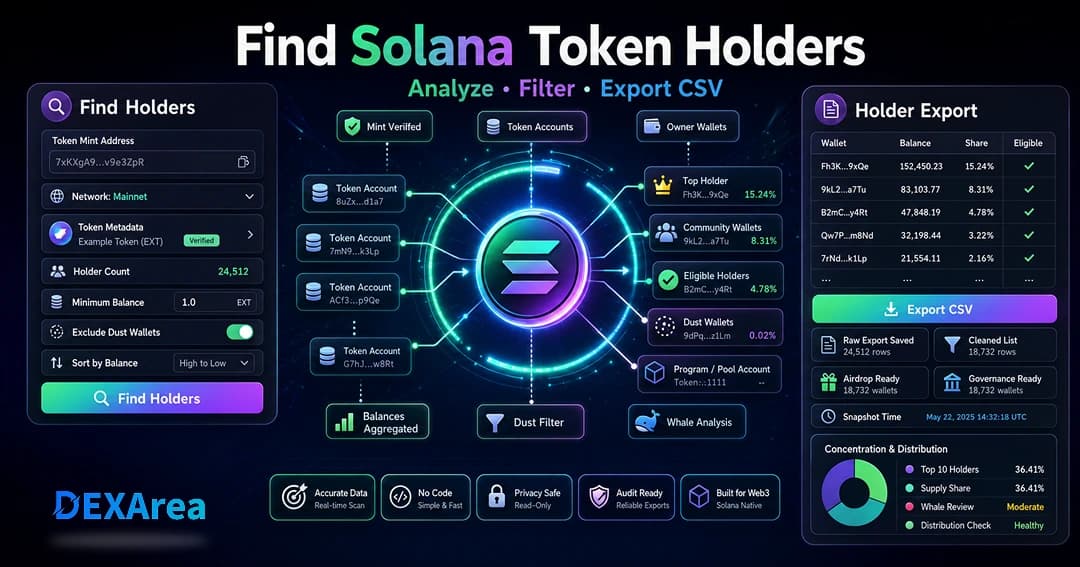
Managing a Solana token means knowing who holds it, how concentrated supply is, and how to build reliable airdrop or reward lists. This guide explains how to find, analyze, and export Solana token holders with a no-code workflow.
TL;DR
- Holders are derived from token accounts for a mint; each account has an owner and balance (Solana tokens).
- Use the mint address, not name or symbol—duplicates exist.
- Exports usually include wallet addresses, balances, and optional supply %, timestamps, and filter flags.
- Filter and clean CSVs (minimum balance, dust, exclusions); keep a raw export untouched.
- Snapshots are point-in-time lists for eligibility; live exports reflect current state.
- Distribute after cleanup with Token Multisender.
What are Solana token holders?
On Solana, balances live in token accounts, not directly in wallet accounts. A mint account defines supply and decimals; a token account tracks ownership of one mint for one owner.
Why find and export token holders?
- Airdrops and holder rewards
- Distribution and concentration analysis
- Identifying whales or program-owned accounts (LP, treasury)
- Governance eligibility lists
- Tracking holder growth over time
- Auditing after a multisender campaign
- Migration or relaunch communications
Holder data does not prove identity or stop Sybil farming—addresses are pseudonymous, and one user may control many wallets.
Holder list vs holder snapshot
| Holder list | Holder snapshot |
|---|---|
| Reflects current on-chain balances when generated | Captured at a specific block/time for fixed eligibility |
| Good for analysis and planning | Required for governance votes and timed campaigns |
What can a holder export include?
Typical columns:
- Wallet address (owner)
- Token balance (watch decimals)
- Token account address (if listed per account)
- % of supply (if calculated)
- Mint and network
- Export timestamp
- Eligibility flags after filtering
- Optional notes (team, LP, etc.)
Open CSV as text where needed so addresses are not shown in scientific notation.
What you need before you start
- Verified mint address (view metadata)
- Correct network (mainnet vs devnet)
- Clear purpose (analysis, airdrop, governance)
- Minimum balance and exclusion rules
- Plan for CSV vs JSON and downstream tools
- Awareness that balances can change before you distribute
Step-by-step: find holders with DEXArea
Step 1: Open Snapshot Token Holders
Step 2: Enter the mint address
Paste the full mint address—do not rely on name or symbol alone.
Step 3: Confirm network and token details
Select mainnet or devnet. Verify name, symbol, and decimals match your token.
Step 4: Generate the holder list
Run the fetch. Large mints may take longer; retry if RPC or indexing is slow.
Step 5: Review holder data
Check holder count, top balances, and unexpected program or pool accounts.
Step 6: Apply filters
Use minimum balance, exclude zero/dust, sort by balance, and choose full vs filtered export.
Step 7: Export
Save CSV (or JSON if supported). Keep raw file; name files with mint, network, and date.
Export to CSV best practices
- Keep an untouched raw export
- Format cells as text for addresses
- Never include private keys or seed phrases
- Label files clearly
- Verify decimals before airdrops
Example:
wallet,balance
7sExampleWalletAddress...,100
9xExampleWalletAddress...,250
Cleaning holder data before an airdrop
- Remove invalid rows
- Apply minimum balance and dust rules
- Remove excluded team, treasury, or LP wallets if required
- Review program-owned accounts
- Keep raw and cleaned copies separate
- Define eligibility (equal vs balance-weighted)
- Test with a small batch first
Holder concentration and whale analysis
Sort by balance and review top holders’ share of supply. Compare exports over time. Large balances may be treasuries, pools, or exchanges—not always a single person.
Using holder data for airdrops
- Define eligibility and communicate rules early
- Use snapshots when timing matters
- Generate with Snapshot Token Holders, clean, then Token Multisender
Common mistakes to avoid
- Wrong mint or network
- Relying on symbol only
- Not saving the raw export
- Corrupted addresses in spreadsheets
- Unintended dust inclusion or exclusion
- Assuming one wallet = one person
- Skipping test batches
- Misleading reward promises
Troubleshooting
| Issue | What to check |
|---|---|
| Missing holders | Mint, network, filters too strict |
| List seems short | Minimum balance; dust exclusion |
| Stale data | RPC delay; regenerate near distribution time |
| Duplicate rows | Multiple token accounts per wallet; tool aggregation |
| Bad CSV | Open as text; avoid scientific notation |
Security and privacy
- Public on-chain data only in exports—no seed phrases
- Addresses are not verified identities
- Store exports securely; beware phishing risk
- Be transparent about how holder data will be used
- Not financial or legal advice
Holder export checklist
- Mint and network verified
- Metadata checked
- Purpose and filters defined
- Holder data generated and reviewed
- Raw CSV saved
- Cleaned copy saved separately
- Airdrop plan and test batch ready
What to do after exporting
- Archive raw and cleaned files
- Review concentration and whales
- Apply eligibility rules
- Format list for multisender
- Test distribution
- Communicate with community
- Take future exports to track changes
FAQ
Fetch token accounts for the mint and read owner addresses—e.g. with Snapshot Token Holders.
Can I export to CSV?
Yes. Keep raw and cleaned copies.
Holder list vs snapshot?
List = current state; snapshot = fixed point in time for eligibility.
Yes after cleaning; test with Token Multisender.
What fields are included?
Typically wallet, balance, mint, network, timestamp; varies by tool.
Filter small balances?
Depends on campaign goals and fee budget.
Why are holders missing?
Wrong mint/network, filters, delays, or zero-balance handling.
Can balances change after export?
Yes—regenerate or snapshot closer to send time if timing matters.
Does a list stop Sybil?
No.
Find holders without coding?
Yes via DEXArea snapshot tool.
Is holder data private?
Balances and addresses are public on-chain; handle exports responsibly.
Financial advice?
No.
Conclusion
Disclaimer
This guide is for educational purposes only and is not financial, legal, or tax advice. Holder lists involve public blockchain data and operational risks. Verify mint, network, and eligibility before distributions.