How to Snapshot Solana Token Holders
Take a Solana token holder snapshot for airdrops and governance: verify the mint, set eligibility rules, export CSV data, clean the list, and distribute with DEXArea tools.
How to Snapshot Solana Token Holders
Capturing who holds your token at a specific moment is one of the most useful steps a project team can take on Solana. A token holder snapshot records wallet addresses and balances at a point in time. You use that list for airdrops, holder rewards, governance eligibility, analytics, and post-launch planning.
TL;DR
- A snapshot records which wallets hold a token and how much, at a chosen time.
- Use snapshots for airdrops, rewards, governance, analytics, and distribution checks.
- Always identify the token by mint address—names and symbols are not unique on Solana.
- Decide rules before you announce a campaign: timing, minimum balance, exclusions, reward model.
- Filter zero-balance and dust wallets when appropriate; save raw and cleaned exports.
- A snapshot is not the airdrop—distribution happens later (e.g. multisender).
What Is a Solana Token Holder Snapshot?
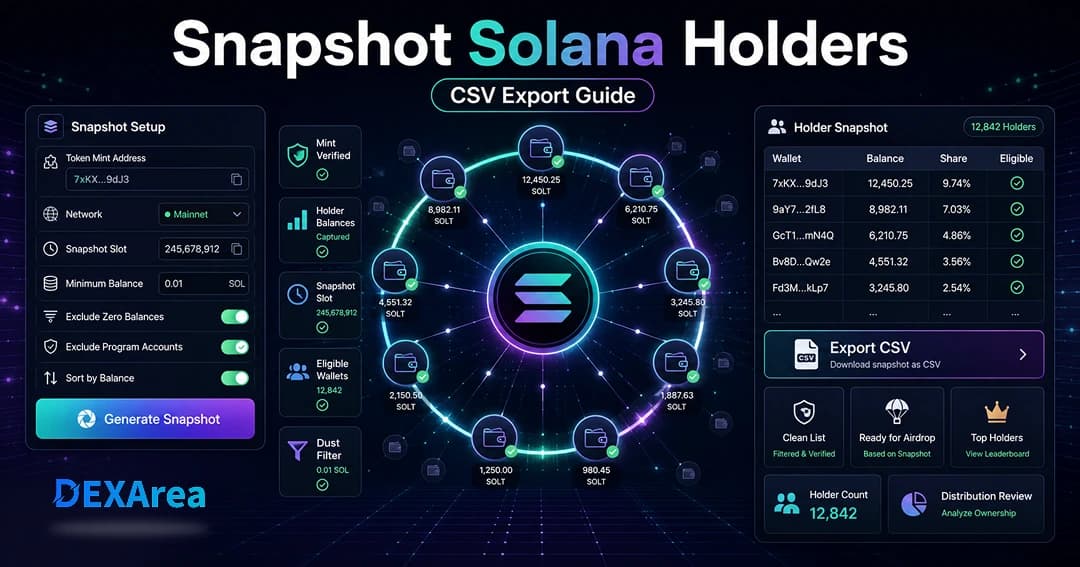
A snapshot is a point-in-time list of wallets holding a specific SPL token and each wallet’s balance. Tools such as DEXArea Snapshot Token Holders read on-chain token accounts and compile balances (and optionally share of supply) for export as CSV or similar formats.
Snapshots let you act on a defined ownership state instead of live balances that change every second. In practice, “snapshot” means reading balances frozen at a slot or block height—not a constantly updating feed. That list is separate from sending tokens: you clean and validate it, then distribute later.
Related tools:
Why Take a Snapshot of Token Holders?
Preparing an airdrop
Before distributing tokens, you need wallet addresses and balances at your cut-off. A snapshot defines who was eligible and how much they held.
Rewarding loyal holders
Compare snapshots over time to reward wallets that held through volatility. Choose equal rewards per wallet or balance-weighted amounts—each model has trade-offs (simplicity vs whale concentration).
Governance and voting
Governance often weights votes by holdings at a snapshot time so last-minute buying cannot dominate a vote.
Distribution analysis and whale tracking
Sort by balance to review concentration, track holder count over time, and inform tokenomics or communications.
Migration, relaunch, and audits
Capture the old token’s holder base before a migration or relaunch, or audit supply concentration (including LP and program accounts).
Limitations
Snapshots do not prove identity, stop Sybil farming, or guarantee an airdrop will run. Be transparent about rules and timing.
Snapshot vs airdrop
| Snapshot | Airdrop |
|---|---|
| Records eligible wallets and balances at a cut-off | Sends tokens to those wallets |
| Defines eligibility for rewards or governance | Executes transfers on-chain |
| Requires validation and cleaning | Uses cleaned list + SOL for fees |
Announcements often separate the two: “Snapshot at block X” and “Distribution follows after review.”
What You Need Before Taking a Holder Snapshot
- Correct mint address — Confirm on an explorer or project docs.
- Correct network — Mainnet vs devnet.
- Snapshot purpose — Airdrop, governance, analytics, migration.
- Cut-off timing — Block height, slot, or published date.
- Minimum balance — Optional filter for dust wallets.
- Exclusion rules — Team wallets, LP pools, program accounts if needed.
- Export format — CSV for editing vs JSON for scripts.
- Distribution plan — Multisender, script, or manual sends.
- Team alignment — Rules fixed before public announcement.
Choosing Snapshot Rules Before Exporting
Define rules before you announce a campaign. Changing them afterward erodes trust.
- Snapshot time — Publish block height or slot in advance.
- Minimum balance — Exclude dust and near-zero wallets when appropriate.
- Exclude team / program accounts — LP and program-controlled wallets if they should not receive rewards.
- Eligibility model — Equal per wallet vs balance-weighted vs hybrid.
- Duplicate wallets — On-chain snapshots treat each address separately unless you have off-chain linking data.
Step-by-Step: How to Snapshot Solana Token Holders
Step 1 — Open the snapshot tool
Step 2 — Enter the token mint
Paste the exact mint address. Do not rely on name or ticker alone.
Step 3 — Confirm network and token details
Step 4 — Choose filters
Typical options:
- Minimum balance threshold
- Exclude zero balances
- Exclude known program or pool addresses where supported
- Sort by balance to review whales
Step 5 — Generate the snapshot
Run the snapshot and wait for indexing—large holder sets can take longer.
Step 6 — Review holder data
Check wallet address, balance (with decimals), optional % of supply, token account address, and snapshot slot/time. Remove or re-filter anomalies before export.
Step 7 — Export
Export CSV or JSON. Name files with symbol, mint snippet, network, and date. Keep a raw copy separate from any edited file.
Step 8 — Use the list
- Airdrops — Clean the list, set per-wallet amounts, then Token Multisender.
- Analysis — Spreadsheets for concentration, holder count, trends.
- Verification — Cross-check against explorer data.
What Data Should a Holder Snapshot Include?
Useful exports often include:
- Wallet (owner) address
- Token account address
- Token balance (raw and human-readable with decimals)
- Optional % of supply
- Snapshot timestamp or slot
- Mint address and network
- Eligibility flag after you apply rules
- Notes (team, LP, program, etc.)
How to Clean Snapshot Data Before an Airdrop
- Remove invalid or empty rows
- Apply minimum balance consistently
- Confirm decimals when calculating send amounts
- Remove excluded team or LP addresses if required
- Keep original and cleaned files
- Run a small test distribution before the full send
Equal airdrops vs balance-weighted airdrops
Equal airdrop — Same amount per eligible wallet; simple and inclusive; vulnerable to splitting across many wallets.
Balance-weighted — Proportional to snapshot balance; rewards larger holders; needs careful math and may concentrate supply.
Hybrid — Base amount plus proportional component, or caps. Communicate the model when you announce the snapshot.
Common snapshot mistakes to avoid
- Wrong mint address or network
- Relying on token name only
- Changing rules after announcement
- Skipping minimum-balance filters (huge dust lists)
- Excluding valid small holders with a threshold set too high
- Not saving the raw export
- Editing CSV without backups (watch scientific notation on addresses)
- Full airdrop without a test batch
- Assuming snapshots stop Sybil behavior
- Misleading reward guarantees
Troubleshooting: wrong or missing holders
| Issue | What to check |
|---|---|
| Wrong mint | Re-verify mint on explorer |
| Wrong network | Mainnet vs devnet |
| Many micro-holders | Processing time and minimum balance filter |
| Indexing delay | Retry after a few minutes |
| Minimum balance too high | Lower threshold |
| Program / multisig wallets | May need different tooling or manual review |
| CSV formatting | Import as text; preserve full addresses |
Security and privacy
- Wallet addresses and balances are public on-chain; never collect private keys or seed phrases for a snapshot.
- Addresses do not prove human identity.
- Publish clear rules and timelines; store exports securely.
- Consult professionals for legal or compliance questions—this guide is not legal advice.
Holder snapshot checklist
- Mint and network verified
- Metadata checked (View token metadata)
- Purpose and eligibility rules defined and communicated
- Snapshot timing chosen
- Filters set (minimum balance, exclusions)
- Snapshot generated via Snapshot Token Holders
- Data reviewed; raw export saved
- Cleaned copy saved for distribution
- Distribution plan and test batch prepared
- Community communication drafted
What to do after taking a snapshot
- Archive the original export
- Maintain a separate cleaned file
- Review holder concentration and top wallets
- Mark eligibility and compute send amounts
- Test with a small batch via multisender
- Communicate results and next steps clearly
- Run future snapshots to measure growth or churn
FAQ
What is a Solana token holder snapshot?
A record of addresses and balances for one token at a specific time, usually keyed by mint address, used for airdrops, governance, or analysis.
How do I snapshot Solana token holders?
Use a tool like DEXArea Snapshot Token Holders: enter the mint, select network, set filters, generate, and export. Save the raw file.
Can I export holders to CSV?
Yes. Keep both raw and cleaned copies; open CSV carefully so long addresses are not corrupted.
Yes. The snapshot locks eligibility; send tokens later with Token Multisender or your own script.
What fields are typically included?
Wallet address, balance, optional supply %, token account, timestamp/slot, mint, and network.
Should I filter small balances?
Often yes for manageable lists; do not set minimums so high that legitimate holders are dropped.
Can a snapshot prevent Sybil farming?
No. One person can use many wallets; combine minimums, caps, or off-chain checks if needed.
Why are holders missing?
Wrong mint, wrong network, filters too strict, or indexing delays—verify inputs and retry.
Can balances change after a snapshot?
Yes. The snapshot is only valid for the cut-off time; trading afterward does not change past eligibility.
Is this financial or legal advice?
No. Educational content only.
Disclaimer
This guide is for educational purposes only and is not financial, legal, or tax advice. Snapshots and token distributions can involve operational and regulatory risks. Review transactions in your wallet and test with small batches when possible.
DEXArea is non-custodial. Your wallet signs transactions, and your private keys stay in your wallet.