How to Airdrop Tokens on Solana
Run a Solana token airdrop safely: prepare recipient lists, holder snapshots, decimals and SOL for fees, test batches, and distribute SPL tokens with DEXArea from your wallet.
How to Airdrop Tokens on Solana
A Solana token airdrop is a distribution campaign where SPL tokens are sent to many wallet addresses at once. It is a popular tactic for rewarding early community members, fulfilling presale commitments, or distributing governance tokens after a token launch. Unlike creating liquidity or minting new tokens, airdropping means you already hold the tokens you want to distribute and need a reliable workflow to send them.
TL;DR
- A Solana token airdrop distributes SPL tokens to multiple wallets. It is a campaign strategy, not just a tool.
- Airdrops can target presale buyers, community members, existing token holders, NFT holders, or any list you prepare.
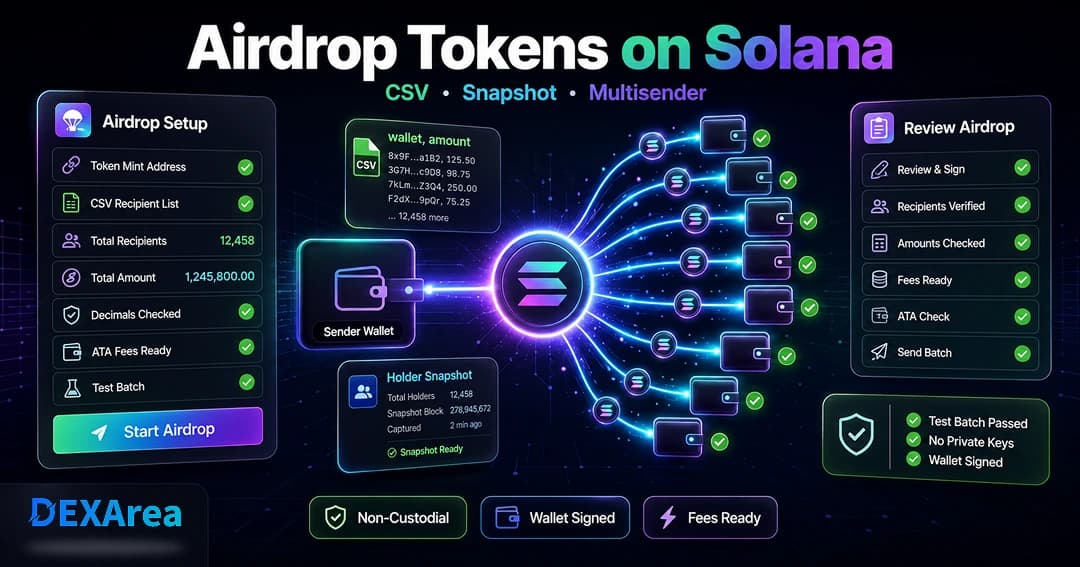
- DEXArea Token Multisender uploads a CSV of wallet addresses and amounts and sends the airdrop in batches. Snapshot Token Holders helps capture holder-based lists.
- Before sending, verify the token mint, decimals, and metadata; prepare a clean recipient list; ensure enough token balance and SOL for fees and ATA creation.
- Always send a small test batch first. Never upload private keys or seed phrases.
- DEXArea is non-custodial. Your private keys stay in your wallet.
What Is a Solana Token Airdrop?
A token airdrop is a distribution strategy where you send tokens to selected wallets. On Solana, each token is defined by a mint account that stores supply, decimal precision, and authorities. Wallets hold balances in token accounts; Solana uses associated token accounts (ATAs) for deterministic addresses per wallet and mint. When a recipient does not yet have an ATA for your token, the first transfer can create one, costing roughly 0.002 SOL in rent. An airdrop is not the same as creating a token or adding liquidity—it assumes your token already exists and you are distributing existing supply.
Airdrop vs multisender
Common Reasons to Airdrop Tokens on Solana
- Reward early community members who joined early or used testnet
- Distribute to presale buyers per allocation
- Reward NFT holders with utility or governance tokens
- Reward existing token holders via snapshot and proportional or fixed amounts
- Partner or ecosystem allocations
- Test a distribution before a larger launch
- Governance or utility distribution
Airdrops distribute tokens; they do not guarantee demand, liquidity, or long-term community quality. Focus on real utility and engagement.
What You Need Before Running a Solana Airdrop
- Token mint address and metadata — Verify name, symbol, and decimals. Never rely on symbol alone.
- Token balance — Enough tokens for the full airdrop; mint more if needed.
- Recipient list — CSV with
wallet,amount(or paste addresses). - SOL for fees — Base transaction fees plus ~0.002 SOL per new ATA.
- Network selection — Mainnet vs devnet; test on devnet first.
- Eligibility rules — For holder campaigns: minimum balance, NFT ownership, snapshot time.
- Test batch plan — Send to 1–3 wallets before the full run.
Relevant tools:
How to Build an Airdrop Recipient List
Sources:
- Manual community list (contests, forms—never collect private keys)
- Presale buyer export from your launchpad
- Existing token holders via Snapshot Token Holders
- NFT holder snapshot
- Partner campaign lists
- Form submissions with clear eligibility rules
Cleaning the list
- Validate wallet format (base58)
- Remove duplicates
- Check amounts against token decimals
- Remove invalid or blank rows
- Keep backups of original and reviewed lists
Example CSV format:
wallet,amount
7sExampleWalletAddress...,100
9xExampleWalletAddress...,250
Warning: Never include private keys, seed phrases, or passwords. Only public wallet addresses and amounts.
Using holder snapshots for airdrops
Step-by-Step: How to Airdrop Tokens on Solana
Step 1: Create or select your token
Step 2: Prepare your recipient list
Compile and clean your CSV. Include amounts per recipient and account for decimals.
Step 3: Open DEXArea Token Multisender
Step 4: Connect your wallet
Use the wallet that holds your token balance. Confirm the correct network (mainnet or devnet). DEXArea is non-custodial.
Step 5: Select token and upload or paste recipients
Enter the mint address and verify name, symbol, and decimals. Review parsed recipients before continuing.
Step 6: Review total amount and fees
Review total tokens, recipient count, transaction fees, and estimated ATA rent (~0.002 SOL per new recipient ATA). Ensure sufficient SOL.
Step 7: Send a small test batch
Test with 1–3 wallets. Confirm amounts, decimals, and ATA creation before the full airdrop.
Step 8: Confirm the full airdrop transaction
Review mint, total amount, and SOL cost in your wallet. Sign only when correct. Save transaction signatures.
Token Amounts, Decimals, and Airdrop Formatting
250 for 250 tokens). If you must use raw integers, multiply by 10^decimals. Test with small amounts to avoid decimal mistakes.Fees and Associated Token Accounts
- Transaction fee — Small SOL cost per signature.
- Rent for new ATAs — If a recipient has no ATA for your mint, creation requires roughly 0.00203928 SOL (rent-exempt), paid by the sender. Existing ATAs do not add this cost.
Estimate how many recipients need new ATAs and keep extra SOL in your wallet.
Airdrop Safety and Abuse Prevention
- Never collect private keys or seed phrases
- Publish eligibility rules up front
- Avoid promising returns or guaranteed profits
- Avoid spam-like sends to uninterested wallets
- Consider legal and tax implications in your jurisdiction (not legal advice in this guide)
Common Airdrop Mistakes to Avoid
- Wrong network (devnet vs mainnet)
- Wrong mint (duplicate symbols)
- Invalid addresses or duplicates in CSV
- Incorrect decimal formatting
- Insufficient SOL for fees and ATA rent
- Full send without a test batch
- Uploading sensitive wallet data
- Changing eligibility after collection without explanation
- Forgetting to save transaction signatures
Airdrop Checklist Before You Send
- Token mint verified
- Token metadata checked (name, symbol, decimals)
- Correct wallet connected with enough tokens and SOL
- Correct network selected
- Recipient list cleaned and validated
- Eligibility rules finalized (for snapshots)
- Amounts and total supply reviewed
- SOL balance checked for fees and new ATAs
- Test batch completed
- Full transaction reviewed before signing
- Transaction signatures saved
Troubleshooting: Why Did My Airdrop Fail?
| Problem | Possible cause | What to check |
|---|---|---|
| Transaction fails | Not enough SOL | SOL balance; estimate ATA rent |
| Some rows fail validation | Invalid wallet addresses | Validate base58; fix CSV |
| Wrong token selected | Duplicate symbols | Verify mint and decimals |
| Amounts look wrong | Decimal formatting | Check decimals; small test send |
| Transaction too large | Too many recipients | Split into smaller batches |
| Holder list seems wrong | Snapshot rule issue | Recheck eligibility and snapshot time |
Also confirm wallet, network, and token balance. Save error details or signatures for support.
What to Do After the Airdrop
- Save transaction signatures for auditing
- Verify recipient balances on a block explorer
- Publish distribution status when appropriate (without leaking private ops data)
- Take a snapshot — Snapshot Token Holders to analyse new distribution
- Follow up on liquidity — Create pool, Add liquidity
- Prepare support for missing-token reports
FAQ
Prepare a CSV of addresses and amounts, connect your wallet, select the token by mint, and use DEXArea Token Multisender to send in batches.
Can I airdrop SPL tokens without coding?
Yes. Upload a CSV, review the summary, and sign from your wallet.
What is the best way to prepare an airdrop wallet list?
Use verified sources (presale export, snapshot, or sign-ups), validate addresses, remove duplicates, and save as CSV with amounts.
Yes. Use Snapshot Token Holders and apply filters as needed.
Do I need a holder snapshot before an airdrop?
Only for holder-based rewards. Presale or manual lists may not need a snapshot.
Do recipients need associated token accounts first?
No. Solana can create ATAs on transfer; the sender pays ~0.002 SOL rent per new ATA.
How much SOL do I need for a Solana airdrop?
Enough for transaction fees plus ~0.002 SOL per recipient who needs a new ATA, plus a buffer.
Can I send different amounts to different wallets?
Yes. Specify per-row amounts in your CSV.
Should I send a test batch first?
Yes. Test decimals, fees, and formatting before the full campaign.
What happens if an address is invalid?
Invalid rows should be caught during validation before you sign and spend SOL.
Is a token airdrop the same as a multisender?
No. The airdrop is the campaign; the multisender executes transfers.
Is this financial or legal advice?
No. This guide is educational only.
Disclaimer
This guide is for educational purposes only and is not financial, legal, or tax advice. Token airdrops can involve legal, operational, and financial risks. Review every transaction in your wallet before signing, and test with small batches when possible.
DEXArea is non-custodial. Your wallet signs transactions, and your private keys stay in your wallet.