How to Recover Rent SOL from Empty Token Accounts
Recover rent SOL from empty Solana token accounts by closing eligible accounts. Learn what can be reclaimed, what not to close, and how rent recovery works.
How to Recover Rent SOL from Empty Token Accounts
TL;DR
- Solana accounts must maintain a rent-exempt minimum balance to remain on-chain. Think of it as a refundable deposit.
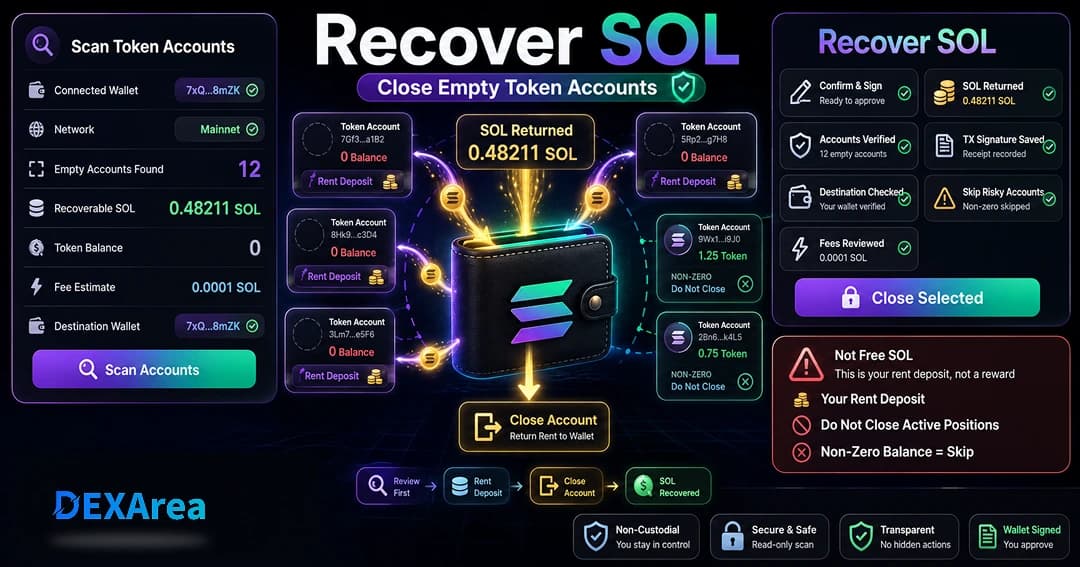
- Closing a token account deletes the account and returns the rent-exempt SOL to a destination account.
- Only empty token accounts (zero token balance) can be closed. Wrapped SOL accounts are a special case; they can close with a balance to reclaim underlying SOL.
- Recovering SOL is not a reward or airdrop. It’s reclaiming SOL you already locked up as rent.
- Do not close accounts that still hold tokens or are tied to active positions or bots.
- Always review every account before signing. DEXArea’s tool presents each candidate so you can decide which to close.
- DEXArea is non-custodial: you connect your wallet, review the accounts, and sign the transaction yourself.
Why SOL Gets Locked in Token Accounts
Solana’s account model differs from some other blockchains. Instead of a single wallet address holding multiple token balances, every SPL token uses a dedicated token account. Each token account stores a token balance and state. This design allows programs to interact safely with token balances but results in many small accounts in your wallet.
Because the Solana network charges rent for storing data, every account must maintain a minimum lamport balance proportional to its size. This minimum is known as the rent-exempt threshold. If you deposit at least the threshold amount, the account becomes rent-exempt and will not be charged ongoing rent. Think of it like a refundable security deposit. When you create a token account, your wallet automatically seeds it with enough SOL to satisfy the rent-exempt threshold (around 0.002 SOL for typical SPL token accounts).
Over time you might receive or swap tokens that you later sell or burn. When the token balance drops to zero, the account remains. The rent-exempt lamports stay locked in that empty token account. If you never use the token again, those lamports could sit idle forever. Closing the account allows you to recover the rent deposit.
Common reasons your wallet has empty token accounts
- Airdrops — you receive tokens that you later send or sell.
- Token swaps — DeFi platforms often create temporary token accounts for intermediate tokens.
- NFT mints — NFT collections may use custom token accounts for whitelist tokens.
- DeFi positions — yield farms, liquidity pools, and lending protocols may open token accounts for derivative tokens.
- Token burns — you burn tokens but the account remains empty.
Each of these interactions leaves behind a small deposit of SOL. Closing the account frees up that SOL for other uses.
What Does Recovering SOL Mean?
Recovering SOL means closing eligible token accounts and receiving their rent-exempt lamports back into your wallet. The Solana documentation explains that closing a token account deletes the account and transfers its lamports to a destination account. Importantly:
- You must empty the account first. The token balance must be zero before it can close (except wrapped SOL in some cases).
- Closing an account does not mint new SOL; you simply withdraw the deposit you originally provided.
- The recovered SOL does not come from DEXArea, an airdrop, or a yield farm. It comes from your own rent-exempt deposit.
- You must sign a transaction through your wallet to close the account. DEXArea prepares the transaction and shows the details.
By clarifying these points, you avoid unrealistic expectations like “free SOL” or “rewards.” You are recovering your own lamports.
Which Token Accounts Can Usually Be Closed?
Not every token account should be closed. Below is guidance on safe candidates and accounts that require extra caution.
Safe to close (usually)
- Token accounts with a zero token balance—these are the primary targets.
- Old associated token accounts created during past swaps or airdrops that you no longer need.
- Accounts for tokens you no longer hold or plan to receive.
- Empty accounts created by DeFi interactions such as bridging, farming, or staking, provided you are sure the position is closed.
Do not close without careful review
- Accounts with a non-zero token balance.
- Accounts tied to active DeFi positions like liquidity pool shares, collateral for lending, or farming contracts.
- Accounts used by bots, DEX aggregators, or on-chain scripts.
- Accounts you don’t understand.
- Accounts expected to receive tokens soon (recreating an ATA costs rent again).
When in doubt, leave the account open until you investigate. Closing a token account is permanent; the address cannot be reused without recreating it and paying the rent deposit again.
Recover SOL vs Claim Your SOL: Are They the Same?
You may hear different phrases for reclaiming rent: recover SOL, claim SOL, reclaim rent, close token accounts. They all describe the same practical action: closing eligible empty token accounts and receiving the rent-exempt lamports back. DEXArea names its tool Claim Your SOL, but other wallets call it “close account” or “reclaim rent.”
The key is that you are not claiming a reward. You are using a wallet feature to remove unused accounts and collect the SOL deposit. DEXArea’s tool streamlines this process by scanning your wallet, showing eligible accounts, and preparing the transaction for you to sign.
Recover SOL vs Burn Tokens vs Transfer Tokens
It’s important to distinguish between closing a token account, burning tokens, and transferring tokens. Each serves a different purpose. Recovering SOL does not burn or transfer tokens—it is strictly about reclaiming the rent deposit from unused accounts.
| Action | What it does | When to use | DEXArea tool |
|---|---|---|---|
| Recover SOL / close empty accounts | Deletes an empty token account and returns its rent-exempt SOL to your wallet (Close Account). | Zero-balance token accounts you no longer need. | Claim Your SOL |
| Burn tokens | Destroys a token balance; the account remains. Burning does not automatically close the account or recover rent. | Reduce supply or destroy unwanted tokens. | Burn tokens and How to burn Solana tokens safely |
| Transfer tokens | Sends tokens to another account; rent deposit stays until you close. | Move tokens to another wallet or address. | Token multisender |
What You Need Before Recovering SOL
Before closing any token accounts, make sure you have:
- Connected wallet — Phantom, Solflare, Backpack, or another supported wallet on the correct network (usually mainnet-beta).
- Enough SOL for fees — Closing accounts uses a small amount of SOL for transaction fees.
- Empty token accounts — Only accounts with zero token balance can be closed (wrapped SOL is a special case).
- Reviewed accounts — Verify each account is unused and not tied to an active DeFi position or bot.
- Destination wallet — Confirm which wallet receives the recovered SOL (usually the connected wallet).
- Understanding of repercussions — Closing is irreversible; receiving the same token again may require a new rent deposit.
- Security in mind — Never share your seed phrase. DEXArea is non-custodial and will never ask for secret phrases.
Step-by-Step: How to Recover SOL from Token Accounts
Follow these steps to reclaim SOL from unused token accounts using DEXArea’s Claim Your SOL tool.
Step 1: Open DEXArea Claim Your SOL
Step 2: Connect Your Wallet
Select your preferred Solana wallet and connect. DEXArea does not access your private keys. Your wallet holds the keys and signs transactions.
Step 3: Scan for Eligible Token Accounts
Once connected, the tool scans your wallet for SPL token accounts and identifies those with zero balance. It also checks for special cases like wrapped SOL accounts that can close with a balance to reclaim the underlying SOL.
Step 4: Review Accounts Carefully
You’ll see a list of candidate accounts with token account address, mint, balance (should be 0 for standard tokens), estimated recoverable SOL, and warnings for protocol or bot ties. Take your time; skip any account you don’t understand.
Step 5: Select Accounts to Close
Tick the boxes next to accounts you want to close. Start with obvious empties. Batching too many accounts in one transaction may fail due to transaction size limits.
Step 6: Review Estimated Recovery
Check total accounts selected, total SOL recoverable, estimated transaction fees, and destination address. If anything looks wrong, stop and double-check.
Step 7: Confirm in Your Wallet
Click Claim SOL. Your wallet will show a transaction prompt. Review accounts to be closed and the destination address. Sign only when certain. Save the transaction signature after confirmation.
How Much SOL Can You Recover?
The amount depends on how many eligible token accounts you have and the rent-exempt threshold for each. Typical SPL token accounts hold about 0.002 SOL as a rent deposit, but this can vary by account size and rent parameters. Transaction fees reduce the net amount. DEXArea estimates recoverable SOL before you sign; the final amount may differ slightly due to network conditions. You are reclaiming your own deposit, not earning guaranteed returns.
When You Should Not Recover SOL Yet
- Non-zero token balance — Keep accounts that still hold tokens.
- Anticipated future use — Leaving the ATA open avoids paying rent again if you receive the same token soon.
- Active DeFi or trading positions — Do not close accounts tied to protocols you still use.
- Unknown purpose — Don’t close accounts you can’t identify.
- Insufficient SOL for fees — If fees exceed recovery, wait or close fewer accounts.
Remember that closing a token account is irreversible.
Common Mistakes to Avoid
- Believing you’re earning free SOL—you’re reclaiming a deposit, not yield.
- Closing accounts without reviewing them.
- Closing accounts with non-zero balances.
- Confusing token accounts with your main wallet.
- Thinking burning tokens recovers SOL—burning destroys tokens; it doesn’t refund rent by itself.
- Ignoring transaction fees.
- Not checking the destination wallet.
- Signing transactions from scam sites—verify the URL.
- Expecting the same recoverable amount in every wallet.
Security Checklist Before Recovering SOL
- Correct wallet connected and network selected (mainnet-beta vs devnet)
- Token balance is zero on accounts you plan to close
- Selected accounts are not tied to active positions or bots
- Estimated recovery and fees reviewed
- Destination address confirmed
- Enough SOL for transaction fees
- Seed phrase never shared with any site
- Transaction reviewed in wallet before signing
- Transaction signature saved
Troubleshooting: Why Can’t I Recover SOL?
| Problem | Possible cause | What to check |
|---|---|---|
| No SOL recoverable | No eligible empty accounts | Ensure token balances are zero and you’re scanning the correct wallet. |
| Transaction fails | Not enough SOL for fees | Keep a small SOL balance; try closing fewer accounts per transaction. |
| Account not closable | Wrong wallet or unsupported account | Only the owner or close authority can close a token account. Check which wallet created the account. |
| Recovered amount lower than expected | Higher fees or fewer eligible accounts | Review fee estimate and account count; congestion can increase fees. |
| Tool cannot load accounts | RPC/network issue | Retry later or adjust RPC in your wallet settings. |
If issues persist, contact support or consult the Solana community. Some accounts cannot be closed by the connected wallet if they are not owned by it.
What to Do After Recovering SOL
- Confirm your SOL balance — Ensure recovered lamports were credited (minus fees).
- Save your transaction signature — For support or record-keeping.
- Review remaining token accounts — Close more empties or wait until accounts become eligible.
- Avoid unnecessary token accounts — Use Token Creator and View token metadata to manage tokens responsibly.
- Perform periodic wallet cleanup — Empty accounts accumulate as you use DeFi or NFTs.
- Explore other DEXArea tools — Token Multisender, Snapshot token holders, Create pool, Add liquidity, Remove liquidity.
FAQ
Why is SOL locked in my Solana token accounts?
Each token account must hold a rent-exempt deposit to stay on-chain. When the token balance goes to zero, that deposit remains until you close the account.
Use DEXArea Claim Your SOL to scan for empty token accounts and sign a close-account transaction.
Is recovering SOL the same as earning free SOL?
No. You reclaim your own rent deposit—not rewards, staking income, or an airdrop.
What happens when I close a token account?
The account is deleted and its lamports transfer to a destination account. The token account address becomes inaccessible until recreated.
Can I close a token account that still has tokens?
No for standard accounts—the balance must be zero. Wrapped SOL accounts are an exception when unwrapping.
Does closing a token account close my wallet?
No. Your main wallet stays active.
Is recovering SOL the same as burning tokens?
No. Burning destroys token balances; closing recovers rent. They are separate actions.
How much SOL can I recover?
Often about 0.002 SOL per typical empty ATA, times eligible accounts, minus fees.
Is it safe to recover SOL from empty token accounts?
It is safe if you verify accounts are unused and follow the checklist above.
Will I need to recreate a token account later?
Receiving the same token again may require a new ATA and rent deposit.
Why can’t I recover SOL from my wallet?
No eligible accounts, wrong wallet/network, accounts not owned by your wallet, or insufficient SOL for fees.
Is this financial advice?
No. Educational content only.
Closing Thoughts
Recovering SOL from unused token accounts is a simple yet often overlooked part of wallet management. Solana’s rent system funds network storage, but deposits are refundable when accounts are no longer needed. DEXArea’s Claim Your SOL tool helps you scan your wallet, review eligible accounts, and reclaim lamports without writing code. Review every account, understand closing vs burning, and never share private keys.
Disclaimer
This guide is for educational purposes only and is not financial advice. Closing token accounts can affect future token workflows, and recovered SOL amounts vary by wallet and account state. Always review every transaction in your wallet before signing.
DEXArea is non-custodial. Your wallet signs transactions, and your private keys stay in your wallet.